Een grootboek, agt identiteite
Elke sensitiewe veld geënkripteer met AES-256-GCM, met sy eie ewekansige IV.
Beskerm jou wagwoorde, wagsleutels, 2FA en bankkaarte met AES-256-GCM-enkripsie. Plaaslik eerste, opsionele iCloud-sinchronisasie.
Built on modern iOS primitives
Nie 'n 'wagwoord-app' nie — 'n geënkripteerde grootboek wat elke digitale identiteit op een plek konsolideer. Alle sensitiewe velde is onafhanklik geënkripteer met AES-256-GCM en slegs plaaslik leesbaar.
Elke sensitiewe veld geënkripteer met AES-256-GCM, met sy eie ewekansige IV.
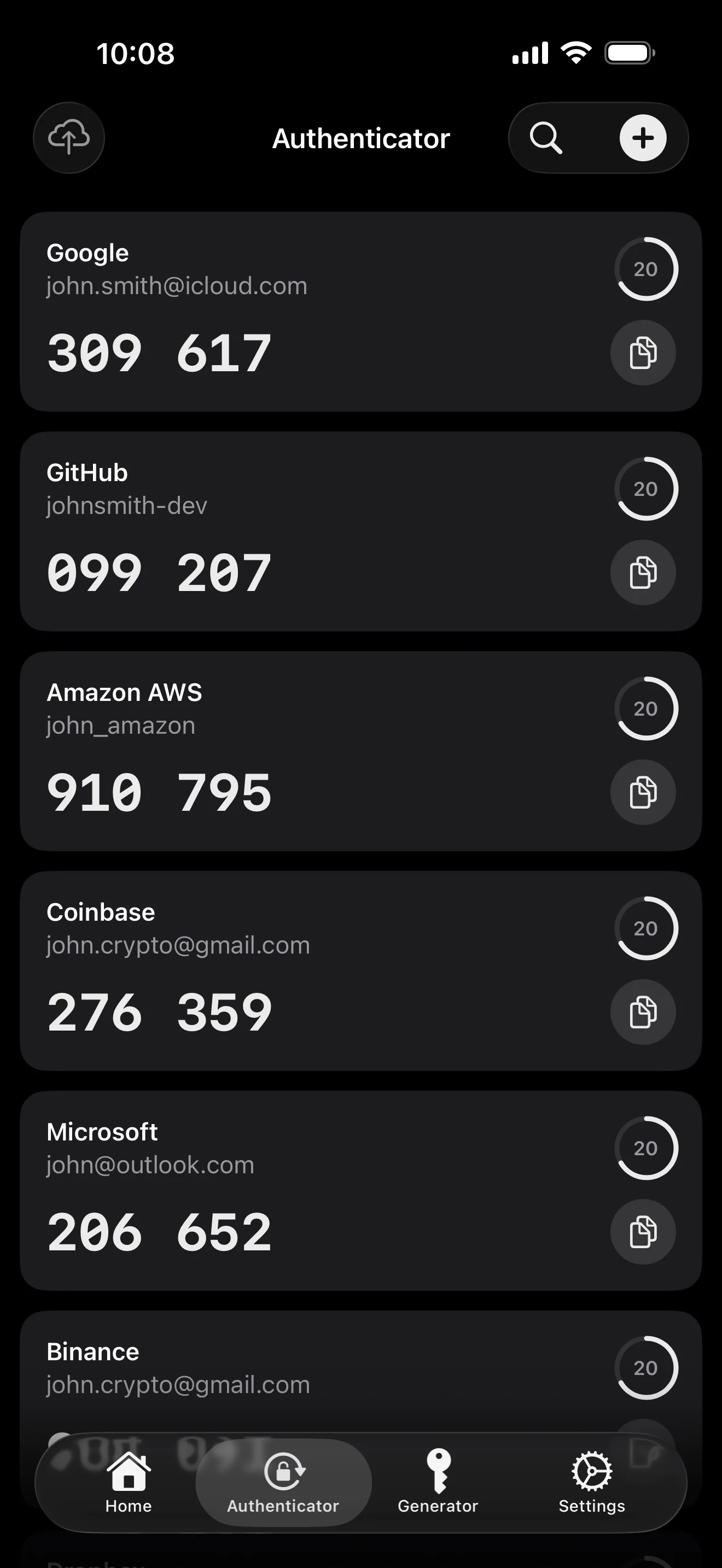
Skandeer om te stoor. AutoFill vul die 6-syfer kode saam met die wagwoord in.
Ewekansige string of EFF-woordelysfrase. Lewendige entropie-meter.
Plaaslik gegenereer en gestoor. Privaatsleutel verlaat nooit die toestel in plaintext nie.
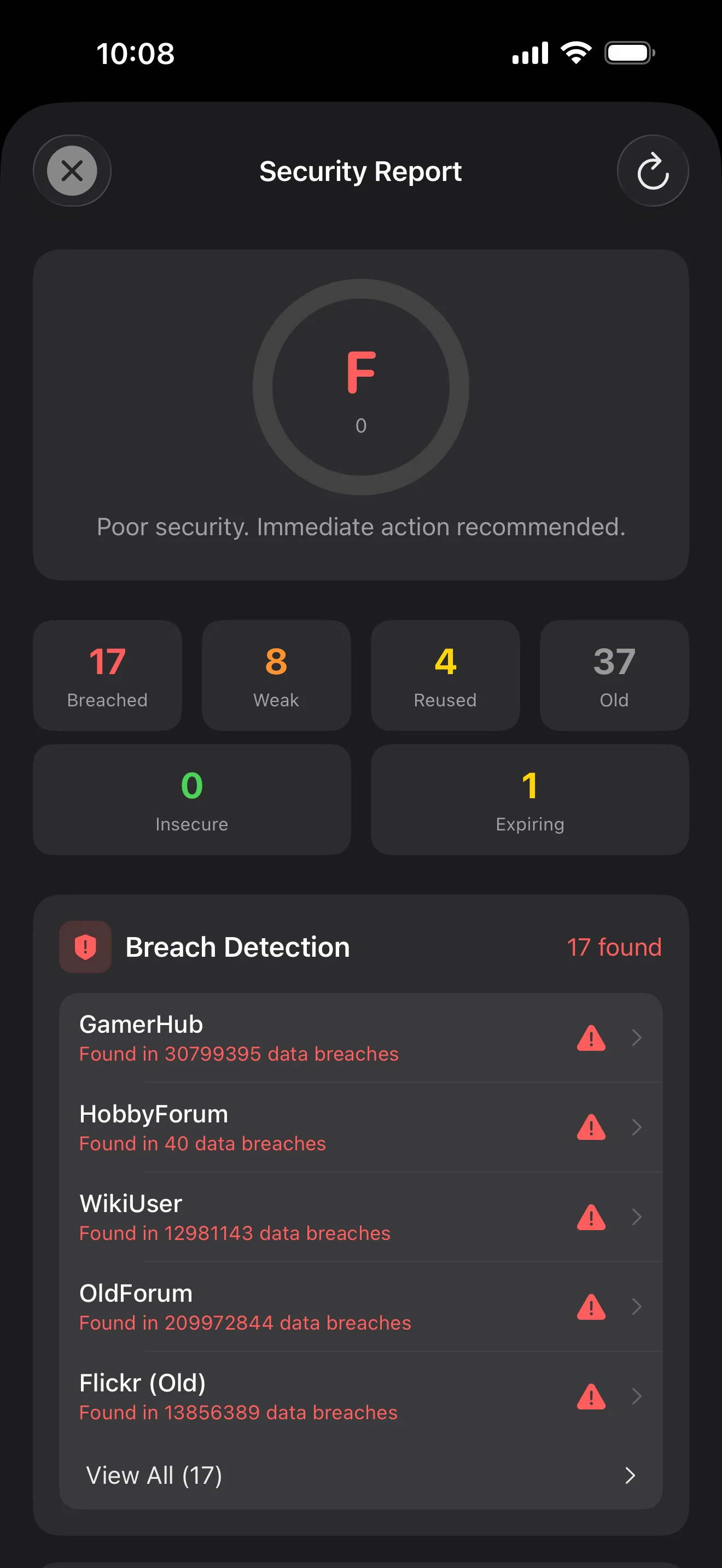
Slegs die eerste 5 karakters van die SHA-1 hash verlaat die toestel. Jou wagwoord nooit nie.
Stelselvlak AutoFill-uitbreiding. Face ID bevestig; kodes word ook ingevul.
Gerig deur Apple se private CloudKit. Sensitiewe velde word op die toestel geënkripteer voor oplaai — slegs syferteks beweeg tussen toestelle.
1Password · Bitwarden · LastPass · KeePass · Dashlane · Apple Keychain. Drie uitvoerformate: JSON / CSV / 1PUX.
Elke wagwoordverandering stoor die vorige waarde — tot 5 geskiedenisweergawes gehou, een-tik terugrol. Geskrapte items gaan na die Asblik.
Plakbord maak outomaties skoon oor 5 voorinstellings (15-90s); voorgrond / agtergrond outo-sluit afsonderlik instelbaar.
Twee widgets: vinnige kluistoegang + onmiddellike wagwoordgenereerder.
Ingeboude TOTP, op-toestel sekuriteitsoudit en Passkeys — die drie plekke waar ByteGuard die duidelikste uitstaan.
Scan to save — every 2FA in one place. The detail page shows the live code with a countdown ring; long-press to copy. With AutoFill, the code goes in along with username and password.
Backed by Have I Been Pwned with the k-anonymity protocol — only the first 5 chars of the SHA-1 hash ever leave the device. Every weakness comes with a concrete next step.
WebAuthn / FIDO2 standard. ES256 (ECDSA P-256, COSE alg -7). Private keys are AES-256-GCM encrypted with the Item Key — plaintext never written to disk. AutoFillExtension handles registration and assertion via the Apple system bridge.
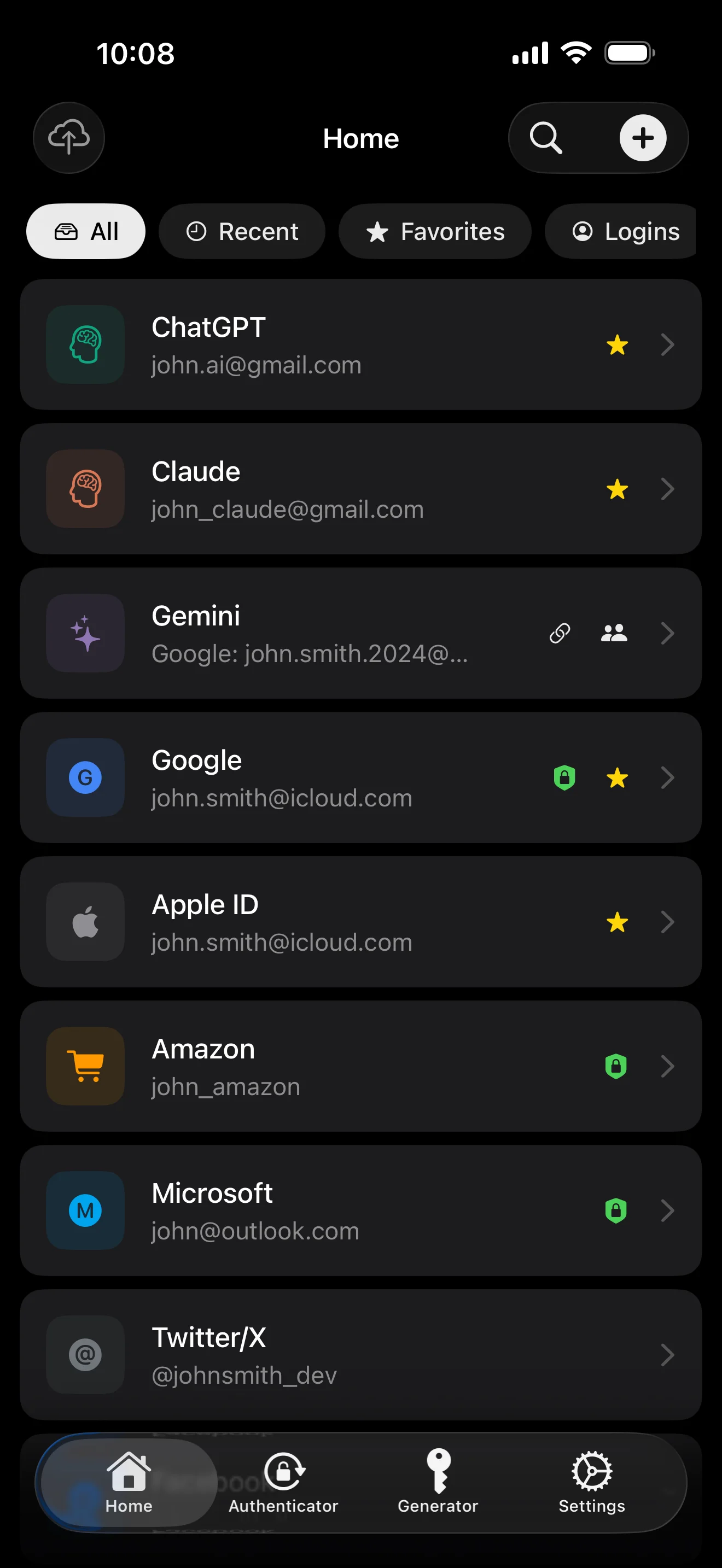
Tien skerms, in scenario-volgorde — die hele app deurloop. Geen bemarkingsteks nie.
Top 10 / All / Favorites / Logins multi-view; live filtered search. All eight DataType cases run the full field-level encryption pipeline — not a 'password app', but a digital-identity ledger.
Scan to save — every 2FA in one place. The detail page shows the live code with a countdown ring; long-press to copy. With AutoFill, the code goes in along with username and password.
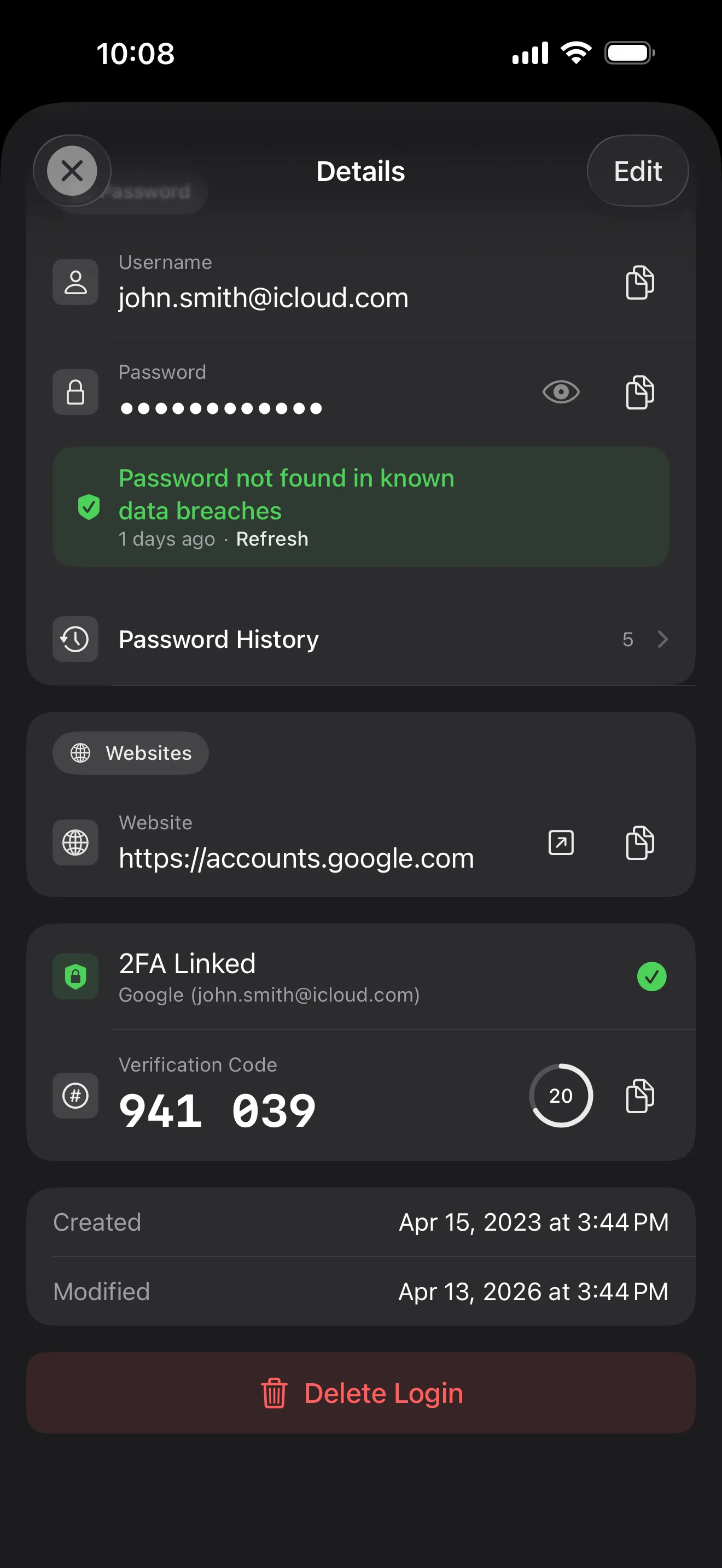
Login detail: username, password, history, linked TOTP, website, custom fields. Each sensitive field independently decrypted with its own IV, shown only on demand. Copy auto-clears the clipboard.
Every change saves the previous value (spec:R3 — up to 5 versions kept); tap the timeline to restore. Deleted items are retained for 90 days before permanent removal.
Backed by Have I Been Pwned with the k-anonymity protocol — only the first 5 chars of the SHA-1 hash ever leave the device. Every weakness comes with a concrete next step.
Random (4-64 chars / exclude look-alikes / digits-only for PIN) or EFF passphrase, with live entropy meter. Replaces the old value and records the change in history.
AutoFill Extension uses Apple's official ASCredentialProviderViewController; after Face ID / Touch ID, the username, password and TOTP all go in together. Info.plist also declares SupportsSavePasswordCredentials, so new passwords save back to ByteGuard from any flow.
WebAuthn / FIDO2 standard. ES256 (ECDSA P-256, COSE alg -7). Private keys are AES-256-GCM encrypted with the Item Key — plaintext never written to disk. AutoFillExtension handles registration and assertion via the Apple system bridge.
Card number (PAN) gets its own AES-256-GCM key with a unique IV. Cardholder name, expiry, brand (Visa / Mastercard / etc.) stay searchable as metadata. CVV/CVC are never persisted on this device.
AppearanceMode three modes: system / light / dark — switch any time, no restart. Premium tier unlocks multi-color themes; Home Screen widgets stay in sync.
Jou hoofwagwoord verlaat nooit jou toestel nie. Jou Secret Key word plaaslik gegenereer en in Apple se end-to-end geënkripteerde Keychain gestoor — selfs Apple kan dit nie lees nie.
wagwoord + Secret Key + 32B sout → Master Key. Parameters: 64 MB geheue · 3 iterasies. Bestand teen GPU/ASIC-aanvalle.
Master Key → KEK → ewekansige DEK. Elke kluis kry sy eie DEK — geen horisontale ontsleutelingspad nie.
Elke sensitiewe veld onafhanklik geënkripteer · nuwe ewekansige IV by elke skryfaksie. Selfde plaintext → verskillende syferteks.
'n Ewekansige sleutel ('n 12-woord BIP39 mnemoniek in vorm), onafhanklik van die hoofwagwoord. Selfs as die hoofwagwoord uitlek, kan dit nie ontsleutel word nie.
No competitor table. No checkmarks. Just an indie developer listing — plainly — what I wrote, and what I deliberately didn't. Read it, then decide whether to trust me with your ledger.
Every sensitive field encrypted independently, with its own random IV.
64 MB memory × 3 iterations — resistant to GPU/ASIC brute force.
A random key independent of the master password — your second line of defense.
iCloud sync can be turned off in one tap; the app falls back to pure local storage.
Only the first 5 chars of the SHA-1 hash are sent — your password never leaves the device.
AutoFill, Passkey, and TOTP all use Apple's official APIs. No reinvented wheels.
No analytics. No tracking. No ads. No crash reporters.
XSS, extension supply-chain attacks, CDN takeovers — that surface is excluded by architecture, not policy.
Each platform means re-implementing the crypto primitives correctly. Get one line wrong and the whole chain breaks.
Sharing is trust delegation — I'm still working out how to do it right. Until I am, I won't ship it.
Under zero-knowledge, self-hosting just shifts the operational burden to you with no real security gain.
Honestly: I haven't paid for one yet. The /security page documents every crypto decision against the source so anyone can verify independently. Independent audit + open-sourcing the crypto core are both on the 2026 roadmap — follow the GitHub repo to be notified when they land.
If I could recover it, it wouldn't be zero-knowledge. The most reliable backup is still old-school: write your master password and Secret Key on paper and store them apart.
Crypto-related changes will move very conservatively. Stability over novelty.
Geen versteekte fooie nie. Teken maandeliks of jaarliks in, of koop een keer vir altyd. Alle fakturering hanteer Apple.
Ek is 'n indie-ontwikkelaar. ByteGuard is deur my alleen geskryf — geen span, geen befondsing, geen derdeparty sekuriteitsoorsig. Kode antwoord — lees die witskrif, inspekteer GitHub, en toets of dit by jou behoeftes pas. Vertroue moet op die sigbare gebaseer wees, nie op handelsmerk nie.
Ek kan dit nie herstel nie. Dit is die prys van zero-knowledge: ek kan nie terugstel wat ek nooit geweet het nie. Gebruik Face ID / Touch ID daagliks, en stel noodherstel op — skryf jou Secret Key en hoofwagwoord op 'n veilige plek neer.
Dit hang af of jy iCloud Keychain-sinchronisasie vir jou Secret Key geaktiveer het. Indien wel, is dit in Apple se end-to-end geënkripteerde Keychain en kan vanaf 'n ander Apple-toestel herstel word. Indien nie, het jy die geskrewe rugsteun nodig.
Alle sensitiewe velde word met AES-256-GCM geënkripteer voordat hulle ooit die toestel verlaat. iCloud ontvang slegs syferteks. Selfs as jou Apple-rekening gekompromitteer word, kan dit nie ontsleutel word sonder jou hoofwagwoord nie.
Twee redes. Een persoon kan net soveel kode onderhou, en kruisplatform beteken om die kripto-kern oor en oor te herimplementeer — elke platform is nog 'n aanvalsoppervlak. Diepte in die Apple-ekosisteem bo wydte gekies.
Direkte invoer vanaf 1Password / Bitwarden / LastPass / KeePass / Dashlane / Apple Keychain uitvoerlêers. Gewoonlik 'n paar minute. Sien die gedetailleerde invoergids binne die app.
$9.99 lewenslank is permanent en sluit alle toekomstige opdaterings in. As 'n 'premium subscription' vlak ooit bygevoeg word, sal jou lewenslange status nie geraak word nie — dit is die belofte.