سجل واحد، ثماني هويات
كل حقل حساس مشفّر بـ AES-256-GCM، مع IV عشوائي خاص به.
أمّن كلمات المرور ومفاتيح المرور والمصادقة الثنائية والبطاقات المصرفية بتشفير AES-256-GCM. محلي أولاً، مزامنة iCloud اختيارية.
Built on modern iOS primitives
ليس مجرد "تطبيق كلمات مرور" — بل سجل مشفّر يجمع كل هوياتك الرقمية في مكان واحد. كل البيانات الحساسة مشفّرة بـ AES-256-GCM على جهازك.
كل حقل حساس مشفّر بـ AES-256-GCM، مع IV عشوائي خاص به.
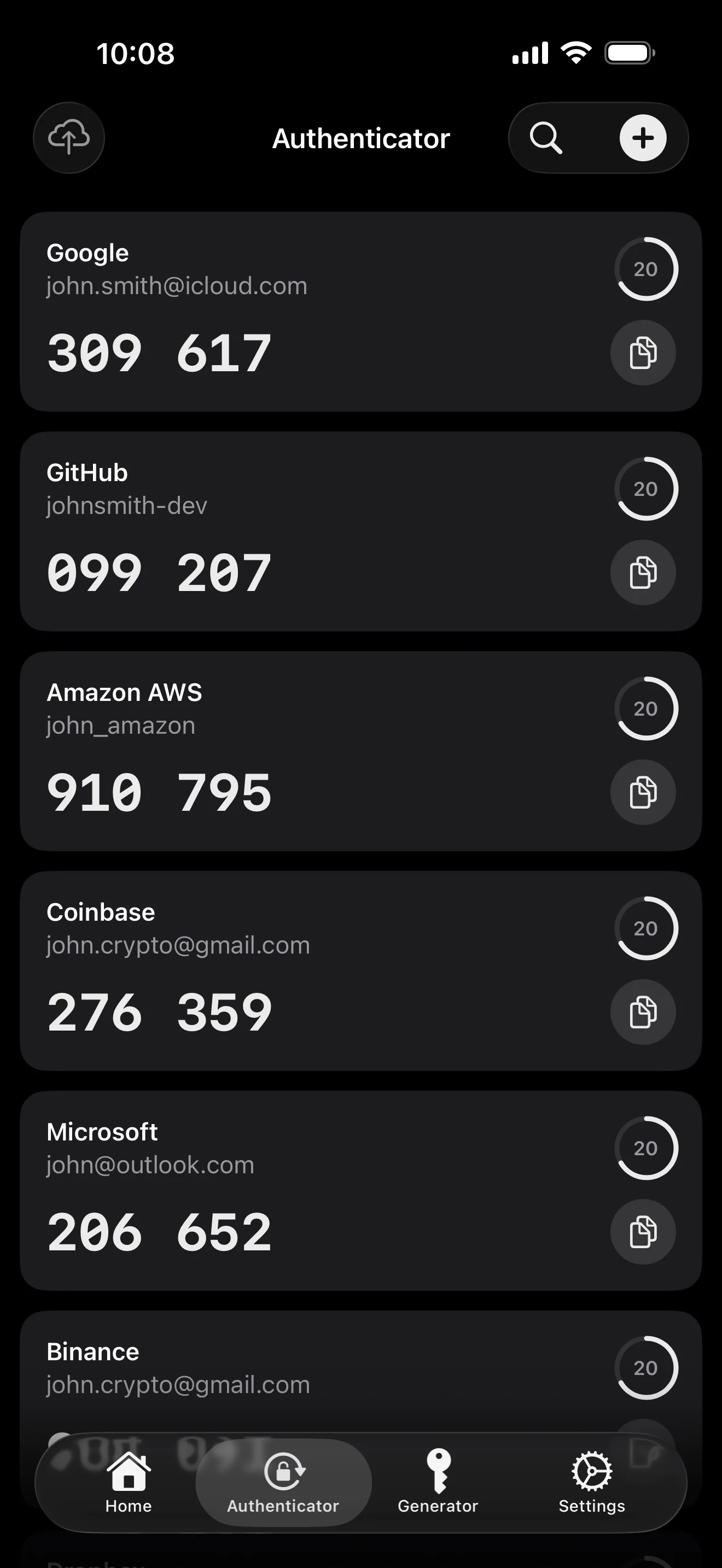
امسح للحفظ. الملء التلقائي يضع رمز الـ 6 أرقام مع كلمة المرور.
سلسلة عشوائية أو عبارة من قائمة كلمات EFF. مقياس إنتروبيا حي.
يُولّد ويُحفظ محلياً. المفتاح الخاص لا يغادر الجهاز كنص واضح أبداً.
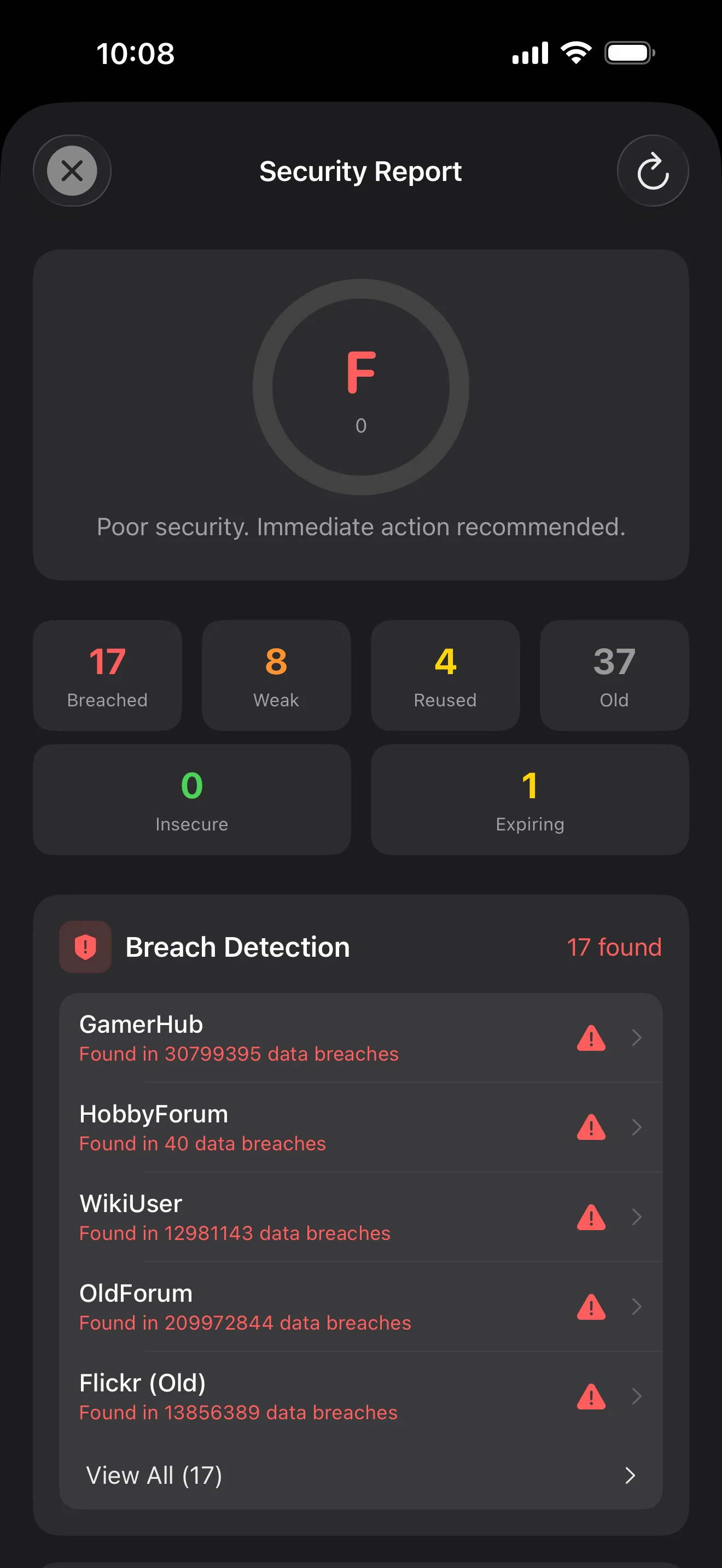
أول 5 أحرف فقط من تجزئة SHA-1 تغادر الجهاز. كلمة مرورك لا تغادر أبداً.
امتداد ملء تلقائي على مستوى النظام. Face ID يؤكد؛ الرموز تُملأ أيضاً.
يُوجّه عبر CloudKit الخاص بـ Apple. الحقول الحساسة تُشفّر على الجهاز قبل الرفع — Apple يرى نصاً مشفّراً فقط.
1Password · Bitwarden · LastPass · KeePass · Dashlane · Apple Keychain. ثلاث صيغ تصدير: JSON / CSV / .bytegx.
كل تغيير لكلمة المرور يحفظ القيمة السابقة — حتى 5 إصدارات تاريخية، تراجع بضغطة واحدة. العناصر المحذوفة تنتقل إلى المهملات.
الحافظة تُمسح تلقائياً عبر 5 إعدادات (15-90 ثانية)؛ القفل التلقائي للمقدمة / الخلفية يُضبط بشكل منفصل.
أداتان: وصول سريع للخزنة + مولّد كلمات مرور فوري.
TOTP مدمج، تدقيق أمان على الجهاز، و Passkeys — الأماكن الثلاثة التي يبرز فيها ByteGuard أوضح ما يمكن.
Scan to save — every 2FA in one place. The detail page shows the live code with a countdown ring; long-press to copy. With AutoFill, the code goes in along with username and password.
Backed by Have I Been Pwned with the k-anonymity protocol — only the first 5 chars of the SHA-1 hash ever leave the device. Every weakness comes with a concrete next step.
WebAuthn / FIDO2 standard. ES256 (ECDSA P-256, COSE alg -7). Private keys are AES-256-GCM encrypted with the Item Key — plaintext never written to disk. AutoFillExtension handles registration and assertion via the Apple system bridge.
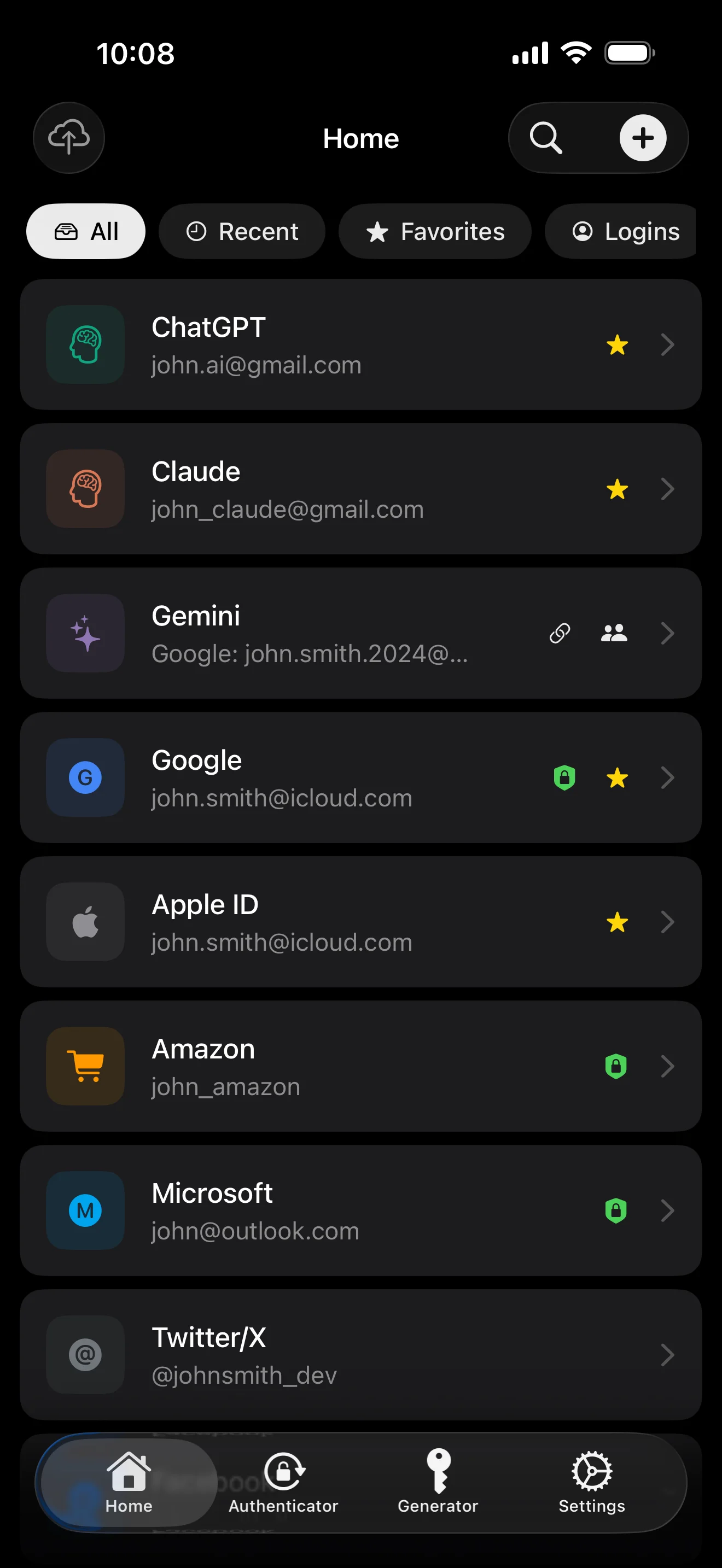
عشر شاشات بترتيب السيناريو — التطبيق كاملاً. لا نسخ تسويقية.
Top 10 / All / Favorites / Logins multi-view; live filtered search. All eight DataType cases run the full field-level encryption pipeline — not a 'password app', but a digital-identity ledger.
Scan to save — every 2FA in one place. The detail page shows the live code with a countdown ring; long-press to copy. With AutoFill, the code goes in along with username and password.
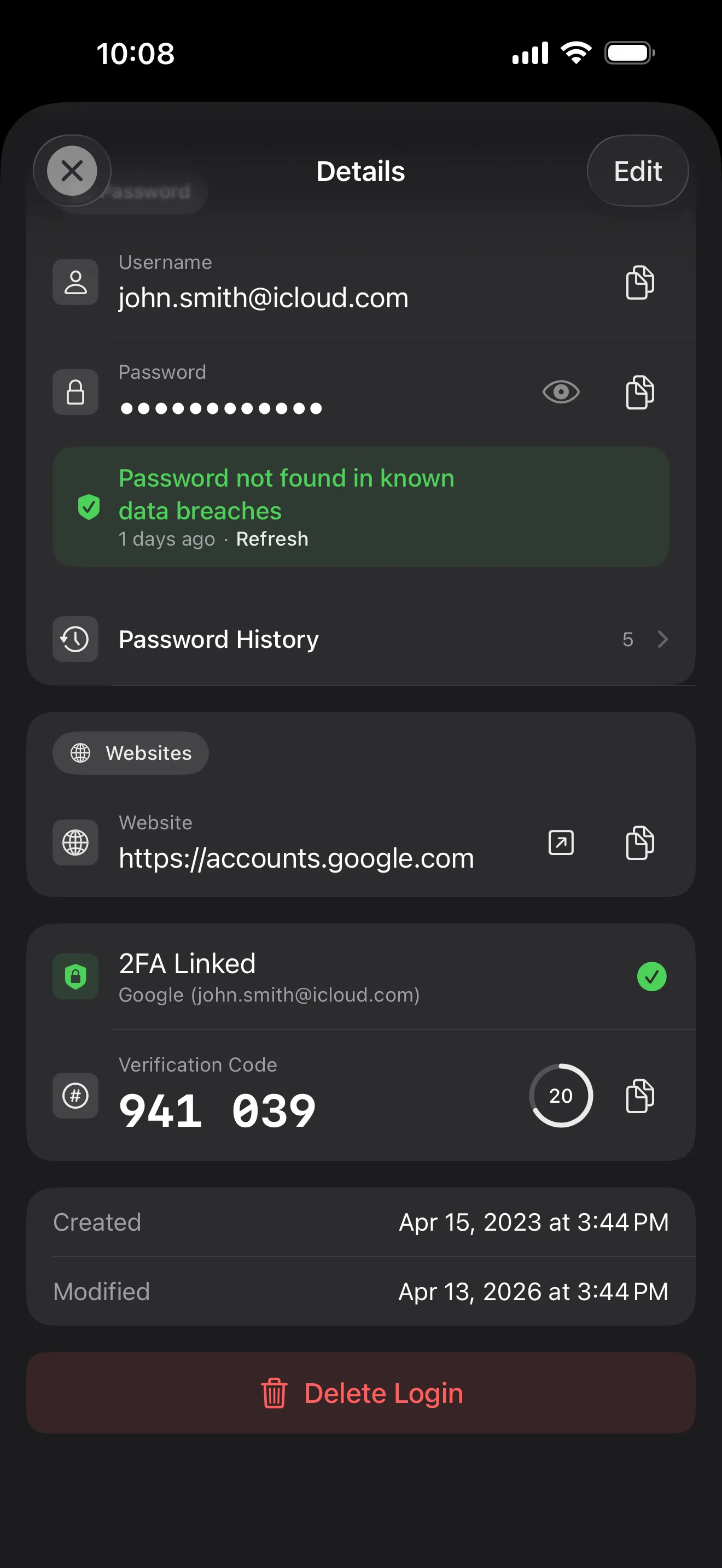
Login detail: username, password, history, linked TOTP, website, custom fields. Each sensitive field independently decrypted with its own IV, shown only on demand. Copy auto-clears the clipboard.
Every change saves the previous value (spec:R3 — up to 5 versions kept); tap the timeline to restore. Deleted items are retained for 90 days before permanent removal.
Backed by Have I Been Pwned with the k-anonymity protocol — only the first 5 chars of the SHA-1 hash ever leave the device. Every weakness comes with a concrete next step.
Random (4-64 chars / exclude look-alikes / digits-only for PIN) or EFF passphrase, with live entropy meter. Replaces the old value and records the change in history.
AutoFill Extension uses Apple's official ASCredentialProviderViewController; after Face ID / Touch ID, the username, password and TOTP all go in together. Info.plist also declares SupportsSavePasswordCredentials, so new passwords save back to ByteGuard from any flow.
WebAuthn / FIDO2 standard. ES256 (ECDSA P-256, COSE alg -7). Private keys are AES-256-GCM encrypted with the Item Key — plaintext never written to disk. AutoFillExtension handles registration and assertion via the Apple system bridge.
Card number (PAN) gets its own AES-256-GCM key with a unique IV. Cardholder name, expiry, brand (Visa / Mastercard / etc.) stay searchable as metadata. CVV/CVC are never persisted on this device.
AppearanceMode three modes: system / light / dark — switch any time, no restart. Premium tier unlocks multi-color themes; Home Screen widgets stay in sync.
كلمة المرور الرئيسية لا تغادر جهازك أبداً. مفتاحك السري يُولّد محلياً ويُخزّن في Keychain من Apple. لا يمتلك أي طرف ثالث أي مفتاح لفك تشفير بياناتك.
كلمة المرور + المفتاح السري + ملح 32 بايت → المفتاح الرئيسي. المعاملات: 64 ميغابايت ذاكرة · 3 تكرارات. مقاوم للهجمات بـ GPU/ASIC.
Master Key → KEK → DEK عشوائي. كل خزنة تحصل على DEK خاص بها — لا مسار فك تشفير أفقي.
كل حقل حساس مشفّر بشكل مستقل · IV عشوائي جديد عند كل كتابة. نفس النص الواضح → نص مشفّر مختلف.
مفتاح عشوائي (في شكل عبارة BIP39 من 12 كلمة)، مستقل عن كلمة المرور الرئيسية. حتى لو سُرّبت كلمة المرور الرئيسية، لا يمكن فك تشفير البيانات بدونه.
No competitor table. No checkmarks. Just an indie developer listing — plainly — what I wrote, and what I deliberately didn't. Read it, then decide whether to trust me with your ledger.
Every sensitive field encrypted independently, with its own random IV.
64 MB memory × 3 iterations — resistant to GPU/ASIC brute force.
A random key independent of the master password — your second line of defense.
iCloud sync can be turned off in one tap; the app falls back to pure local storage.
Only the first 5 chars of the SHA-1 hash are sent — your password never leaves the device.
AutoFill, Passkey, and TOTP all use Apple's official APIs. No reinvented wheels.
No analytics. No tracking. No ads. No crash reporters.
XSS, extension supply-chain attacks, CDN takeovers — that surface is excluded by architecture, not policy.
Each platform means re-implementing the crypto primitives correctly. Get one line wrong and the whole chain breaks.
Sharing is trust delegation — I'm still working out how to do it right. Until I am, I won't ship it.
Under zero-knowledge, self-hosting just shifts the operational burden to you with no real security gain.
Honestly: I haven't paid for one yet. The /security page documents every crypto decision against the source so anyone can verify independently. Independent audit + open-sourcing the crypto core are both on the 2026 roadmap — follow the GitHub repo to be notified when they land.
If I could recover it, it wouldn't be zero-knowledge. The most reliable backup is still old-school: write your master password and Secret Key on paper and store them apart.
Crypto-related changes will move very conservatively. Stability over novelty.
لا رسوم خفية. اشترك شهرياً، سنوياً، أو ادفع مرة واحدة مدى الحياة. كل الفوترة تُدار بواسطة Apple.
أنا مطور مستقل. ByteGuard كتبته بمفردي — بدون فريق، بدون تمويل، بدون تدقيق أمني خارجي حتى الآن. الثقة لا تأتي مني، بل من البنية: لا يمكنني تقنياً رؤية بياناتك. الكود سيُفتح للجمهور في 2026، وسيتم تدقيق التشفير بشكل مستقل.
لا أستطيع استرداده. هذه تكلفة "بدون معرفة": لا يمكنني إعادة تعيين ما لم أعرفه أبداً. استخدم Face ID / Touch ID للوصول اليومي، واكتب كلمة المرور الرئيسية على ورق وضعها في مكان آمن.
يعتمد على ما إذا كنت قد فعّلت مزامنة iCloud Keychain لمفتاحك السري. إذا كانت مفعّلة، سيتزامن المفتاح بين أجهزتك. إذا لم تكن، فقدان المفتاح السري يعني فقدان البيانات. اكتب العبارة المنميمونية المكوّنة من 12 كلمة وضعها في مكان آمن.
كل الحقول الحساسة مشفّرة بـ AES-256-GCM قبل أن تغادر الجهاز. iCloud يستلم نصاً مشفّراً فقط — Apple لا يمكنه رؤية كلمات المرور الخاصة بك. حتى لو طُلب من Apple تسليم البيانات، فإنها مشفّرة بمفتاحك أنت.
سببان. شخص واحد يستطيع صيانة قدر معين من الكود فقط، والمنصات المتعددة تعني إعادة تنفيذ التشفير. أركّز على Apple لأنني أعرف منصة Apple بعمق وأريد توفير تجربة ممتازة بدلاً من تجربة متوسطة في كل مكان.
استيراد مباشر من ملفات تصدير 1Password / Bitwarden / LastPass / KeePass / Dashlane / Apple Keychain. صدّر ملف CSV / JSON من تطبيقك الحالي، استورده في ByteGuard، تم.
9.99$ مدى الحياة دائم ويشمل كل التحديثات المستقبلية. إذا تم إطلاق فئة "اشتراك مميز" يوماً ما، فسيكون اختيارياً — مالكو النسخة مدى الحياة لن يفقدوا أبداً الميزات التي اشتروها.