One ledger, eight identities
Every sensitive field encrypted with AES-256-GCM, with its own random IV.
Zabezpečte svá hesla, přístupové klíče, 2FA a platební karty šifrováním AES-256-GCM. Místní úložiště, volitelná synchronizace iCloud.
Built on modern iOS primitives
Není to „aplikace na hesla“ — je to šifrovaný záznamník, který sjednocuje každou digitální identitu na jednom místě. Všech osm typů položek prochází stejným pipeline šifrování na úrovni polí.
Every sensitive field encrypted with AES-256-GCM, with its own random IV.
Scan to save. AutoFill fills the 6-digit code along with the password.
Random string or EFF wordlist phrase. Live entropy meter.
Generated and stored locally. Private key never leaves the device in plaintext.
Only the first 5 chars of the SHA-1 hash leave the device. Your password never does.
System-level AutoFill extension. Face ID confirms; codes get filled in too.
Routed via Apple's private CloudKit. Sensitive fields are encrypted on-device before upload — only ciphertext reaches the server. Toggle off anytime to go fully local.
1Password · Bitwarden · LastPass · KeePass · Dashlane · Apple Keychain. Three export formats: JSON / CSV (plaintext) + encrypted .bytegx.
Every password change saves the previous value — up to 5 history versions kept, one-tap rollback. Deleted items go to a recycle bin and clear after the retention window.
Pasteboard auto-clears after a configurable delay; foreground / background auto-lock timers can be set separately.
Two widgets: quick vault access + on-the-fly password generator.
Vestavěný TOTP, bezpečnostní audit na zařízení a Passkeys — tři místa, kde ByteGuard nejjasněji předčí běžné správce hesel.
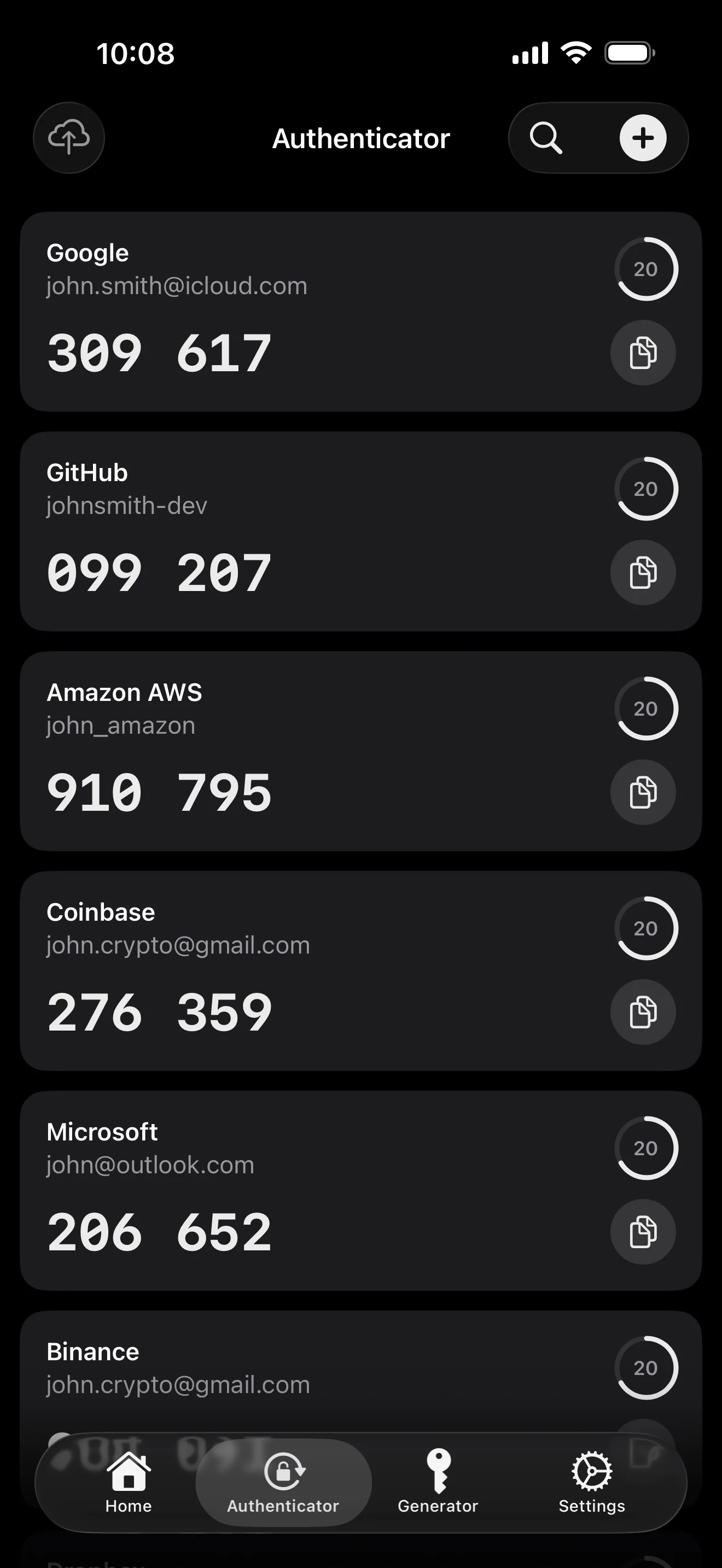
Scan to save — every 2FA in one place. The detail page shows the live code with a countdown ring; long-press to copy. With AutoFill, the code goes in along with username and password.
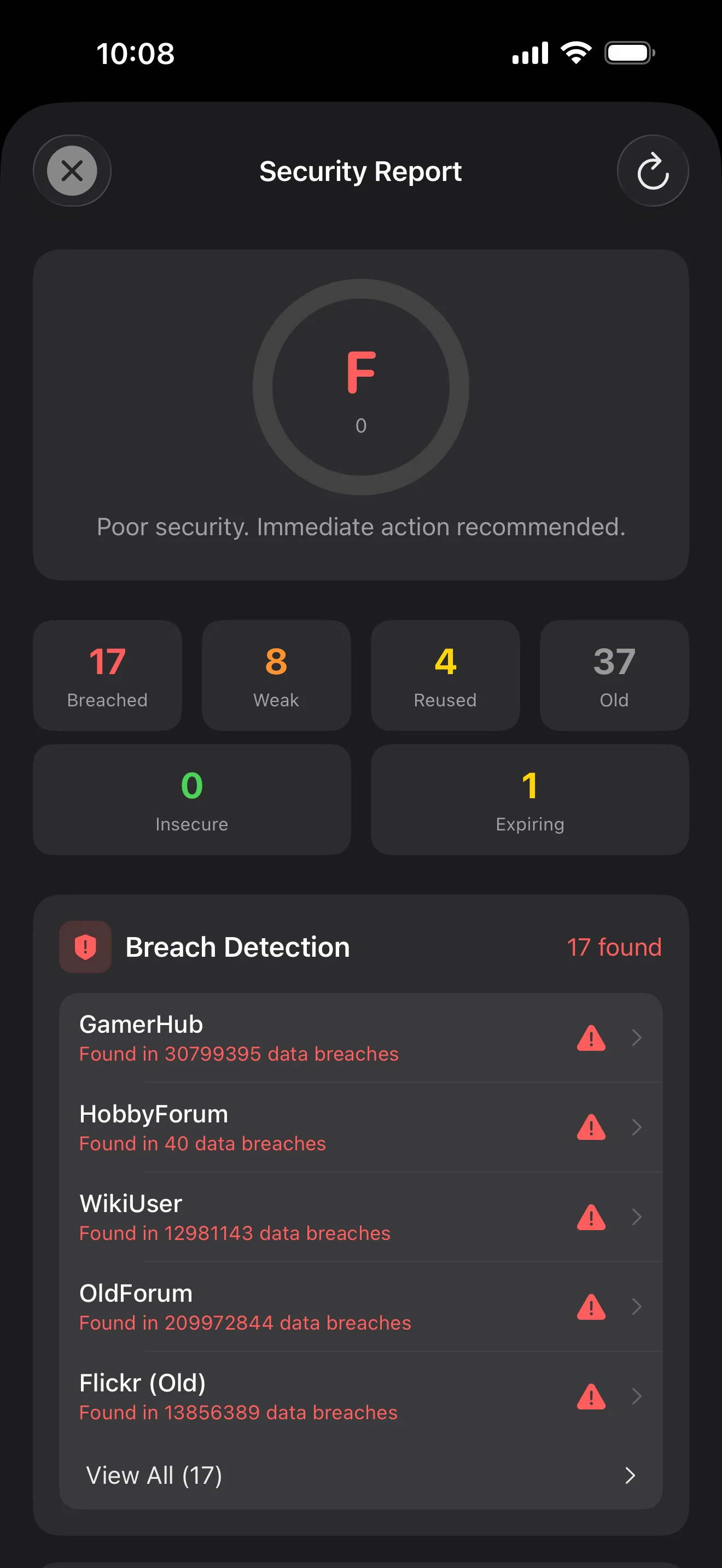
Backed by Have I Been Pwned with the k-anonymity protocol — only the first 5 chars of the SHA-1 hash ever leave the device. Every weakness comes with a concrete next step.
WebAuthn / FIDO2 standard. ES256 (ECDSA P-256, COSE alg -7). Private keys are AES-256-GCM encrypted with the Item Key — plaintext never written to disk. AutoFillExtension handles registration and assertion via the Apple system bridge.
Deset obrazovek v pořadí scénářů — celá aplikace krok za krokem. Bez marketingových frází.
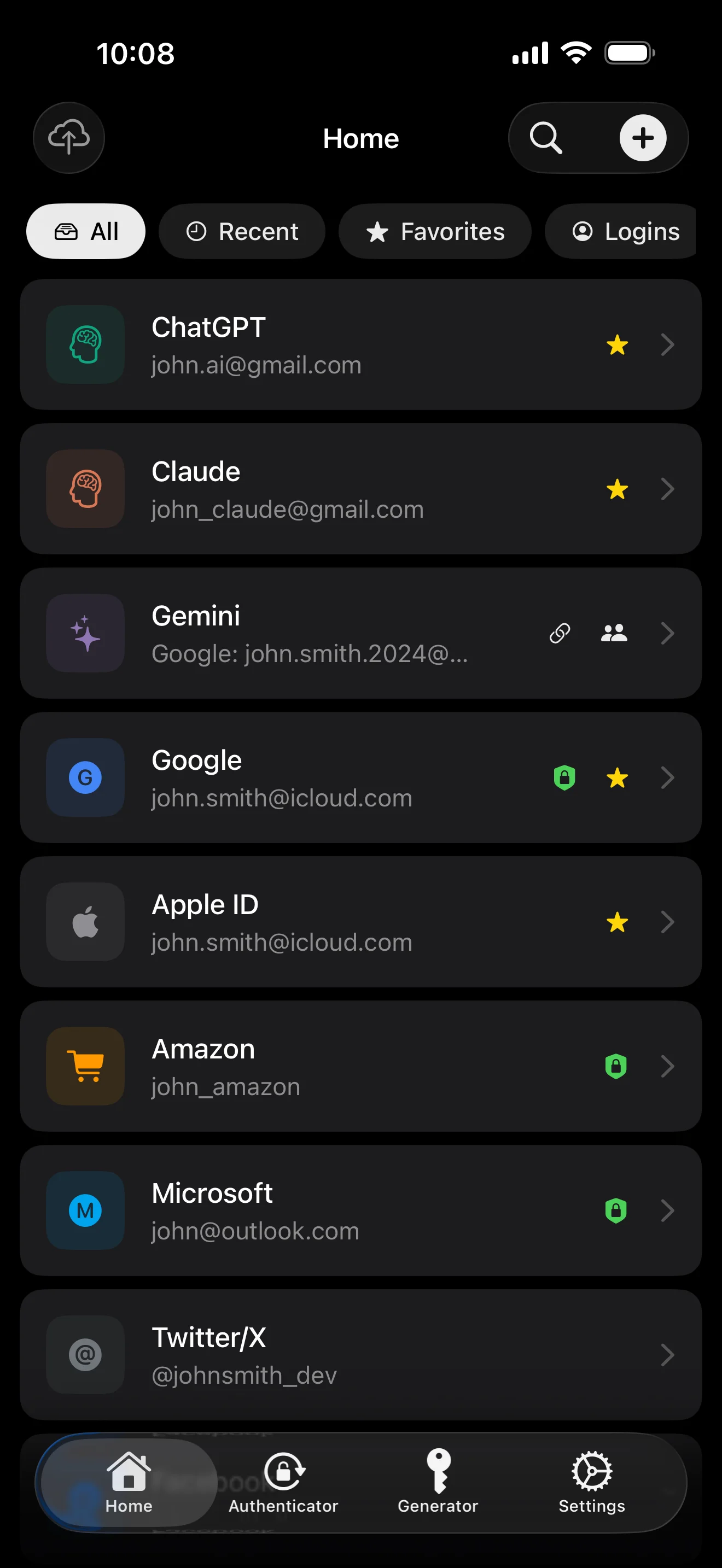
Top 10 / All / Favorites / Logins multi-view; live filtered search. All eight DataType cases run the full field-level encryption pipeline — not a 'password app', but a digital-identity ledger.
Scan to save — every 2FA in one place. The detail page shows the live code with a countdown ring; long-press to copy. With AutoFill, the code goes in along with username and password.
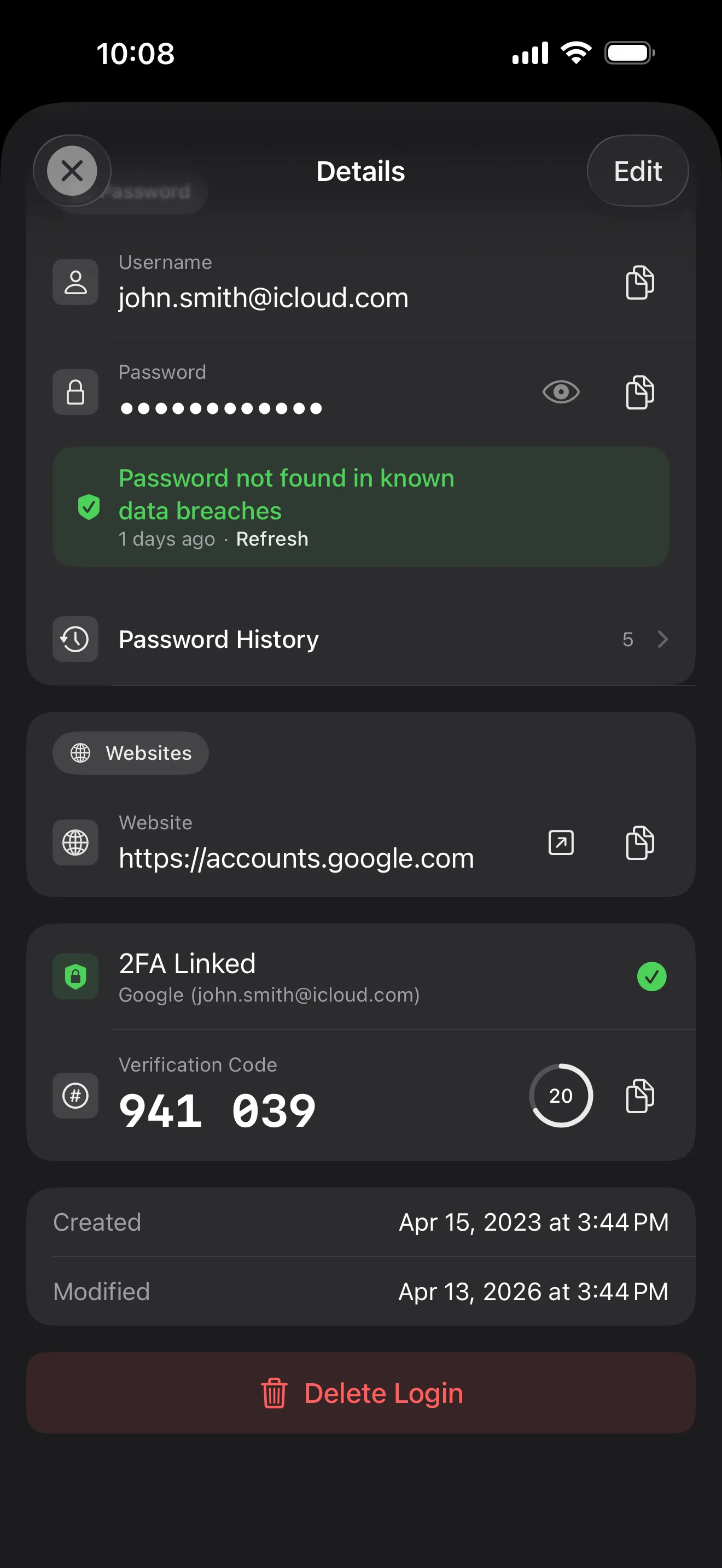
Login detail: username, password, history, linked TOTP, website, custom fields. Each sensitive field independently decrypted with its own IV, shown only on demand. Copy auto-clears the clipboard.
Every change saves the previous value (spec:R3 — up to 5 versions kept); tap the timeline to restore. Deleted items are retained for 90 days before permanent removal.
Backed by Have I Been Pwned with the k-anonymity protocol — only the first 5 chars of the SHA-1 hash ever leave the device. Every weakness comes with a concrete next step.
Random (4-64 chars / exclude look-alikes / digits-only for PIN) or EFF passphrase, with live entropy meter. Replaces the old value and records the change in history.
AutoFill Extension uses Apple's official ASCredentialProviderViewController; after Face ID / Touch ID, the username, password and TOTP all go in together. Info.plist also declares SupportsSavePasswordCredentials, so new passwords save back to ByteGuard from any flow.
WebAuthn / FIDO2 standard. ES256 (ECDSA P-256, COSE alg -7). Private keys are AES-256-GCM encrypted with the Item Key — plaintext never written to disk. AutoFillExtension handles registration and assertion via the Apple system bridge.
Card number (PAN) gets its own AES-256-GCM key with a unique IV. Cardholder name, expiry, brand (Visa / Mastercard / etc.) stay searchable as metadata. CVV/CVC are never persisted on this device.
AppearanceMode three modes: system / light / dark — switch any time, no restart. Premium tier unlocks multi-color themes; Home Screen widgets stay in sync.
Tvé hlavní heslo nikdy neopustí tvé zařízení. Tvůj Secret Key je generován lokálně a uložen v Apple Keychain — synchronizován mezi tvými Apple zařízeními skrze end-to-end šifrovaný Keychain od Applu (můžeš ho také ponechat na jediném zařízení). K dešifrování dat jsou potřeba oba klíče a ani já, ani Apple nemůžeme přečíst žádný z nich. Není to slib — je to architektura.
password + Secret Key + 32B salt → Master Key. Parameters: 64 MB memory · 3 iterations. Resistant to GPU/ASIC brute force.
Master Key → KEK → random DEK. Each vault gets its own DEK — no horizontal decryption path.
Every sensitive field encrypted independently · new random IV on every write. Same plaintext → different ciphertext · authenticated tag prevents tampering.
A random key (a 12-word BIP39 mnemonic in form), independent of the master password. Even if the master password leaks, your vault still cannot be opened without it.
No competitor table. No checkmarks. Just an indie developer listing — plainly — what I wrote, and what I deliberately didn't. Read it, then decide whether to trust me with your ledger.
Every sensitive field encrypted independently, with its own random IV.
64 MB memory × 3 iterations — resistant to GPU/ASIC brute force.
A random key independent of the master password — your second line of defense.
iCloud sync can be turned off in one tap; the app falls back to pure local storage.
Only the first 5 chars of the SHA-1 hash are sent — your password never leaves the device.
AutoFill, Passkey, and TOTP all use Apple's official APIs. No reinvented wheels.
No analytics. No tracking. No ads. No crash reporters.
XSS, extension supply-chain attacks, CDN takeovers — that surface is excluded by architecture, not policy.
Each platform means re-implementing the crypto primitives correctly. Get one line wrong and the whole chain breaks.
Sharing is trust delegation — I'm still working out how to do it right. Until I am, I won't ship it.
Under zero-knowledge, self-hosting just shifts the operational burden to you with no real security gain.
Honestly: I haven't paid for one yet. The /security page documents every crypto decision against the source so anyone can verify independently. Independent audit + open-sourcing the crypto core are both on the 2026 roadmap — follow the GitHub repo to be notified when they land.
If I could recover it, it wouldn't be zero-knowledge. The most reliable backup is still old-school: write your master password and Secret Key on paper and store them apart.
Crypto-related changes will move very conservatively. Stability over novelty.
Žádné skryté poplatky. Předplať si měsíčně, ročně, nebo zaplať jednou za život. Veškerou fakturaci řeší Apple.
Jsem nezávislý vývojář. ByteGuard píšu sám — žádný tým, žádné financování, zatím žádný nezávislý bezpečnostní audit. (V sekci výše to uvádím poctivě.) Jediné, co můžu slíbit, je samotná architektura: tvé hlavní heslo a Secret Key nikdy neopustí tvé zařízení a na mém serveru není nic, co by mohlo dešifrovat tvá data. Pokud ti tato premisa nestačí, tahle aplikace pro tebe není — a to je naprosto v pořádku.
Nedokážu ho obnovit. To je cena za zero-knowledge: nemohu resetovat to, co jsem nikdy neznal. Pro denní odemykání používej Face ID / Touch ID a hlavní heslo i Secret Key si napiš na papír uložený v sejfu nebo bankovní schránce. Zní to jako 90. léta — a stále je to nejspolehlivější záloha, kterou máme.
Záleží, jestli jsi pro Secret Key zapnul/a synchronizaci přes iCloud Keychain. Pokud je iCloud Keychain sync zapnutý (výchozí doporučené nastavení): tvůj Secret Key je end-to-end šifrovaný Applem a synchronizovaný napříč tvými Apple zařízeními. Na novém zařízení stačí přihlásit se Apple ID a Secret Key se obnoví automaticky — stačí si pamatovat hlavní heslo. Pokud je iCloud Keychain sync vypnutý (maximální bezpečnost, oba klíče si držíš sám/a): Secret Key nikdy neopustí zařízení, kde byl vygenerován. Jediná záloha je 12slovná recovery fráze (standard BIP39) zobrazená při prvním vytvoření trezoru. Napiš si ji na papír a ulož odděleně od hlavního hesla. Bez té papírové zálohy nelze Secret Key na novém zařízení obnovit. V obou případech: hlavní heslo je stále potřeba k dešifrování čehokoli — samotný Secret Key nestačí. A já jsem nikdy neviděl ani jeden bit z žádného z nich: na mém serveru není nic, co by mohlo dešifrovat tvá data, a Apple také nedokáže přečíst tvůj Secret Key (je E2E šifrovaný uvnitř jejich Keychain vrstvy).
Všechna citlivá pole jsou šifrovaná pomocí AES-256-GCM ještě než opustí zařízení. iCloud dostává pouze ciphertext; ani já nemám klíč (klíč nikdy neopustí tvé zařízení). Pokud nechceš cloud používat vůbec, můžeš sync v nastavení vypnout — aplikace přejde do plně lokálního režimu, což je naprosto legitimní způsob použití.
Dva důvody. Jeden člověk uživí jen určité množství kódu a multiplatformnost znamená správně reimplementovat kryptografické primitivy na každé platformě — stačí jeden řádek špatně a celý řetěz padne. Druhý: útočná plocha webové aplikace (XSS, supply-chain rozšíření, CDN takeover) je mnohem větší než nativní iOS aplikace. Raději udělám jednu platformu pořádně, než abych dodal něco, co vypadá komplexně, ale je nerovnoměrně bezpečné.
Přímý import z exportních souborů 1Password / Bitwarden / LastPass / KeePass / Dashlane / Apple Keychain je podporován. Celý import probíhá lokálně — nic se neodesílá. Pokud ti exportní formát starého správce dělá problémy, napiš mi mail a podporu doplním.
9,99 $ doživotně je trvalých a zahrnuje všechny budoucí aktualizace. Pokud někdy přibude tarif „prémiové předplatné“ (např. hlubší bezpečnostní analytika), bude pouze předplatný — stávající doživotní funkce za něj nikdy nebudou skryty. To je závazek, který jsem ochoten dát na tuto stránku.