One ledger, eight identities
Every sensitive field encrypted with AES-256-GCM, with its own random IV.
אבטחו סיסמאות, מפתחות גישה, 2FA וכרטיסי בנק עם הצפנת AES-256-GCM. מקומי קודם, סנכרון iCloud אופציונלי.
Built on modern iOS primitives
לא 'אפליקציית סיסמאות' — אלא ספר מוצפן שמאחד כל זהות דיגיטלית במקום אחד. כל שמונת סוגי הפריטים עוברים באותו צינור הצפנה ברמת השדה.
Every sensitive field encrypted with AES-256-GCM, with its own random IV.
Scan to save. AutoFill fills the 6-digit code along with the password.
Random string or EFF wordlist phrase. Live entropy meter.
Generated and stored locally. Private key never leaves the device in plaintext.
Only the first 5 chars of the SHA-1 hash leave the device. Your password never does.
System-level AutoFill extension. Face ID confirms; codes get filled in too.
Routed via Apple's private CloudKit. Sensitive fields are encrypted on-device before upload — only ciphertext reaches the server. Toggle off anytime to go fully local.
1Password · Bitwarden · LastPass · KeePass · Dashlane · Apple Keychain. Three export formats: JSON / CSV (plaintext) + encrypted .bytegx.
Every password change saves the previous value — up to 5 history versions kept, one-tap rollback. Deleted items go to a recycle bin and clear after the retention window.
Pasteboard auto-clears after a configurable delay; foreground / background auto-lock timers can be set separately.
Two widgets: quick vault access + on-the-fly password generator.
TOTP מובנה, ביקורת אבטחה במכשיר ו-Passkeys — שלוש הנקודות שבהן ByteGuard עוקף בבירור את מנהלי הסיסמאות הרגילים.
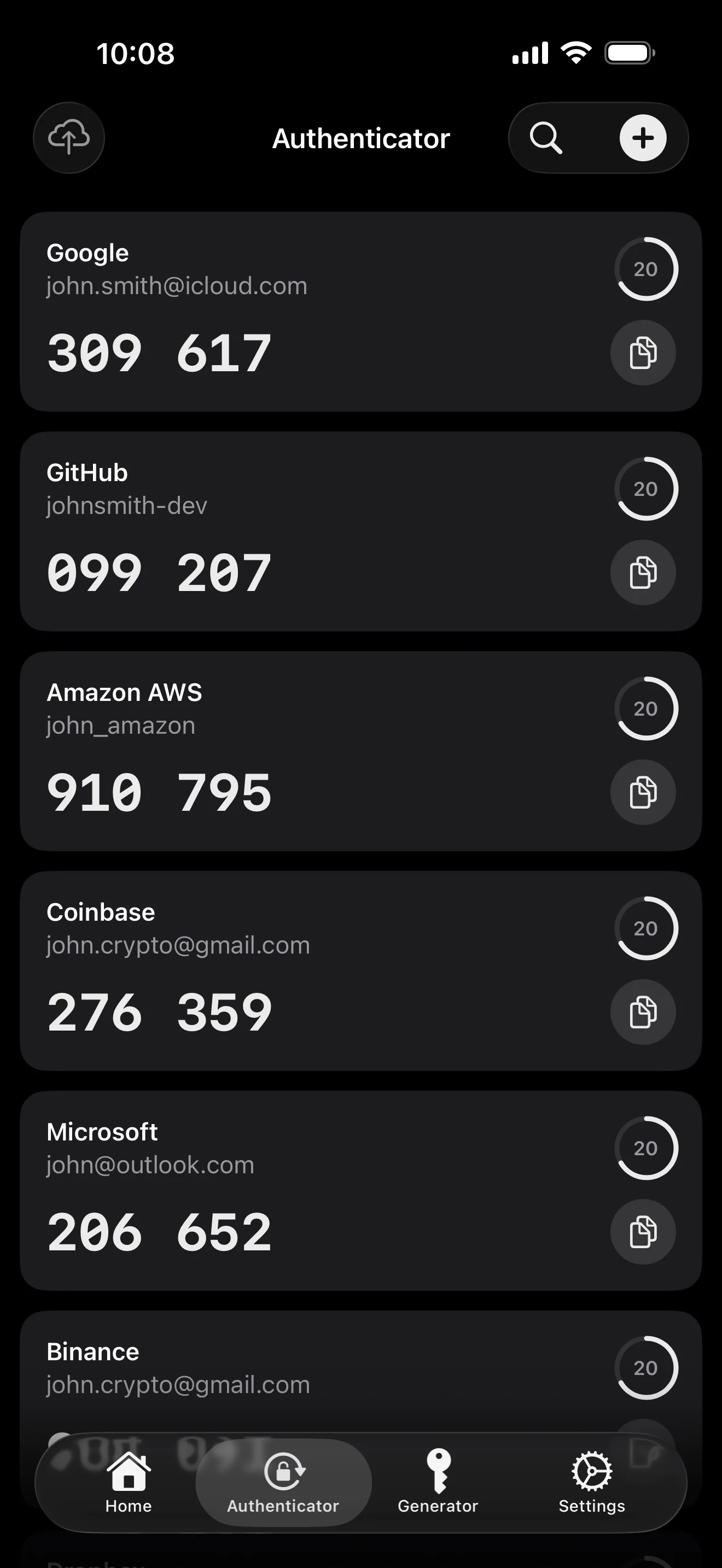
Scan to save — every 2FA in one place. The detail page shows the live code with a countdown ring; long-press to copy. With AutoFill, the code goes in along with username and password.
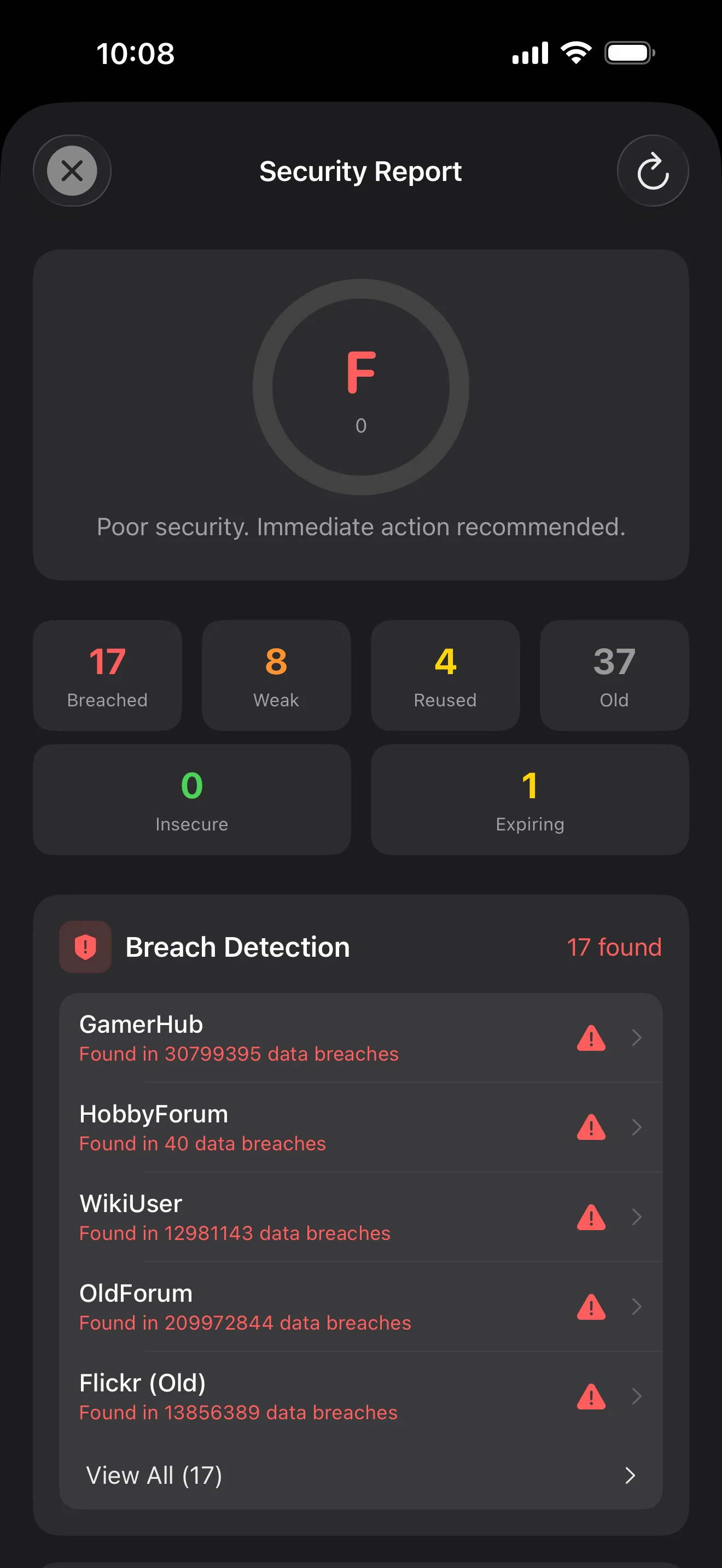
Backed by Have I Been Pwned with the k-anonymity protocol — only the first 5 chars of the SHA-1 hash ever leave the device. Every weakness comes with a concrete next step.
WebAuthn / FIDO2 standard. ES256 (ECDSA P-256, COSE alg -7). Private keys are AES-256-GCM encrypted with the Item Key — plaintext never written to disk. AutoFillExtension handles registration and assertion via the Apple system bridge.
עשרה מסכים, בסדר תרחיש — כל האפליקציה במעבר אחד. בלי טקסט שיווקי.
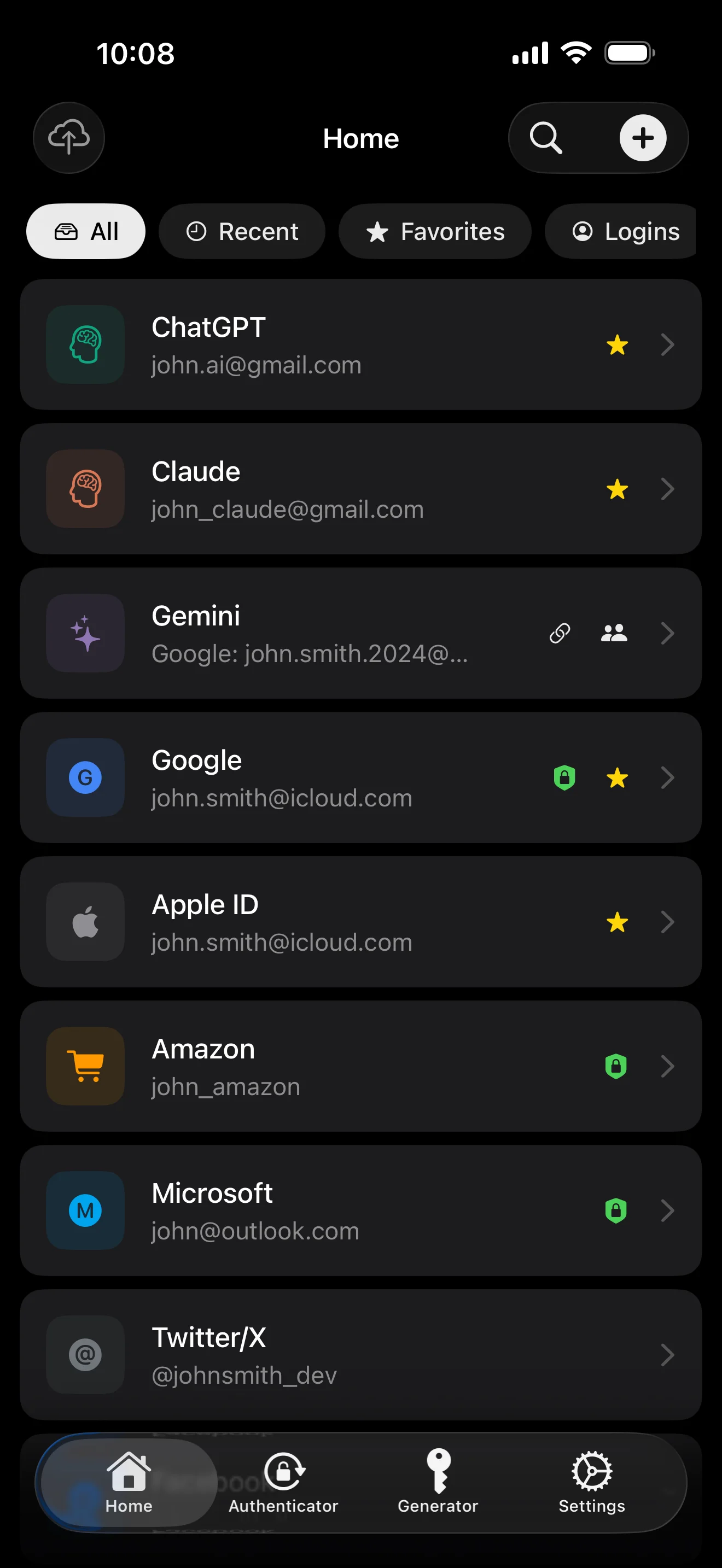
Top 10 / All / Favorites / Logins multi-view; live filtered search. All eight DataType cases run the full field-level encryption pipeline — not a 'password app', but a digital-identity ledger.
Scan to save — every 2FA in one place. The detail page shows the live code with a countdown ring; long-press to copy. With AutoFill, the code goes in along with username and password.
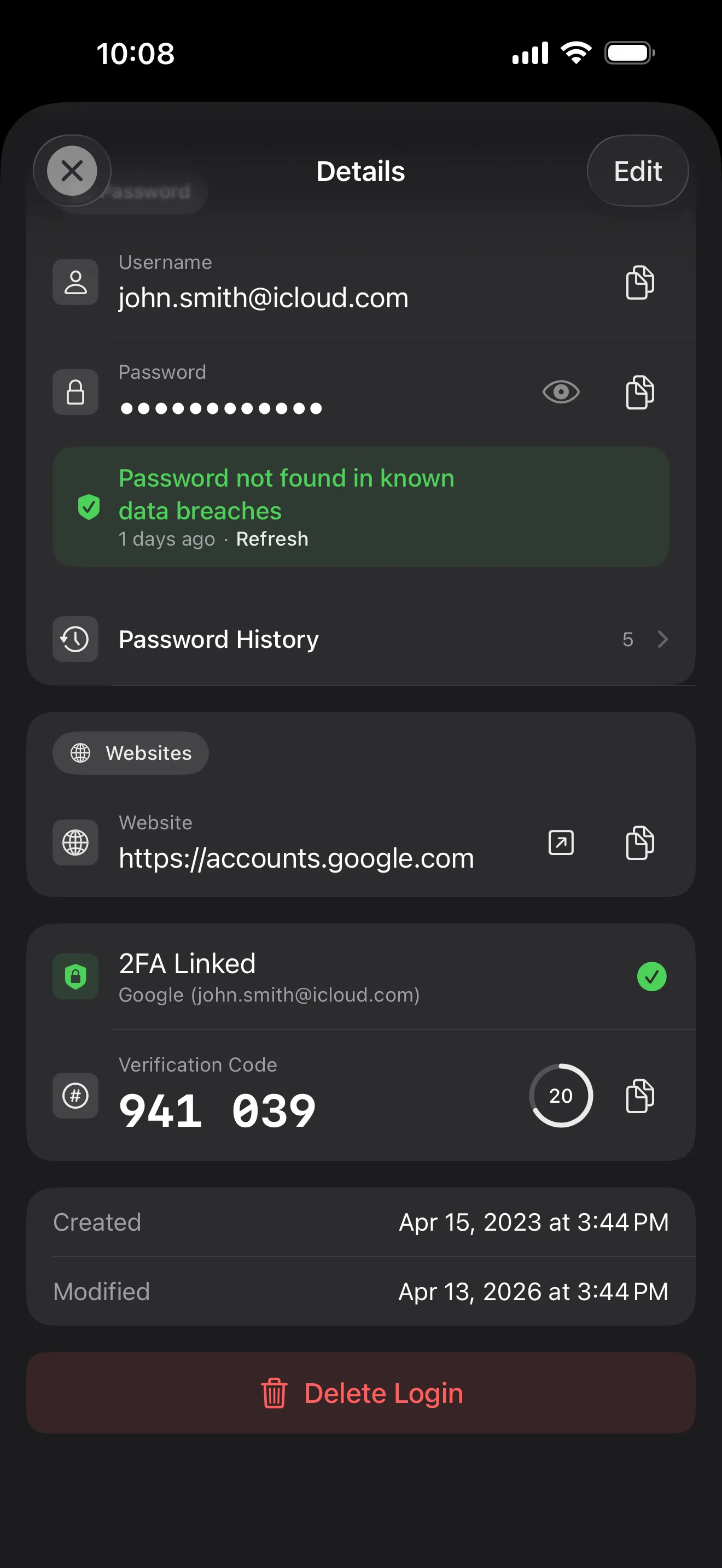
Login detail: username, password, history, linked TOTP, website, custom fields. Each sensitive field independently decrypted with its own IV, shown only on demand. Copy auto-clears the clipboard.
Every change saves the previous value (spec:R3 — up to 5 versions kept); tap the timeline to restore. Deleted items are retained for 90 days before permanent removal.
Backed by Have I Been Pwned with the k-anonymity protocol — only the first 5 chars of the SHA-1 hash ever leave the device. Every weakness comes with a concrete next step.
Random (4-64 chars / exclude look-alikes / digits-only for PIN) or EFF passphrase, with live entropy meter. Replaces the old value and records the change in history.
AutoFill Extension uses Apple's official ASCredentialProviderViewController; after Face ID / Touch ID, the username, password and TOTP all go in together. Info.plist also declares SupportsSavePasswordCredentials, so new passwords save back to ByteGuard from any flow.
WebAuthn / FIDO2 standard. ES256 (ECDSA P-256, COSE alg -7). Private keys are AES-256-GCM encrypted with the Item Key — plaintext never written to disk. AutoFillExtension handles registration and assertion via the Apple system bridge.
Card number (PAN) gets its own AES-256-GCM key with a unique IV. Cardholder name, expiry, brand (Visa / Mastercard / etc.) stay searchable as metadata. CVV/CVC are never persisted on this device.
AppearanceMode three modes: system / light / dark — switch any time, no restart. Premium tier unlocks multi-color themes; Home Screen widgets stay in sync.
סיסמת המאסטר שלך לעולם לא עוזבת את המכשיר. ה-Secret Key נוצר באופן מקומי ונשמר ב-Apple Keychain — מסונכרן בין מכשירי Apple שלך דרך Keychain מוצפן end-to-end של Apple (אפשר גם לשמור אותו במכשיר יחיד). שני המפתחות נדרשים כדי לפענח את הנתונים שלך, ואיש מאיתנו — לא אני ולא Apple — לא יכול לקרוא אף אחד מהם. זו לא הבטחה — זו הארכיטקטורה.
סיסמה + Secret Key + 32B salt → Master Key. פרמטרים: 64 MB זיכרון · 3 איטרציות. עמיד מול brute force של GPU/ASIC.
Master Key → KEK → DEK אקראי. כל vault מקבל DEK משלו — אין מסלול פענוח אופקי.
כל שדה רגיש מוצפן בנפרד · IV אקראי חדש בכל כתיבה. אותו plaintext → ciphertext שונה · authenticated tag מונע שינוי.
מפתח אקראי (במבנה של 12 מילים BIP39), בלתי תלוי בסיסמת המאסטר. גם אם סיסמת המאסטר תדלוף, לא ניתן לפתוח את ה-vault בלעדיו.
No competitor table. No checkmarks. Just an indie developer listing — plainly — what I wrote, and what I deliberately didn't. Read it, then decide whether to trust me with your ledger.
Every sensitive field encrypted independently, with its own random IV.
64 MB memory × 3 iterations — resistant to GPU/ASIC brute force.
A random key independent of the master password — your second line of defense.
iCloud sync can be turned off in one tap; the app falls back to pure local storage.
Only the first 5 chars of the SHA-1 hash are sent — your password never leaves the device.
AutoFill, Passkey, and TOTP all use Apple's official APIs. No reinvented wheels.
No analytics. No tracking. No ads. No crash reporters.
XSS, extension supply-chain attacks, CDN takeovers — that surface is excluded by architecture, not policy.
Each platform means re-implementing the crypto primitives correctly. Get one line wrong and the whole chain breaks.
Sharing is trust delegation — I'm still working out how to do it right. Until I am, I won't ship it.
Under zero-knowledge, self-hosting just shifts the operational burden to you with no real security gain.
Honestly: I haven't paid for one yet. The /security page documents every crypto decision against the source so anyone can verify independently. Independent audit + open-sourcing the crypto core are both on the 2026 roadmap — follow the GitHub repo to be notified when they land.
If I could recover it, it wouldn't be zero-knowledge. The most reliable backup is still old-school: write your master password and Secret Key on paper and store them apart.
Crypto-related changes will move very conservatively. Stability over novelty.
ללא עמלות נסתרות. מנוי חודשי, שנתי או רכישה חד-פעמית לכל החיים. כל החיוב מטופל על ידי Apple.
אני מפתח עצמאי. ByteGuard נכתב על ידי, לבד — בלי צוות, בלי מימון, בלי ביקורת אבטחה חיצונית בינתיים. (אני מציין זאת ביושר בסעיף שלמעלה.) הדבר היחיד שאני יכול להבטיח הוא הארכיטקטורה עצמה: סיסמת המאסטר וה-Secret Key לעולם לא עוזבים את המכשיר שלך, ואין דבר בשרת שלי שיכול לפענח את הנתונים שלך. אם ההנחה הזאת לא מספיקה לך, האפליקציה הזאת לא מתאימה — וזה לגמרי בסדר.
אני לא יכול לשחזר אותה. זה המחיר של ידע אפס: אני לא יכול לאפס דבר שמעולם לא ידעתי. השתמש ב-Face ID / Touch ID לפתיחה יומית, וכתוב את סיסמת המאסטר וה-Secret Key על נייר השמור בכספת או בתיבת בנק. נשמע שנות ה-90 — וזה עדיין הגיבוי האמין ביותר שיש לנו.
תלוי אם הפעלת סנכרון iCloud Keychain ל-Secret Key. אם סנכרון iCloud Keychain מופעל (ההגדרה המומלצת כברירת מחדל): ה-Secret Key מוצפן end-to-end על ידי Apple ומסונכרן בכל מכשירי Apple שלך. במכשיר חדש, מספיק להיכנס עם ה-Apple ID שלך וה-Secret Key ישוחזר אוטומטית — צריך לזכור רק את סיסמת המאסטר. אם סנכרון iCloud Keychain מבוטל (אבטחה מקסימלית, אתה שומר את שני המפתחות בעצמך): ה-Secret Key לעולם לא עוזב את המכשיר שבו נוצר. הגיבוי היחיד שלך הוא ביטוי שחזור של 12 מילים (תקן BIP39) שהוצג כשיצרת את ה-vault לראשונה. רשום אותו על נייר ושמור אותו בנפרד מסיסמת המאסטר. ללא הגיבוי הפיזי הזה, ה-Secret Key לא יכול להיות משוחזר במכשיר חדש. בכל מקרה: סיסמת המאסטר עדיין נדרשת כדי לפענח כל דבר — Secret Key לבדו לא מספיק. ומעולם לא ראיתי ביט אחד מאף אחד מהם: השרת שלי לא מחזיק שום דבר שיכול לפענח את הנתונים שלך, וגם Apple לא יכולה לקרוא את ה-Secret Key (הוא מוצפן E2E בתוך שכבת Keychain שלהם).
כל השדות הרגישים מוצפנים ב-AES-256-GCM לפני שהם עוזבים את המכשיר. iCloud מקבל ciphertext בלבד; אפילו לי אין את המפתח (המפתח לעולם לא עוזב את המכשיר שלך). אם אתה מעדיף לא להשתמש בענן בכלל, אפשר לכבות את הסנכרון בהגדרות — האפליקציה חוזרת למצב מקומי לחלוטין, וזו דרך שימוש לגיטימית לחלוטין.
שתי סיבות. אדם אחד יכול לתחזק רק כך-וכך קוד, ופלטפורמות מרובות פירושן יישום מחדש של primitives קריפטוגרפיים נכון בכל אחת — שורה אחת לא נכונה ושרשרת שלמה נשברת. השנייה: שטח התקיפה של אפליקציית web (XSS, supply-chain של הרחבות, השתלטות על CDN) גדול בהרבה מאפליקציית iOS native. אני מעדיף לעשות פלטפורמה אחת היטב מאשר לשלוח משהו שנראה מקיף אך אבטחתו אינה אחידה.
ייבוא ישיר מקבצי export של 1Password / Bitwarden / LastPass / KeePass / Dashlane / Apple Keychain נתמך. כל הייבוא רץ באופן מקומי — שום דבר לא מועלה. אם פורמט ה-export של המנהל הישן שלך מקשה, שלח לי מייל ואוסיף תמיכה.
9.99$ לכל החיים הוא קבוע וכולל את כל העדכונים העתידיים. אם אי פעם תתווסף שכבת 'premium subscription' (למשל אנליטיקת אבטחה מעמיקה יותר), היא תהיה מבוססת מנוי בלבד — תכונות לכל החיים הקיימות לעולם לא יועברו מאחוריה. זו התחייבות שאני מוכן לציין בעמוד הזה.