एक लेज़र, आठ पहचानें
हर संवेदनशील फ़ील्ड AES-256-GCM से एन्क्रिप्ट होता है, अपने स्वयं के रैंडम IV के साथ।
AES-256-GCM एन्क्रिप्शन के साथ अपने पासवर्ड, पासकी, 2FA और बैंक कार्ड सुरक्षित करें। लोकल-फर्स्ट, वैकल्पिक iCloud सिंक।
Built on modern iOS primitives
एक 'पासवर्ड ऐप' नहीं — एक एन्क्रिप्टेड लेज़र जो आपकी हर डिजिटल पहचान को एक जगह जोड़ता है। सारा संवेदनशील डेटा आपके डिवाइस पर AES-256-GCM से एन्क्रिप्टेड होता है।
हर संवेदनशील फ़ील्ड AES-256-GCM से एन्क्रिप्ट होता है, अपने स्वयं के रैंडम IV के साथ।
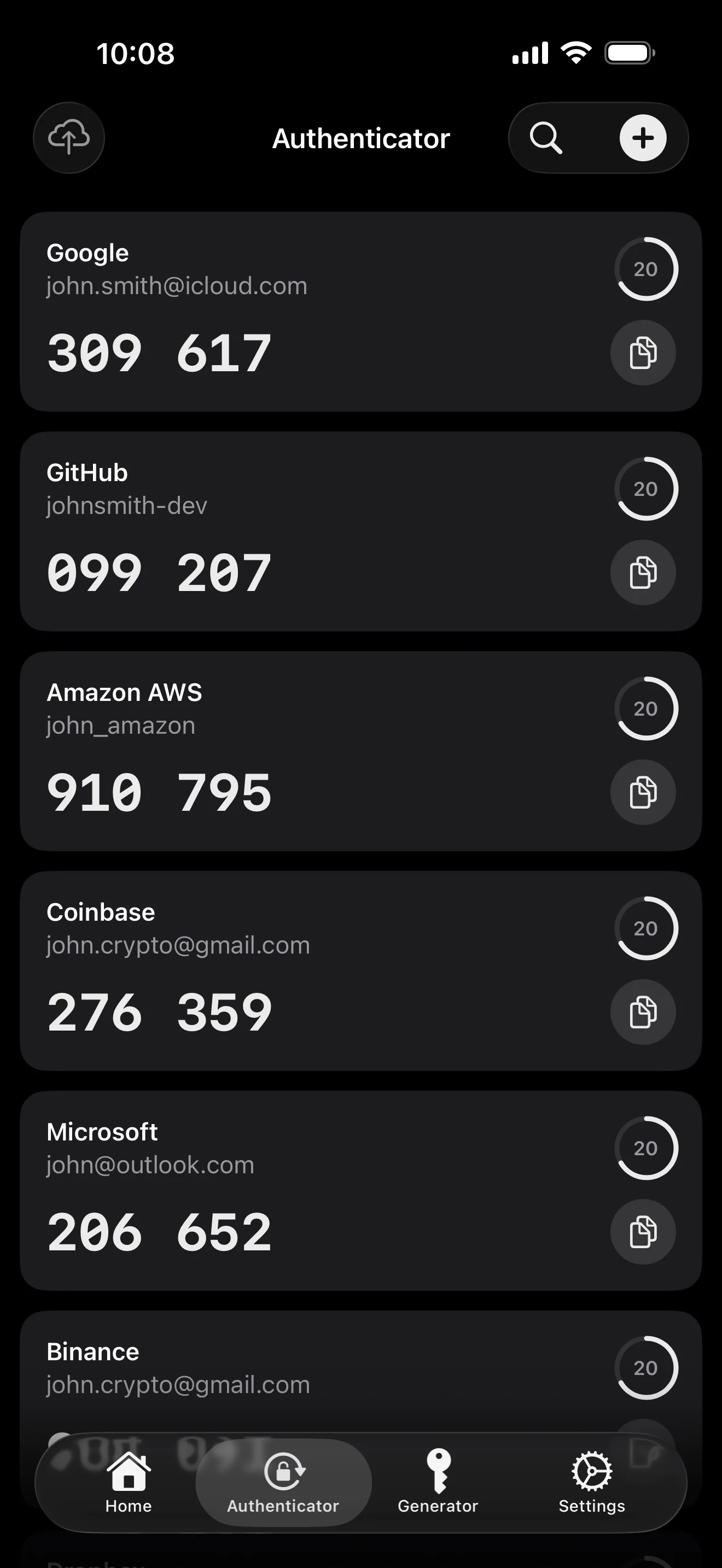
स्कैन करके सेव करें। AutoFill 6-अंकीय कोड को पासवर्ड के साथ भर देता है।
रैंडम स्ट्रिंग या EFF वर्डलिस्ट से वाक्यांश। लाइव एन्ट्रॉपी मीटर।
स्थानीय रूप से जेनरेट और स्टोर। निजी कुंजी कभी भी प्लेनटेक्स्ट में डिवाइस नहीं छोड़ती।
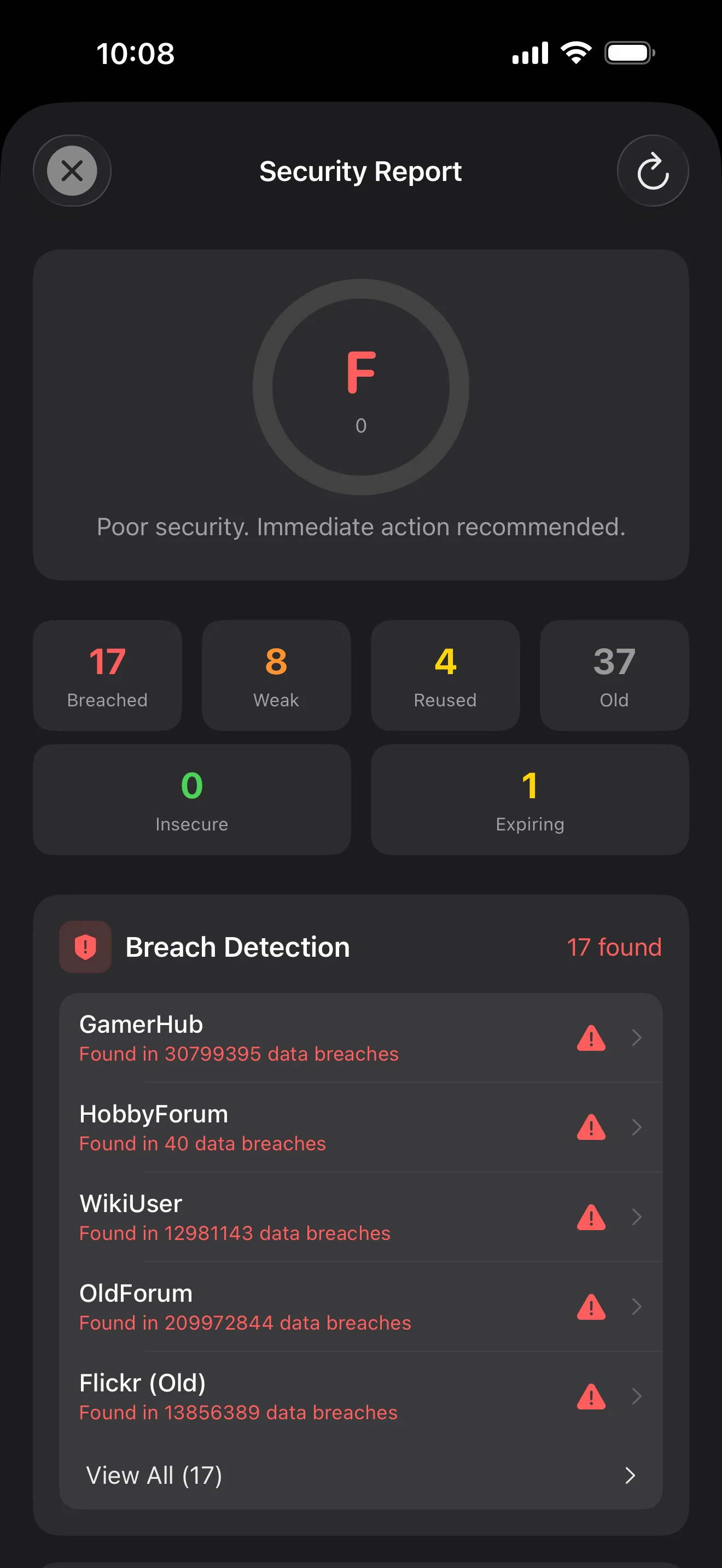
SHA-1 हैश के केवल पहले 5 अक्षर डिवाइस छोड़ते हैं। आपका पासवर्ड कभी नहीं।
सिस्टम-लेवल AutoFill एक्सटेंशन। Face ID पुष्टि करता है; कोड भी भर जाते हैं।
Apple के निजी CloudKit के माध्यम से रूट होता है। संवेदनशील फ़ील्ड अपलोड से पहले डिवाइस पर एन्क्रिप्ट होते हैं — Apple केवल साइफरटेक्स्ट देखता है।
1Password · Bitwarden · LastPass · KeePass · Dashlane · Apple Keychain. तीन एक्सपोर्ट फ़ॉर्मैट: JSON / CSV / .bytegx।
हर पासवर्ड बदलाव पिछली वैल्यू सेव करता है — 5 हिस्ट्री वर्ज़न तक रखे जाते हैं, एक-टैप रोलबैक। डिलीट किए आइटम ट्रैश में जाते हैं।
पेस्टबोर्ड 5 प्रीसेट (15-90 सेकंड) में ऑटो-क्लियर होता है; फ़ोरग्राउंड / बैकग्राउंड ऑटो-लॉक अलग से कॉन्फ़िगर।
दो विजेट: क्विक वॉल्ट एक्सेस + ऑन-द-फ्लाई पासवर्ड जेनरेटर।
बिल्ट-इन TOTP, ऑन-डिवाइस सुरक्षा ऑडिट, और Passkeys — तीन जगहें जहां ByteGuard सबसे स्पष्ट दिखता है।
Scan to save — every 2FA in one place. The detail page shows the live code with a countdown ring; long-press to copy. With AutoFill, the code goes in along with username and password.
Backed by Have I Been Pwned with the k-anonymity protocol — only the first 5 chars of the SHA-1 hash ever leave the device. Every weakness comes with a concrete next step.
WebAuthn / FIDO2 standard. ES256 (ECDSA P-256, COSE alg -7). Private keys are AES-256-GCM encrypted with the Item Key — plaintext never written to disk. AutoFillExtension handles registration and assertion via the Apple system bridge.
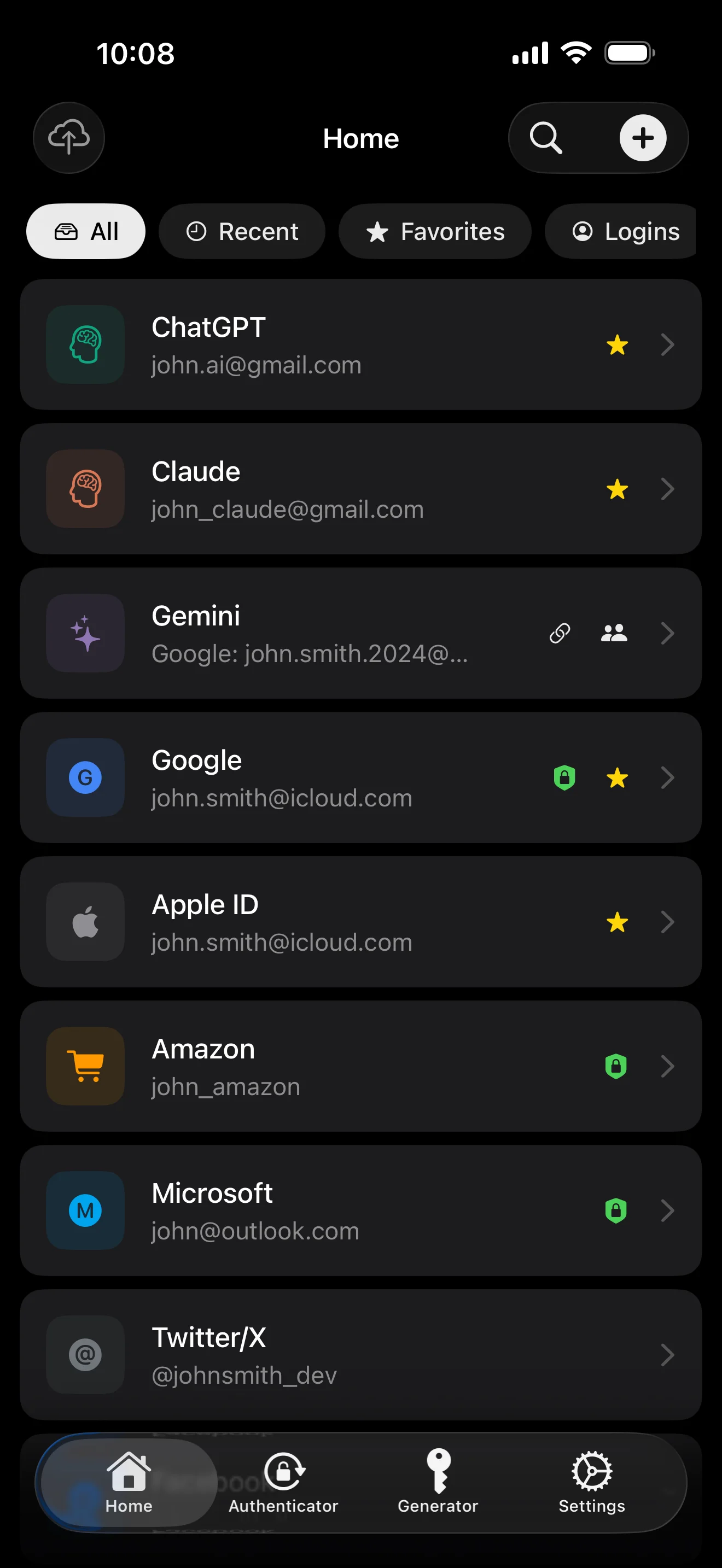
दस स्क्रीन, परिदृश्य क्रम में — पूरा ऐप। कोई मार्केटिंग कॉपी नहीं।
Top 10 / All / Favorites / Logins multi-view; live filtered search. All eight DataType cases run the full field-level encryption pipeline — not a 'password app', but a digital-identity ledger.
Scan to save — every 2FA in one place. The detail page shows the live code with a countdown ring; long-press to copy. With AutoFill, the code goes in along with username and password.
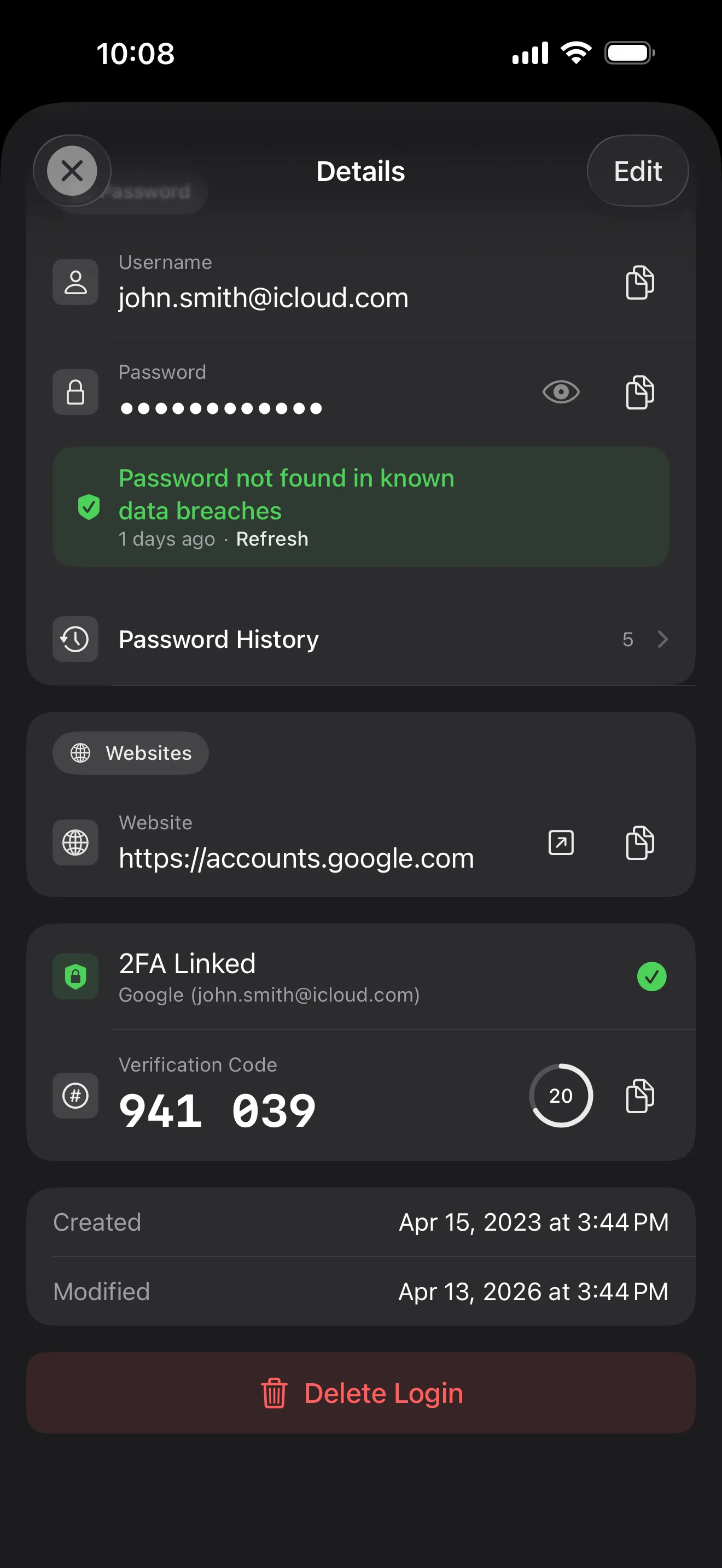
Login detail: username, password, history, linked TOTP, website, custom fields. Each sensitive field independently decrypted with its own IV, shown only on demand. Copy auto-clears the clipboard.
Every change saves the previous value (spec:R3 — up to 5 versions kept); tap the timeline to restore. Deleted items are retained for 90 days before permanent removal.
Backed by Have I Been Pwned with the k-anonymity protocol — only the first 5 chars of the SHA-1 hash ever leave the device. Every weakness comes with a concrete next step.
Random (4-64 chars / exclude look-alikes / digits-only for PIN) or EFF passphrase, with live entropy meter. Replaces the old value and records the change in history.
AutoFill Extension uses Apple's official ASCredentialProviderViewController; after Face ID / Touch ID, the username, password and TOTP all go in together. Info.plist also declares SupportsSavePasswordCredentials, so new passwords save back to ByteGuard from any flow.
WebAuthn / FIDO2 standard. ES256 (ECDSA P-256, COSE alg -7). Private keys are AES-256-GCM encrypted with the Item Key — plaintext never written to disk. AutoFillExtension handles registration and assertion via the Apple system bridge.
Card number (PAN) gets its own AES-256-GCM key with a unique IV. Cardholder name, expiry, brand (Visa / Mastercard / etc.) stay searchable as metadata. CVV/CVC are never persisted on this device.
AppearanceMode three modes: system / light / dark — switch any time, no restart. Premium tier unlocks multi-color themes; Home Screen widgets stay in sync.
आपका मास्टर पासवर्ड कभी डिवाइस नहीं छोड़ता। आपकी Secret Key स्थानीय रूप से जेनरेट होती है और Apple के Keychain में स्टोर होती है। कोई तीसरा पक्ष आपके डेटा को डिक्रिप्ट करने वाली कुंजी नहीं रखता।
पासवर्ड + Secret Key + 32B सॉल्ट → Master Key। पैरामीटर: 64 MB मेमोरी · 3 इटरेशन। GPU/ASIC हमलों के प्रति प्रतिरोधी।
Master Key → KEK → रैंडम DEK। हर वॉल्ट को अपना DEK मिलता है — कोई हॉरिज़ॉन्टल डिक्रिप्शन पाथ नहीं।
हर संवेदनशील फ़ील्ड स्वतंत्र रूप से एन्क्रिप्ट · हर राइट पर नया रैंडम IV। एक ही प्लेनटेक्स्ट → अलग साइफरटेक्स्ट।
एक रैंडम कुंजी (12-शब्द BIP39 निमॉनिक के रूप में), मास्टर पासवर्ड से स्वतंत्र। मास्टर पासवर्ड लीक हो जाए तो भी इसके बिना डेटा डिक्रिप्ट नहीं हो सकता।
No competitor table. No checkmarks. Just an indie developer listing — plainly — what I wrote, and what I deliberately didn't. Read it, then decide whether to trust me with your ledger.
Every sensitive field encrypted independently, with its own random IV.
64 MB memory × 3 iterations — resistant to GPU/ASIC brute force.
A random key independent of the master password — your second line of defense.
iCloud sync can be turned off in one tap; the app falls back to pure local storage.
Only the first 5 chars of the SHA-1 hash are sent — your password never leaves the device.
AutoFill, Passkey, and TOTP all use Apple's official APIs. No reinvented wheels.
No analytics. No tracking. No ads. No crash reporters.
XSS, extension supply-chain attacks, CDN takeovers — that surface is excluded by architecture, not policy.
Each platform means re-implementing the crypto primitives correctly. Get one line wrong and the whole chain breaks.
Sharing is trust delegation — I'm still working out how to do it right. Until I am, I won't ship it.
Under zero-knowledge, self-hosting just shifts the operational burden to you with no real security gain.
Honestly: I haven't paid for one yet. The /security page documents every crypto decision against the source so anyone can verify independently. Independent audit + open-sourcing the crypto core are both on the 2026 roadmap — follow the GitHub repo to be notified when they land.
If I could recover it, it wouldn't be zero-knowledge. The most reliable backup is still old-school: write your master password and Secret Key on paper and store them apart.
Crypto-related changes will move very conservatively. Stability over novelty.
कोई छुपी हुई फ़ीस नहीं। मासिक, वार्षिक सब्सक्राइब करें, या आजीवन के लिए एक बार खरीदें। सभी बिलिंग Apple द्वारा।
मैं एक इंडी डेवलपर हूं। ByteGuard केवल मेरे द्वारा लिखा गया है — कोई टीम नहीं, कोई फंडिंग नहीं, अभी तक कोई बाहरी सुरक्षा ऑडिट नहीं। भरोसा मुझ पर नहीं, आर्किटेक्चर पर है: मैं तकनीकी रूप से आपका डेटा नहीं देख सकता। कोड 2026 में ओपन-सोर्स होगा, क्रिप्टो का स्वतंत्र ऑडिट होगा।
मैं उसे रिकवर नहीं कर सकता। यह ज़ीरो-नॉलेज की कीमत है: मैं जो कभी जाना नहीं उसे रीसेट नहीं कर सकता। दैनिक एक्सेस के लिए Face ID / Touch ID उपयोग करें, और मास्टर पासवर्ड कागज पर लिखकर सुरक्षित जगह रखें।
निर्भर करता है कि आपने Secret Key के लिए iCloud Keychain सिंक चालू किया था या नहीं। चालू है तो आपके डिवाइस में सिंक होगी। नहीं तो Secret Key खोने का मतलब डेटा खोना। 12-शब्द निमॉनिक लिखकर सुरक्षित जगह रखें।
सभी संवेदनशील फ़ील्ड डिवाइस छोड़ने से पहले AES-256-GCM से एन्क्रिप्ट होते हैं। iCloud केवल साइफरटेक्स्ट प्राप्त करता है — Apple आपके पासवर्ड नहीं देख सकता। यदि Apple से डेटा सौंपने को कहा भी जाए, वह आपकी कुंजी से एन्क्रिप्टेड है।
दो कारण। एक व्यक्ति इतना ही कोड संभाल सकता है, और क्रॉस-प्लेटफ़ॉर्म का मतलब क्रिप्टो को फिर से लिखना। मैं Apple पर फ़ोकस करता हूं क्योंकि मैं Apple प्लेटफ़ॉर्म गहराई से जानता हूं और हर जगह औसत के बजाय एक उत्कृष्ट अनुभव देना चाहता हूं।
1Password / Bitwarden / LastPass / KeePass / Dashlane / Apple Keychain एक्सपोर्ट फ़ाइलों से सीधा इंपोर्ट। अपने मौजूदा ऐप से CSV / JSON एक्सपोर्ट करें, ByteGuard में इंपोर्ट करें, बस।
$9.99 आजीवन स्थायी है और इसमें सभी भविष्य के अपडेट शामिल हैं। यदि कभी 'प्रीमियम सब्सक्रिप्शन' टियर आया, तो वह वैकल्पिक होगा — आजीवन धारक कभी वो फ़ीचर नहीं खोएंगे जो उन्होंने खरीदे।