One ledger, eight identities
Every sensitive field encrypted with AES-256-GCM, with its own random IV.
Zaštitite lozinke, pristupne ključeve, 2FA i bankovne kartice s AES-256-GCM enkripcijom. Lokalno prvo, opcionalna iCloud sinkronizacija.
Built on modern iOS primitives
Nije 'aplikacija za lozinke' — to je šifrirani registar koji objedinjuje svaki digitalni identitet na jednom mjestu. Svih osam tipova stavki prolazi kroz isti pipeline enkripcije na razini polja.
Every sensitive field encrypted with AES-256-GCM, with its own random IV.
Scan to save. AutoFill fills the 6-digit code along with the password.
Random string or EFF wordlist phrase. Live entropy meter.
Generated and stored locally. Private key never leaves the device in plaintext.
Only the first 5 chars of the SHA-1 hash leave the device. Your password never does.
System-level AutoFill extension. Face ID confirms; codes get filled in too.
Routed via Apple's private CloudKit. Sensitive fields are encrypted on-device before upload — only ciphertext reaches the server. Toggle off anytime to go fully local.
1Password · Bitwarden · LastPass · KeePass · Dashlane · Apple Keychain. Three export formats: JSON / CSV (plaintext) + encrypted .bytegx.
Every password change saves the previous value — up to 5 history versions kept, one-tap rollback. Deleted items go to a recycle bin and clear after the retention window.
Pasteboard auto-clears after a configurable delay; foreground / background auto-lock timers can be set separately.
Two widgets: quick vault access + on-the-fly password generator.
Ugrađeni TOTP, sigurnosna revizija na uređaju i Passkeys — tri područja gdje ByteGuard najjasnije inženjerski nadmašuje prosječni upravitelj lozinki.
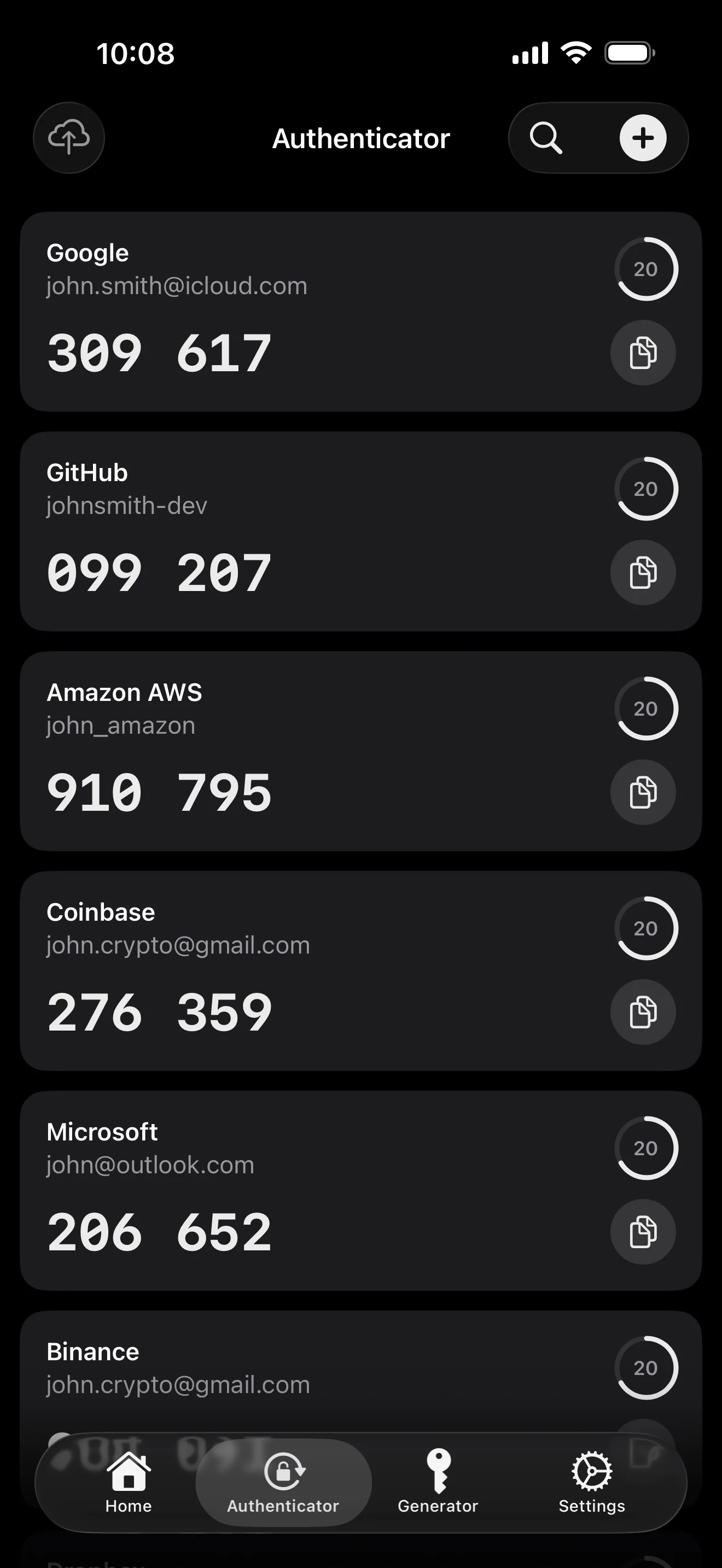
Scan to save — every 2FA in one place. The detail page shows the live code with a countdown ring; long-press to copy. With AutoFill, the code goes in along with username and password.
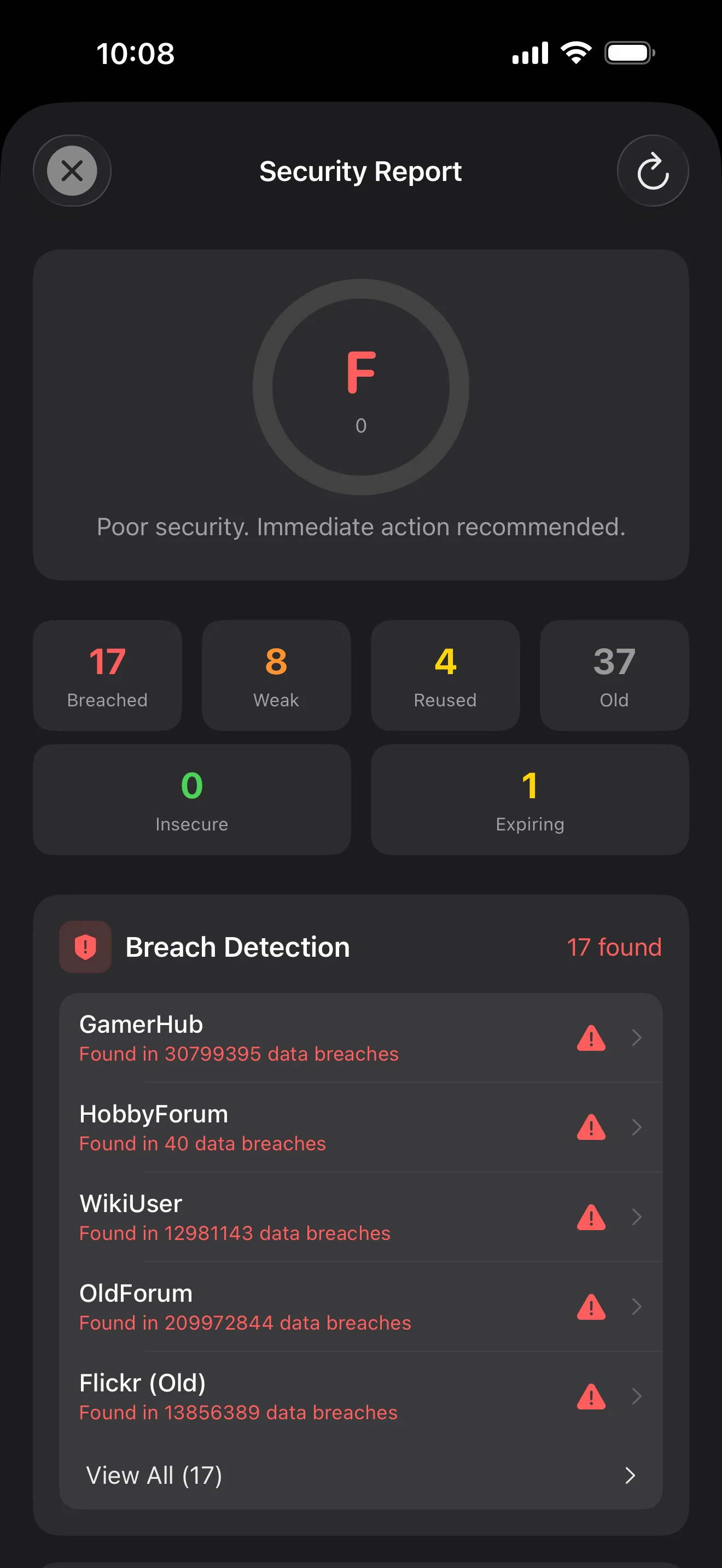
Backed by Have I Been Pwned with the k-anonymity protocol — only the first 5 chars of the SHA-1 hash ever leave the device. Every weakness comes with a concrete next step.
WebAuthn / FIDO2 standard. ES256 (ECDSA P-256, COSE alg -7). Private keys are AES-256-GCM encrypted with the Item Key — plaintext never written to disk. AutoFillExtension handles registration and assertion via the Apple system bridge.
Deset zaslona, redoslijedom scenarija — cijela aplikacija prošetana. Bez marketinških tekstova.
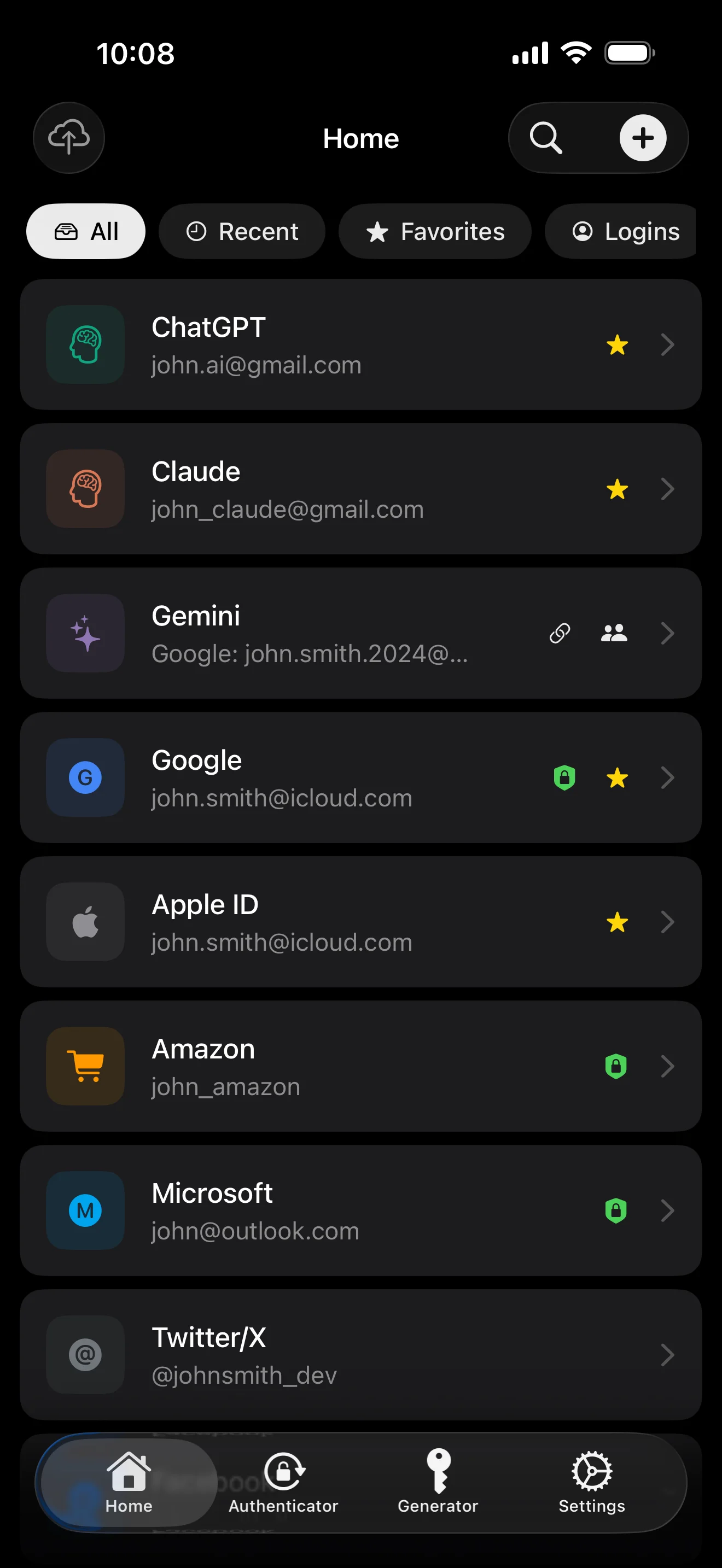
Top 10 / All / Favorites / Logins multi-view; live filtered search. All eight DataType cases run the full field-level encryption pipeline — not a 'password app', but a digital-identity ledger.
Scan to save — every 2FA in one place. The detail page shows the live code with a countdown ring; long-press to copy. With AutoFill, the code goes in along with username and password.
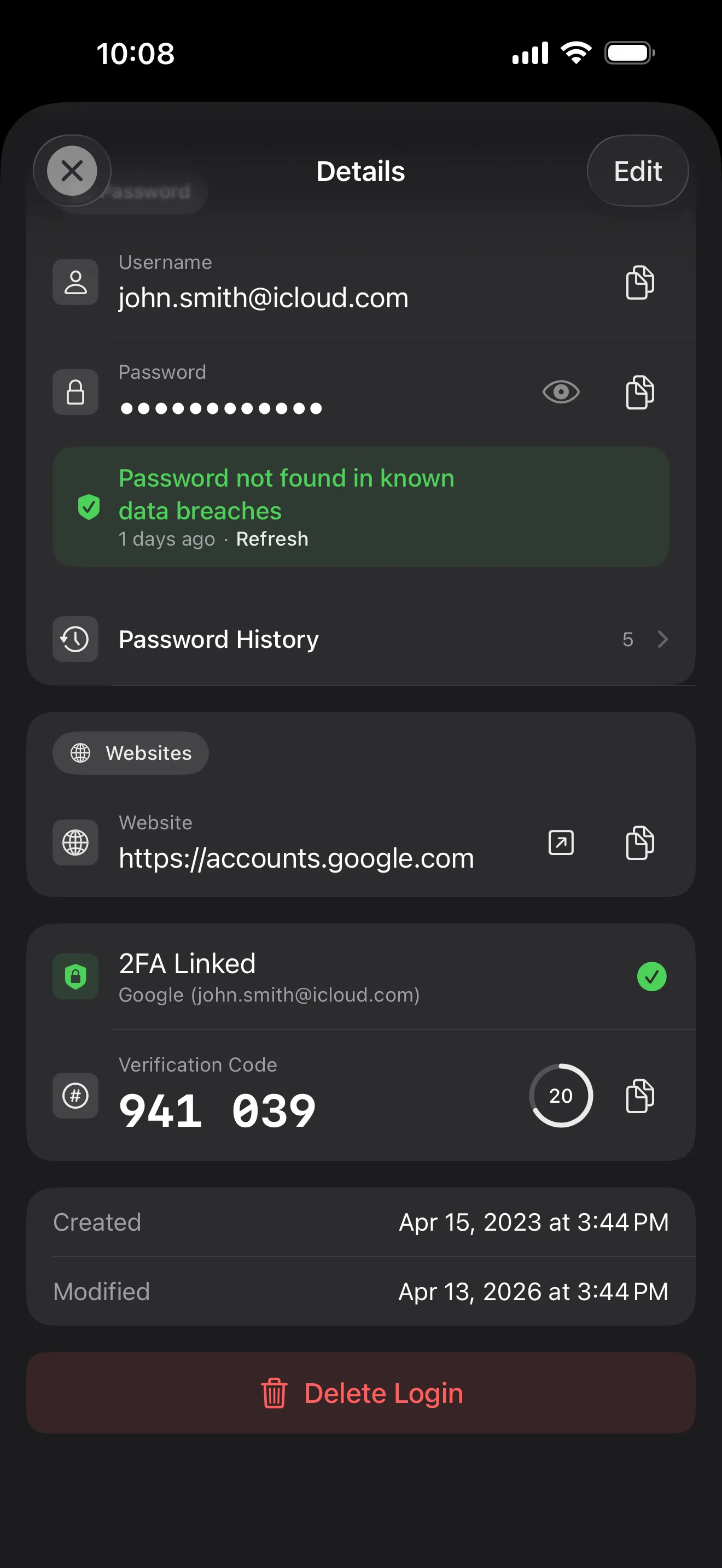
Login detail: username, password, history, linked TOTP, website, custom fields. Each sensitive field independently decrypted with its own IV, shown only on demand. Copy auto-clears the clipboard.
Every change saves the previous value (spec:R3 — up to 5 versions kept); tap the timeline to restore. Deleted items are retained for 90 days before permanent removal.
Backed by Have I Been Pwned with the k-anonymity protocol — only the first 5 chars of the SHA-1 hash ever leave the device. Every weakness comes with a concrete next step.
Random (4-64 chars / exclude look-alikes / digits-only for PIN) or EFF passphrase, with live entropy meter. Replaces the old value and records the change in history.
AutoFill Extension uses Apple's official ASCredentialProviderViewController; after Face ID / Touch ID, the username, password and TOTP all go in together. Info.plist also declares SupportsSavePasswordCredentials, so new passwords save back to ByteGuard from any flow.
WebAuthn / FIDO2 standard. ES256 (ECDSA P-256, COSE alg -7). Private keys are AES-256-GCM encrypted with the Item Key — plaintext never written to disk. AutoFillExtension handles registration and assertion via the Apple system bridge.
Card number (PAN) gets its own AES-256-GCM key with a unique IV. Cardholder name, expiry, brand (Visa / Mastercard / etc.) stay searchable as metadata. CVV/CVC are never persisted on this device.
AppearanceMode three modes: system / light / dark — switch any time, no restart. Premium tier unlocks multi-color themes; Home Screen widgets stay in sync.
Tvoja master lozinka nikada ne napušta tvoj uređaj. Tvoj Secret Key generira se lokalno i pohranjuje u Apple Keychain — sinkroniziran između tvojih Apple uređaja kroz Appleov end-to-end šifrirani Keychain (možeš ga zadržati i samo na jednom uređaju). Oba ključa potrebna su za dešifriranje tvojih podataka, i ni ja ni Apple ne možemo pročitati nijedan od njih. Ovo nije obećanje — to je arhitektura.
lozinka + Secret Key + 32B salt → Master Key. Parametri: 64 MB memorije · 3 iteracije. Otporno na GPU/ASIC brute force.
Master Key → KEK → nasumični DEK. Svaki trezor ima vlastiti DEK — bez horizontalnog puta dešifriranja.
Svako osjetljivo polje šifrirano nezavisno · novi nasumični IV pri svakom upisu. Isti plaintext → drugačiji ciphertext · autentikacijski tag sprječava manipulaciju.
Nasumični ključ (u obliku 12-rječne BIP39 mnemoničke fraze), neovisan o master lozinci. Čak i ako master lozinka procuri, tvoj trezor se bez njega ne može otvoriti.
No competitor table. No checkmarks. Just an indie developer listing — plainly — what I wrote, and what I deliberately didn't. Read it, then decide whether to trust me with your ledger.
Every sensitive field encrypted independently, with its own random IV.
64 MB memory × 3 iterations — resistant to GPU/ASIC brute force.
A random key independent of the master password — your second line of defense.
iCloud sync can be turned off in one tap; the app falls back to pure local storage.
Only the first 5 chars of the SHA-1 hash are sent — your password never leaves the device.
AutoFill, Passkey, and TOTP all use Apple's official APIs. No reinvented wheels.
No analytics. No tracking. No ads. No crash reporters.
XSS, extension supply-chain attacks, CDN takeovers — that surface is excluded by architecture, not policy.
Each platform means re-implementing the crypto primitives correctly. Get one line wrong and the whole chain breaks.
Sharing is trust delegation — I'm still working out how to do it right. Until I am, I won't ship it.
Under zero-knowledge, self-hosting just shifts the operational burden to you with no real security gain.
Honestly: I haven't paid for one yet. The /security page documents every crypto decision against the source so anyone can verify independently. Independent audit + open-sourcing the crypto core are both on the 2026 roadmap — follow the GitHub repo to be notified when they land.
If I could recover it, it wouldn't be zero-knowledge. The most reliable backup is still old-school: write your master password and Secret Key on paper and store them apart.
Crypto-related changes will move very conservatively. Stability over novelty.
Bez skrivenih troškova. Pretplati se mjesečno, godišnje ili plati jednom za cijeli život. Sve naplate vodi Apple.
I'm an indie developer. ByteGuard is written by me, alone — no team, no funding, no third-party security audit yet. (I list this honestly in the section above.) The only thing I can promise is the architecture itself: your master password and Secret Key never leave your device, and there is nothing on my server that can decrypt your data. If that premise isn't enough for you, this app isn't a fit — and that's perfectly fine.
I can't recover it. That's the cost of zero-knowledge: I can't reset what I never knew. Use Face ID / Touch ID for daily unlocking, and write your master password and Secret Key on a piece of paper kept in a safe or a bank deposit box. It sounds 1990s — and it remains the most reliable backup we have.
It depends on whether you enabled iCloud Keychain sync for your Secret Key. If iCloud Keychain sync is enabled (the default-recommended setup): your Secret Key is end-to-end encrypted by Apple and synchronized across all your Apple devices. On a new device, just sign in with your Apple ID and your Secret Key restores automatically — you only need to remember your master password. If iCloud Keychain sync is disabled (maximum security, you keep both keys yourself): the Secret Key never leaves the device it was generated on. Your only backup is the 12-word recovery phrase (BIP39 standard) shown when you first created the vault. Write it on paper and store it separately from your master password. Without that paper backup, the Secret Key cannot be restored on a new device. Either way: your master password is still required to decrypt anything — Secret Key alone is not enough. And I have never seen a single bit of either: my server holds nothing that can decrypt your data, and Apple cannot read your Secret Key either (it's E2E encrypted within their Keychain layer).
All sensitive fields are encrypted with AES-256-GCM before they ever leave the device. iCloud receives ciphertext only; even I don't have the key (the key never leaves your device). If you'd rather not use the cloud at all, you can turn sync off in settings — the app falls back to a fully local mode, which is a perfectly legitimate way to use it.
Two reasons. One person can only maintain so much code, and cross-platform means re-implementing crypto primitives correctly on each — get one line wrong and the whole chain breaks. The other: a web app's attack surface (XSS, extension supply-chain, CDN takeover) is far larger than a native iOS app. I'd rather do one platform well than ship something that looks comprehensive but is unevenly secure.
Direct import from 1Password / Bitwarden / LastPass / KeePass / Dashlane / Apple Keychain export files is supported. The whole import runs locally — nothing is uploaded. If your old manager's export format gives you trouble, email me and I'll add support.
$9.99 lifetime is permanent and includes all future updates. If a 'premium subscription' tier is ever added (e.g. deeper security analytics), it'll be subscription-only — existing lifetime features will never be moved behind it. That's a commitment I'm willing to put on this page.