Satu buku besar, delapan identitas
Setiap field sensitif dienkripsi dengan AES-256-GCM, dengan IV acak masing-masing.
Amankan kata sandi, passkey, 2FA, dan kartu bank dengan enkripsi AES-256-GCM. Utamakan lokal, sinkronisasi iCloud opsional.
Built on modern iOS primitives
Bukan "aplikasi kata sandi" — melainkan buku besar terenkripsi yang menyatukan setiap identitas digital di satu tempat. Delapan tipe item lewat pipeline enkripsi tingkat field yang sama.
Setiap field sensitif dienkripsi dengan AES-256-GCM, dengan IV acak masing-masing.
Pindai untuk simpan. AutoFill mengisi kode 6 digit bersama kata sandi.
String acak atau frasa EFF wordlist. Pengukur entropi waktu nyata.
Dibuat dan disimpan lokal. Kunci privat tak pernah keluar perangkat dalam bentuk plaintext.
Hanya 5 karakter pertama hash SHA-1 yang keluar perangkat. Kata sandimu tidak.
Ekstensi AutoFill tingkat sistem. Face ID mengonfirmasi; kode pun ikut terisi.
Lewat CloudKit privat milik Apple. Field sensitif dienkripsi di perangkat sebelum diunggah — hanya ciphertext yang sampai server. Matikan kapan saja untuk mode lokal sepenuhnya.
1Password · Bitwarden · LastPass · KeePass · Dashlane · Apple Keychain. Tiga format ekspor: JSON / CSV (plaintext) + .bytegx terenkripsi.
Setiap perubahan kata sandi menyimpan nilai sebelumnya — hingga 5 versi riwayat, satu ketuk untuk rollback. Item terhapus masuk recycle bin dan terhapus setelah masa retensi.
Pasteboard auto-clear lewat 5 preset (15-90s); auto-lock foreground / background diatur terpisah (selalu aktif, tak bisa dimatikan).
Dua widget: akses cepat brankas + generator kata sandi instan.
TOTP bawaan, audit keamanan di perangkat, dan Passkey — tiga area di mana ByteGuard paling jelas mengungguli pengelola kata sandi rata-rata.
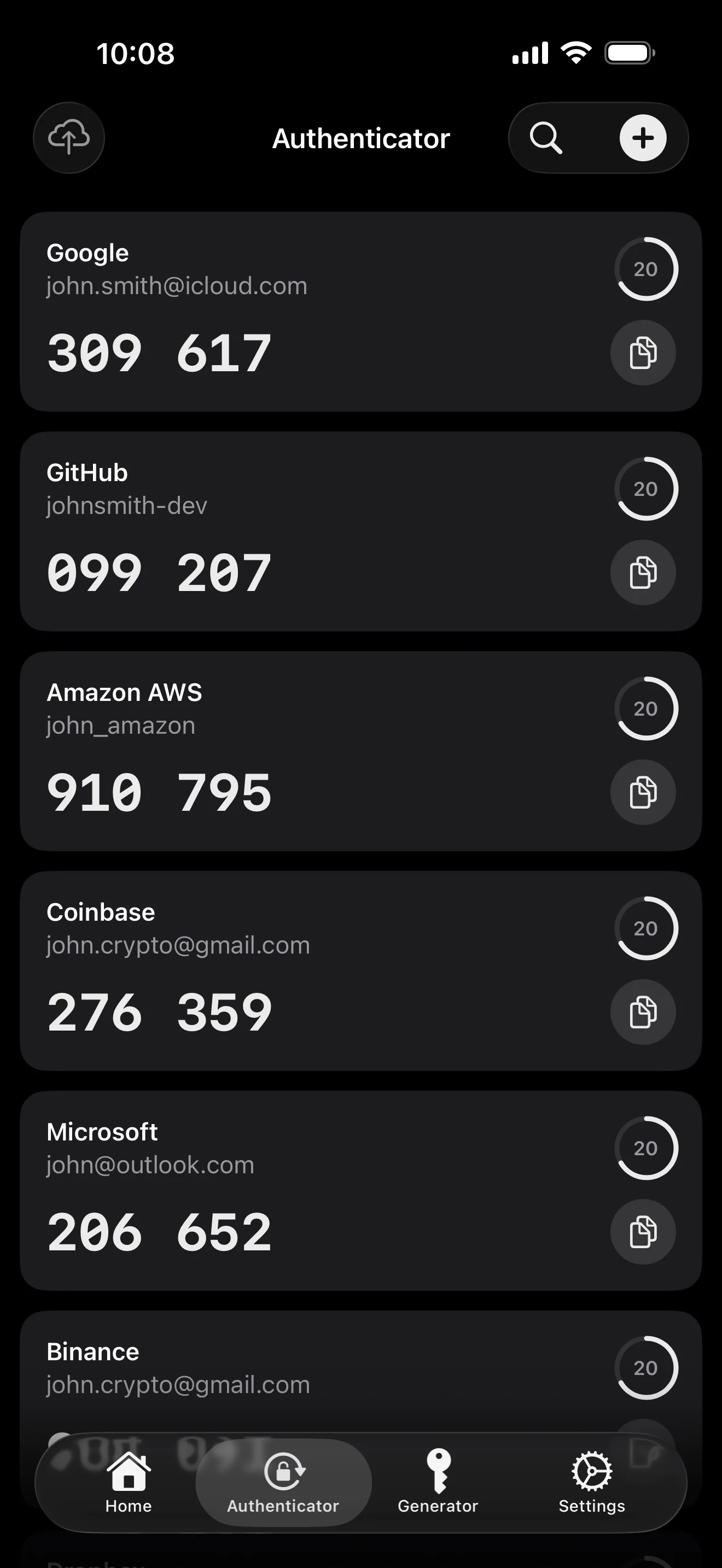
Scan to save — every 2FA in one place. The detail page shows the live code with a countdown ring; long-press to copy. With AutoFill, the code goes in along with username and password.
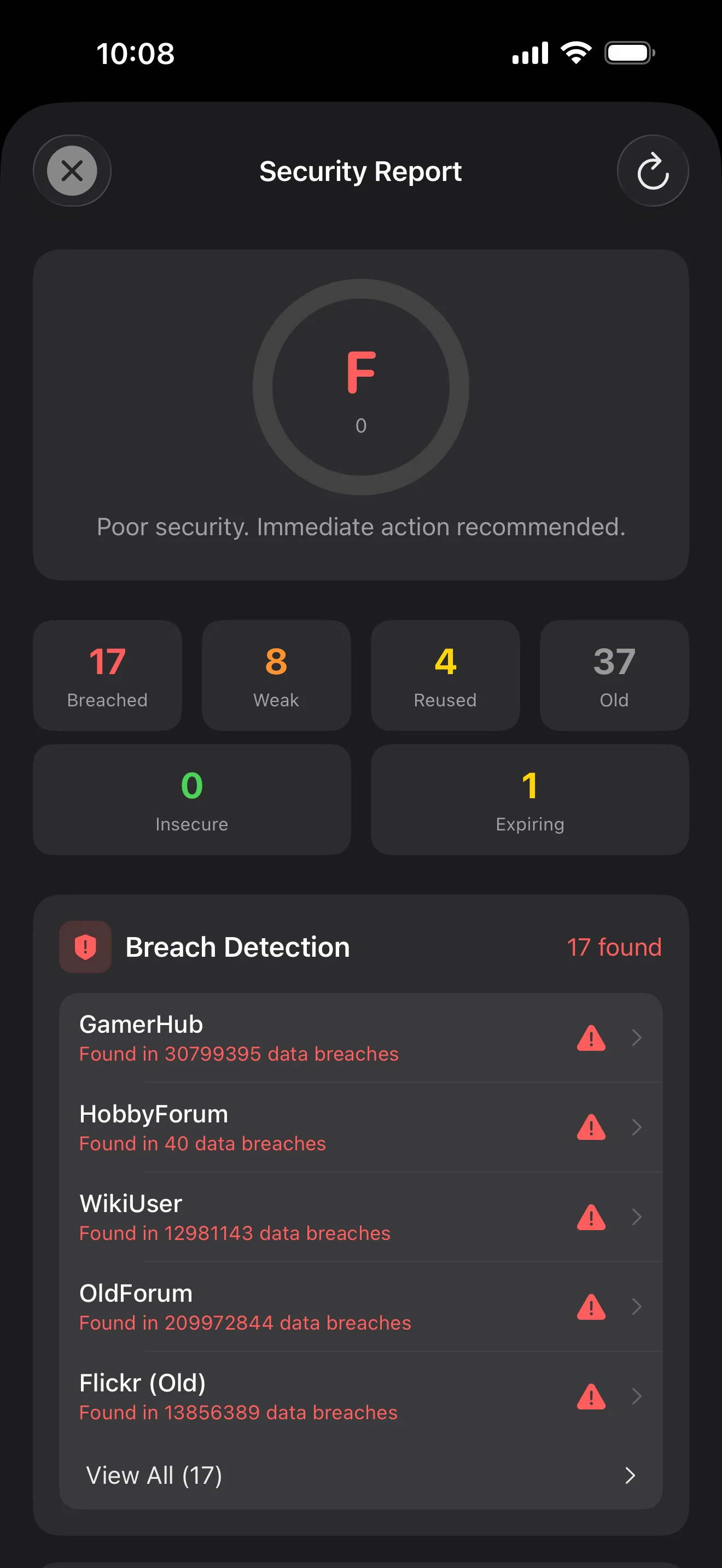
Backed by Have I Been Pwned with the k-anonymity protocol — only the first 5 chars of the SHA-1 hash ever leave the device. Every weakness comes with a concrete next step.
WebAuthn / FIDO2 standard. ES256 (ECDSA P-256, COSE alg -7). Private keys are AES-256-GCM encrypted with the Item Key — plaintext never written to disk. AutoFillExtension handles registration and assertion via the Apple system bridge.
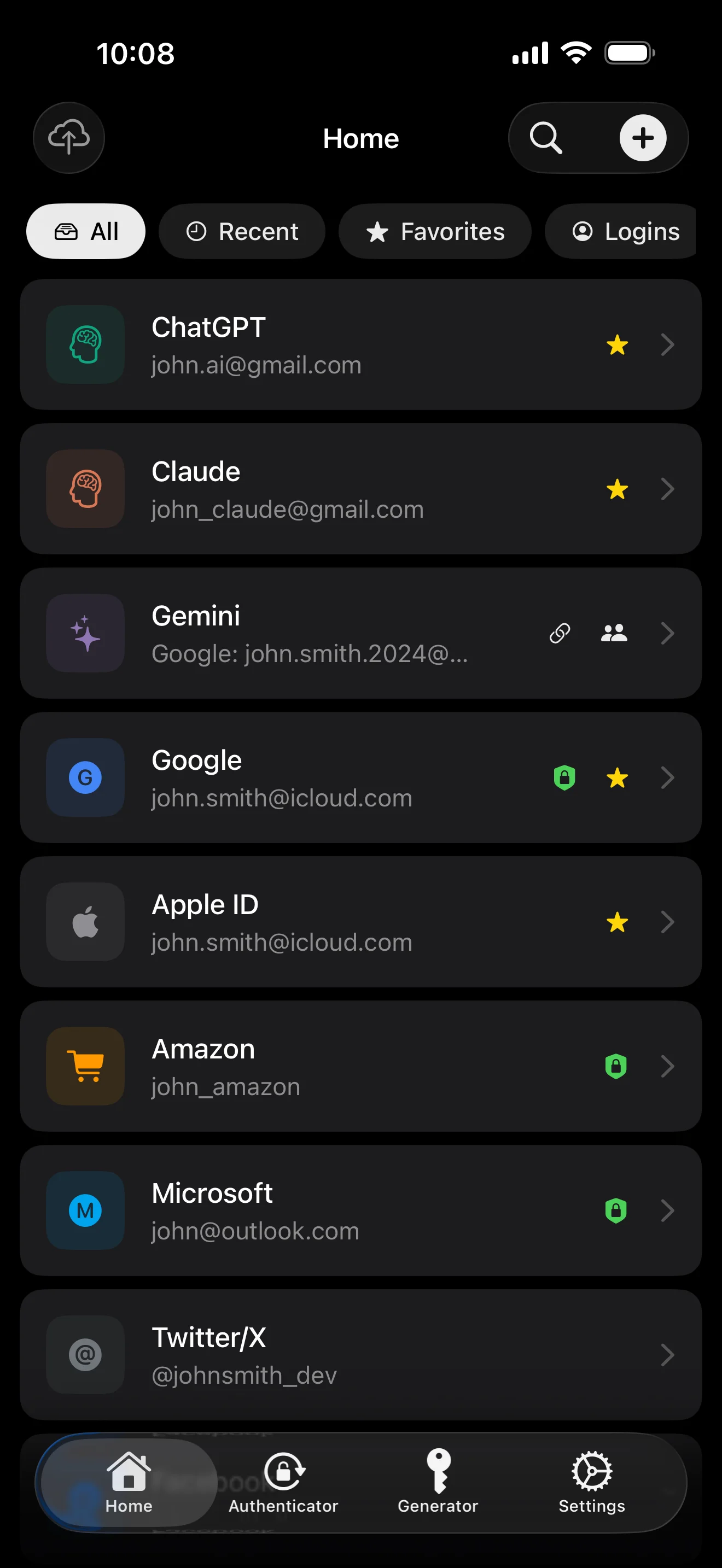
Sepuluh layar, urut sesuai skenario — seluruh aplikasi ditelusuri. Tanpa marketing copy.
Top 10 / All / Favorites / Logins multi-view; live filtered search. All eight DataType cases run the full field-level encryption pipeline — not a 'password app', but a digital-identity ledger.
Scan to save — every 2FA in one place. The detail page shows the live code with a countdown ring; long-press to copy. With AutoFill, the code goes in along with username and password.
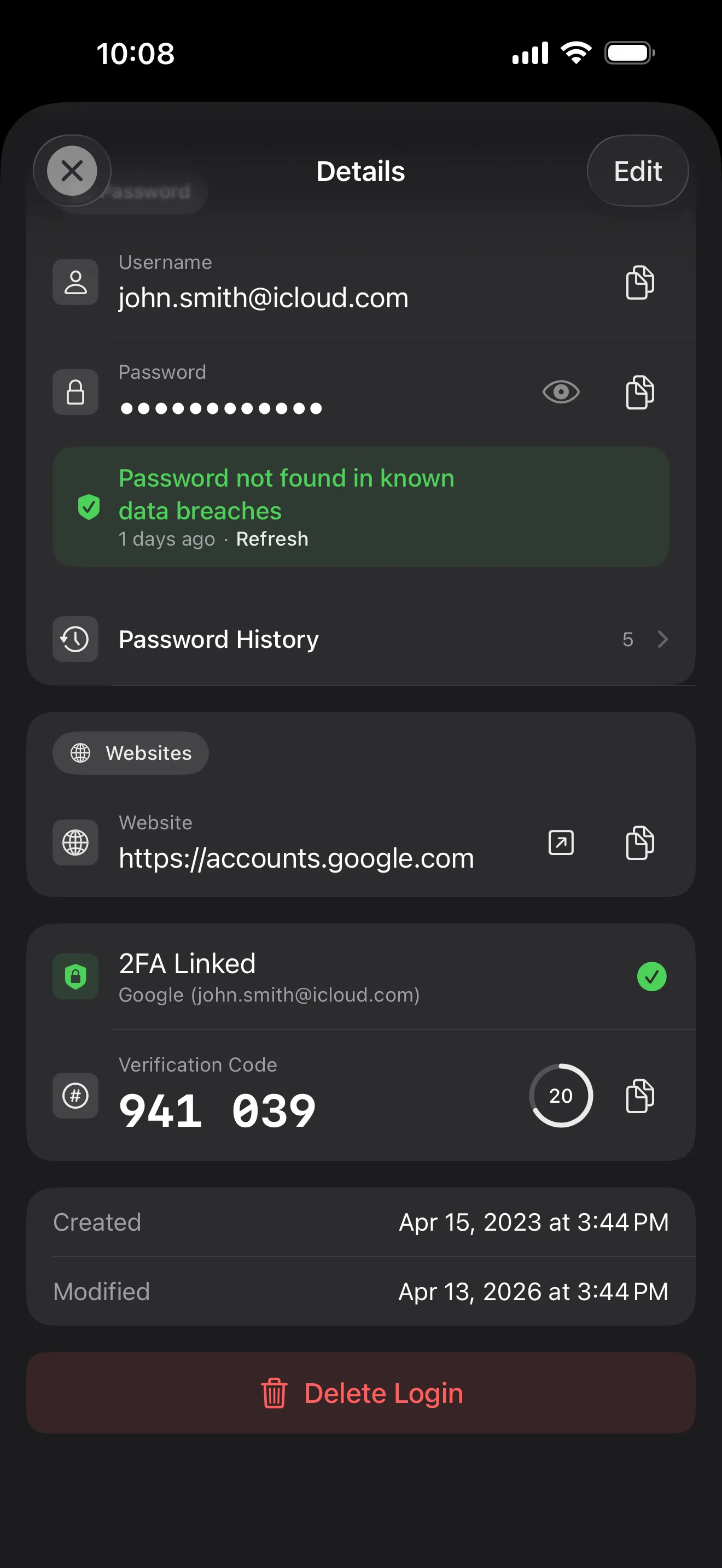
Login detail: username, password, history, linked TOTP, website, custom fields. Each sensitive field independently decrypted with its own IV, shown only on demand. Copy auto-clears the clipboard.
Every change saves the previous value (spec:R3 — up to 5 versions kept); tap the timeline to restore. Deleted items are retained for 90 days before permanent removal.
Backed by Have I Been Pwned with the k-anonymity protocol — only the first 5 chars of the SHA-1 hash ever leave the device. Every weakness comes with a concrete next step.
Random (4-64 chars / exclude look-alikes / digits-only for PIN) or EFF passphrase, with live entropy meter. Replaces the old value and records the change in history.
AutoFill Extension uses Apple's official ASCredentialProviderViewController; after Face ID / Touch ID, the username, password and TOTP all go in together. Info.plist also declares SupportsSavePasswordCredentials, so new passwords save back to ByteGuard from any flow.
WebAuthn / FIDO2 standard. ES256 (ECDSA P-256, COSE alg -7). Private keys are AES-256-GCM encrypted with the Item Key — plaintext never written to disk. AutoFillExtension handles registration and assertion via the Apple system bridge.
Card number (PAN) gets its own AES-256-GCM key with a unique IV. Cardholder name, expiry, brand (Visa / Mastercard / etc.) stay searchable as metadata. CVV/CVC are never persisted on this device.
AppearanceMode three modes: system / light / dark — switch any time, no restart. Premium tier unlocks multi-color themes; Home Screen widgets stay in sync.
Kata sandi utama tak pernah meninggalkan perangkatmu. Secret Key dibuat lokal dan disimpan di Apple Keychain — tersinkron antar perangkat Apple lewat Keychain end-to-end milik Apple (bisa juga disimpan hanya di satu perangkat). Kedua kunci dibutuhkan untuk mendekripsi data, dan baik saya maupun Apple tak bisa membaca keduanya. Ini bukan janji — ini arsitekturnya.
kata sandi + Secret Key + 32B salt → Master Key. Parameter: memori 64 MB · 3 iterasi. Tahan brute force GPU/ASIC.
Master Key → KEK → DEK acak. Setiap brankas punya DEK sendiri — tak ada jalur dekripsi horizontal.
Setiap field sensitif dienkripsi terpisah · IV acak baru tiap penulisan. Plaintext sama → ciphertext berbeda · authenticated tag mencegah manipulasi.
Kunci acak (berbentuk mnemonic 12 kata BIP39), independen dari kata sandi utama. Kalau kata sandi utama bocor, brankas tetap tak bisa dibuka tanpanya.
No competitor table. No checkmarks. Just an indie developer listing — plainly — what I wrote, and what I deliberately didn't. Read it, then decide whether to trust me with your ledger.
Every sensitive field encrypted independently, with its own random IV.
64 MB memory × 3 iterations — resistant to GPU/ASIC brute force.
A random key independent of the master password — your second line of defense.
iCloud sync can be turned off in one tap; the app falls back to pure local storage.
Only the first 5 chars of the SHA-1 hash are sent — your password never leaves the device.
AutoFill, Passkey, and TOTP all use Apple's official APIs. No reinvented wheels.
No analytics. No tracking. No ads. No crash reporters.
XSS, extension supply-chain attacks, CDN takeovers — that surface is excluded by architecture, not policy.
Each platform means re-implementing the crypto primitives correctly. Get one line wrong and the whole chain breaks.
Sharing is trust delegation — I'm still working out how to do it right. Until I am, I won't ship it.
Under zero-knowledge, self-hosting just shifts the operational burden to you with no real security gain.
Honestly: I haven't paid for one yet. The /security page documents every crypto decision against the source so anyone can verify independently. Independent audit + open-sourcing the crypto core are both on the 2026 roadmap — follow the GitHub repo to be notified when they land.
If I could recover it, it wouldn't be zero-knowledge. The most reliable backup is still old-school: write your master password and Secret Key on paper and store them apart.
Crypto-related changes will move very conservatively. Stability over novelty.
Tanpa biaya tersembunyi. Berlangganan bulanan, tahunan, atau beli sekali untuk seumur hidup. Semua penagihan ditangani Apple.
Saya developer indie. ByteGuard saya tulis sendirian — tanpa tim, tanpa pendanaan, belum ada audit keamanan pihak ketiga. (Saya cantumkan ini secara jujur di bagian atas.) Yang bisa saya janjikan hanyalah arsitekturnya: kata sandi utama dan Secret Key kamu tak pernah meninggalkan perangkat, dan tak ada apa pun di server saya yang bisa mendekripsi datamu. Kalau premis itu belum cukup buatmu, aplikasi ini bukan pilihan tepat — dan itu tak masalah.
Saya tak bisa memulihkannya. Itu konsekuensi zero-knowledge: saya tak bisa mereset apa yang tak pernah saya tahu. Pakai Face ID / Touch ID untuk membuka harian, dan tulis kata sandi utama serta Secret Key di kertas, simpan di brankas atau safe deposit bank. Terdengar 1990-an — tapi tetap cadangan paling andal.
Tergantung apakah kamu mengaktifkan sinkronisasi iCloud Keychain untuk Secret Key. Bila iCloud Keychain aktif (default yang direkomendasikan): Secret Key dienkripsi end-to-end oleh Apple dan tersinkron di semua perangkat Apple kamu. Di perangkat baru, cukup login Apple ID dan Secret Key terpulihkan otomatis — kamu hanya perlu mengingat kata sandi utama. Bila iCloud Keychain dimatikan (keamanan maksimum, kamu pegang sendiri kedua kunci): Secret Key tak pernah meninggalkan perangkat tempatnya dibuat. Cadangan satu-satunya adalah frasa pemulihan 12 kata (standar BIP39) yang muncul saat kamu pertama membuat brankas. Tulis di kertas dan simpan terpisah dari kata sandi utama. Tanpa cadangan kertas itu, Secret Key tak bisa dipulihkan di perangkat baru. Bagaimanapun: kata sandi utama tetap dibutuhkan untuk mendekripsi — Secret Key sendiri tak cukup. Dan saya belum pernah melihat satu bit pun dari keduanya: server saya tak menyimpan apa pun yang bisa mendekripsi datamu, dan Apple juga tak bisa membaca Secret Key (terenkripsi E2E di lapisan Keychain mereka).
Semua field sensitif dienkripsi dengan AES-256-GCM sebelum meninggalkan perangkat. iCloud hanya menerima ciphertext; saya pun tak punya kuncinya (kunci tak pernah meninggalkan perangkatmu). Kalau kamu lebih suka tak pakai cloud, matikan sinkronisasi di pengaturan — aplikasi jatuh ke mode lokal sepenuhnya, cara penggunaan yang sama-sama valid.
Dua alasan. Satu orang hanya bisa memelihara kode dalam jumlah terbatas, dan lintas-platform berarti mengimplementasi ulang primitif kripto di tiap platform — salah satu baris saja, seluruh rantai patah. Lainnya: permukaan serangan aplikasi web (XSS, supply-chain ekstensi, takeover CDN) jauh lebih besar daripada aplikasi iOS native. Saya lebih suka mengerjakan satu platform dengan baik daripada merilis sesuatu yang terlihat lengkap tapi keamanannya tidak merata.
Impor langsung dari berkas ekspor 1Password / Bitwarden / LastPass / KeePass / Dashlane / Apple Keychain didukung. Seluruh proses impor jalan lokal — tak ada yang diunggah. Kalau format ekspor pengelola lamamu bermasalah, email saya dan saya tambahkan dukungannya.
Paket seumur hidup $9.99 itu permanen dan termasuk semua pembaruan ke depan. Kalau nanti ada tier "premium berlangganan" (misal analitik keamanan lebih dalam), itu hanya berbasis langganan — fitur seumur hidup yang ada tak akan pernah dipindah ke baliknya. Itu komitmen yang siap saya tulis di halaman ini.