One ledger, eight identities
Every sensitive field encrypted with AES-256-GCM, with its own random IV.
Proteggi password, passkey, 2FA e carte bancarie con crittografia AES-256-GCM. Prima locale, sincronizzazione iCloud opzionale.
Built on modern iOS primitives
Non una 'app per password' — un registro cifrato che riunisce ogni identità digitale in un unico posto. Tutti gli otto tipi di voci passano attraverso la stessa pipeline di cifratura a livello di campo.
Every sensitive field encrypted with AES-256-GCM, with its own random IV.
Scan to save. AutoFill fills the 6-digit code along with the password.
Random string or EFF wordlist phrase. Live entropy meter.
Generated and stored locally. Private key never leaves the device in plaintext.
Only the first 5 chars of the SHA-1 hash leave the device. Your password never does.
System-level AutoFill extension. Face ID confirms; codes get filled in too.
Routed via Apple's private CloudKit. Sensitive fields are encrypted on-device before upload — only ciphertext reaches the server. Toggle off anytime to go fully local.
1Password · Bitwarden · LastPass · KeePass · Dashlane · Apple Keychain. Three export formats: JSON / CSV (plaintext) + encrypted .bytegx.
Every password change saves the previous value — up to 5 history versions kept, one-tap rollback. Deleted items go to a recycle bin and clear after the retention window.
Pasteboard auto-clears after a configurable delay; foreground / background auto-lock timers can be set separately.
Two widgets: quick vault access + on-the-fly password generator.
TOTP integrato, audit di sicurezza on-device e Passkey: i tre punti in cui ByteGuard supera nettamente la media dei password manager.
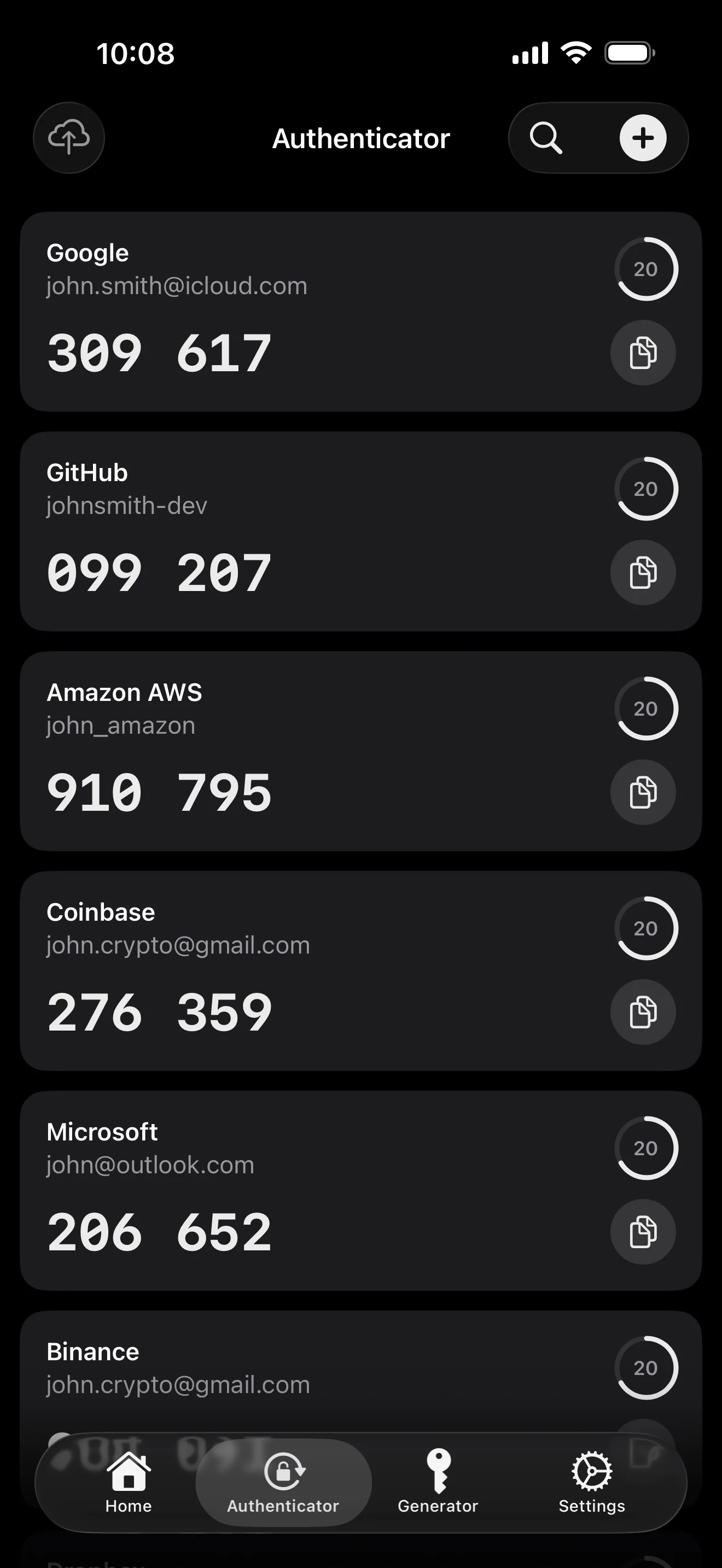
Scan to save — every 2FA in one place. The detail page shows the live code with a countdown ring; long-press to copy. With AutoFill, the code goes in along with username and password.
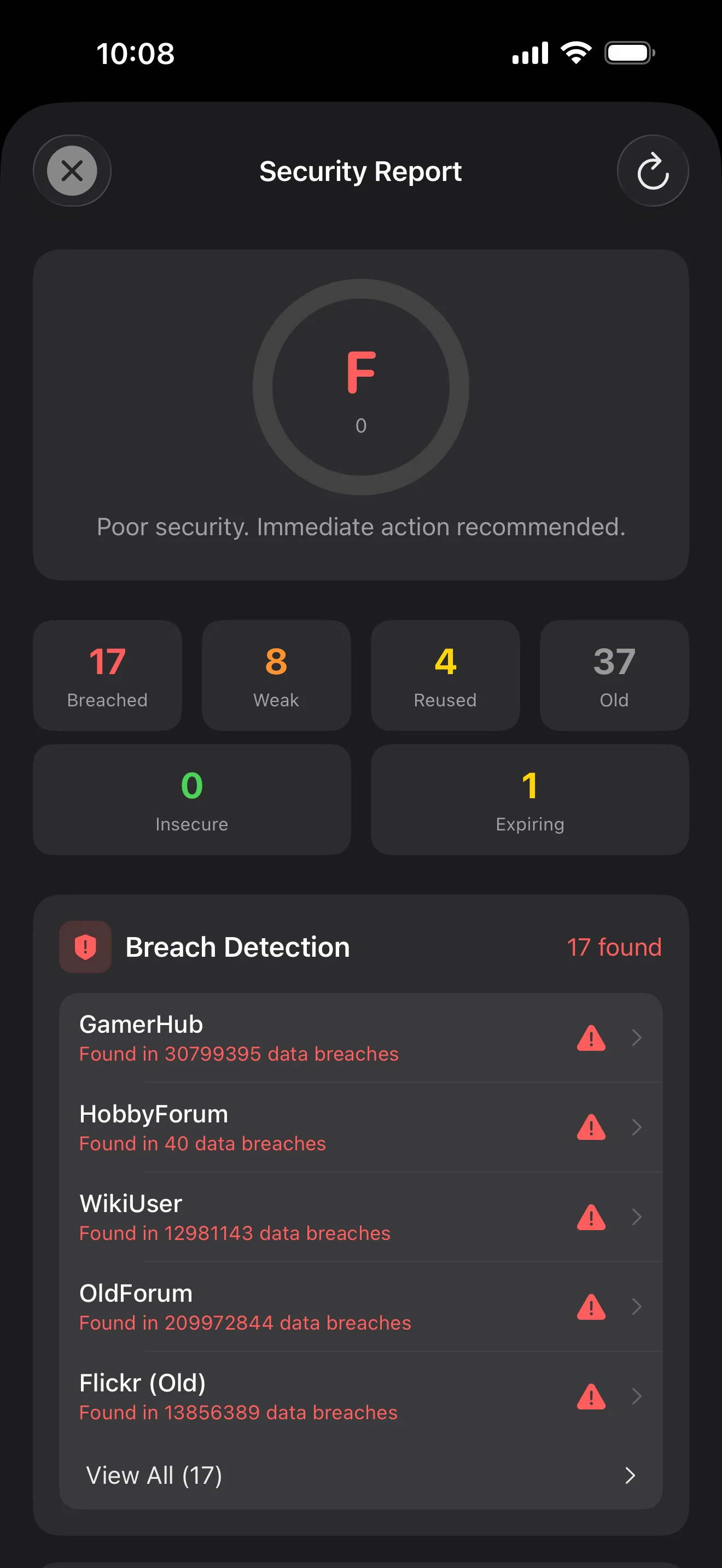
Backed by Have I Been Pwned with the k-anonymity protocol — only the first 5 chars of the SHA-1 hash ever leave the device. Every weakness comes with a concrete next step.
WebAuthn / FIDO2 standard. ES256 (ECDSA P-256, COSE alg -7). Private keys are AES-256-GCM encrypted with the Item Key — plaintext never written to disk. AutoFillExtension handles registration and assertion via the Apple system bridge.
Dieci schermate, in ordine di scenario — l'intera app illustrata. Niente testi di marketing.
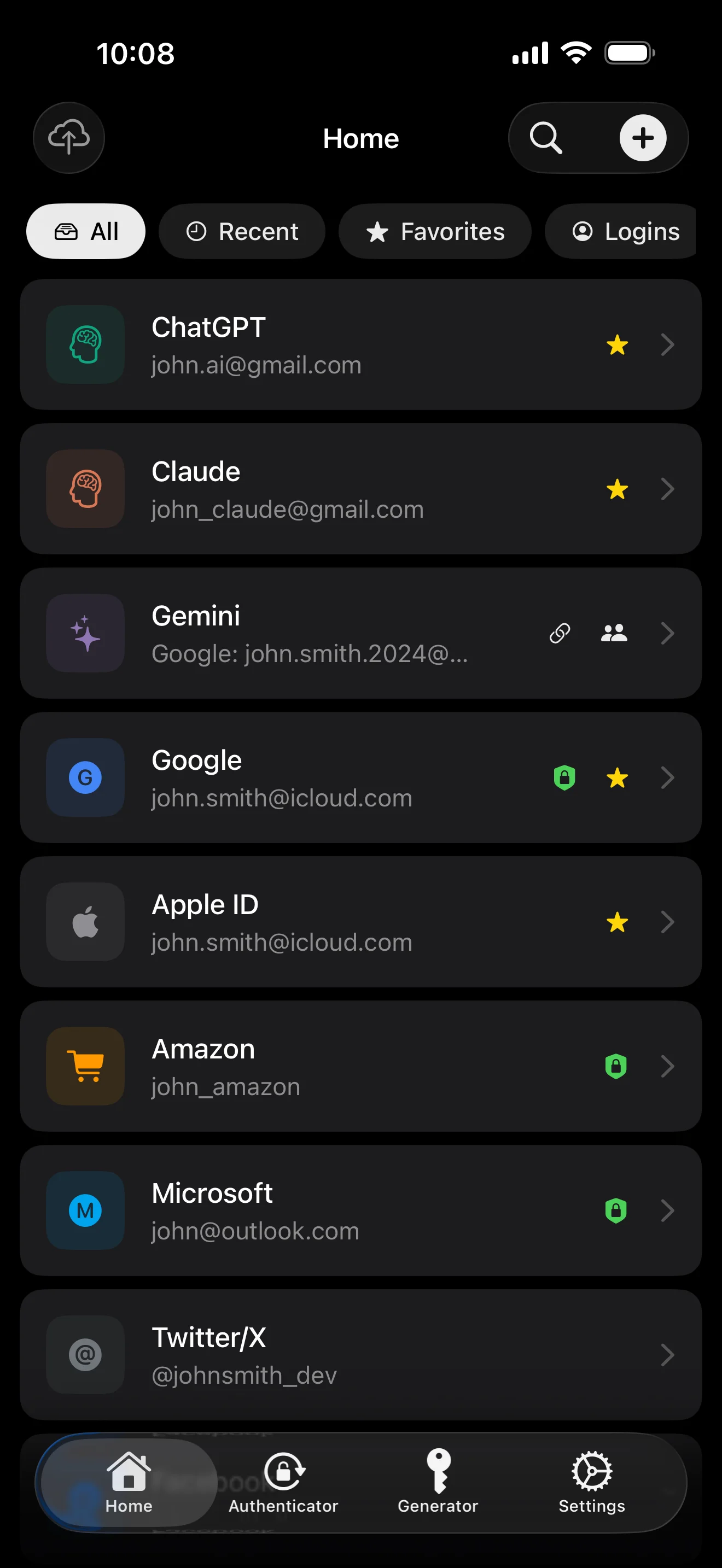
Top 10 / All / Favorites / Logins multi-view; live filtered search. All eight DataType cases run the full field-level encryption pipeline — not a 'password app', but a digital-identity ledger.
Scan to save — every 2FA in one place. The detail page shows the live code with a countdown ring; long-press to copy. With AutoFill, the code goes in along with username and password.
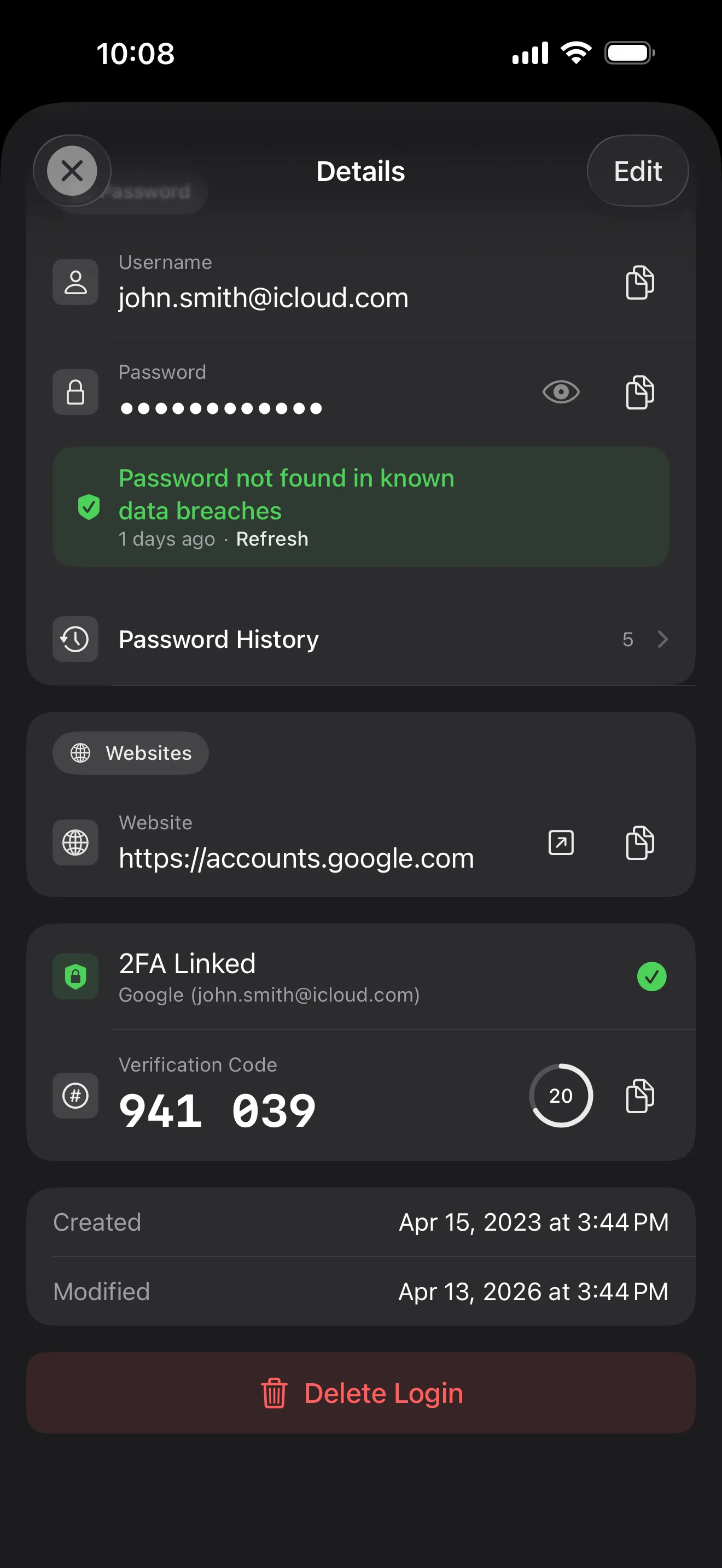
Login detail: username, password, history, linked TOTP, website, custom fields. Each sensitive field independently decrypted with its own IV, shown only on demand. Copy auto-clears the clipboard.
Every change saves the previous value (spec:R3 — up to 5 versions kept); tap the timeline to restore. Deleted items are retained for 90 days before permanent removal.
Backed by Have I Been Pwned with the k-anonymity protocol — only the first 5 chars of the SHA-1 hash ever leave the device. Every weakness comes with a concrete next step.
Random (4-64 chars / exclude look-alikes / digits-only for PIN) or EFF passphrase, with live entropy meter. Replaces the old value and records the change in history.
AutoFill Extension uses Apple's official ASCredentialProviderViewController; after Face ID / Touch ID, the username, password and TOTP all go in together. Info.plist also declares SupportsSavePasswordCredentials, so new passwords save back to ByteGuard from any flow.
WebAuthn / FIDO2 standard. ES256 (ECDSA P-256, COSE alg -7). Private keys are AES-256-GCM encrypted with the Item Key — plaintext never written to disk. AutoFillExtension handles registration and assertion via the Apple system bridge.
Card number (PAN) gets its own AES-256-GCM key with a unique IV. Cardholder name, expiry, brand (Visa / Mastercard / etc.) stay searchable as metadata. CVV/CVC are never persisted on this device.
AppearanceMode three modes: system / light / dark — switch any time, no restart. Premium tier unlocks multi-color themes; Home Screen widgets stay in sync.
La tua master password non lascia mai il tuo dispositivo. La tua Secret Key viene generata localmente e archiviata nel Portachiavi di Apple — sincronizzata tra i tuoi dispositivi Apple tramite il Portachiavi end-to-end cifrato di Apple (puoi anche conservarla su un solo dispositivo). Servono entrambe le chiavi per decifrare i tuoi dati, e né io né Apple possiamo leggerle. Non è una promessa — è l'architettura.
password + Secret Key + 32B salt → Master Key. Parameters: 64 MB memory · 3 iterations. Resistant to GPU/ASIC brute force.
Master Key → KEK → random DEK. Each vault gets its own DEK — no horizontal decryption path.
Every sensitive field encrypted independently · new random IV on every write. Same plaintext → different ciphertext · authenticated tag prevents tampering.
A random key (a 12-word BIP39 mnemonic in form), independent of the master password. Even if the master password leaks, your vault still cannot be opened without it.
No competitor table. No checkmarks. Just an indie developer listing — plainly — what I wrote, and what I deliberately didn't. Read it, then decide whether to trust me with your ledger.
Every sensitive field encrypted independently, with its own random IV.
64 MB memory × 3 iterations — resistant to GPU/ASIC brute force.
A random key independent of the master password — your second line of defense.
iCloud sync can be turned off in one tap; the app falls back to pure local storage.
Only the first 5 chars of the SHA-1 hash are sent — your password never leaves the device.
AutoFill, Passkey, and TOTP all use Apple's official APIs. No reinvented wheels.
No analytics. No tracking. No ads. No crash reporters.
XSS, extension supply-chain attacks, CDN takeovers — that surface is excluded by architecture, not policy.
Each platform means re-implementing the crypto primitives correctly. Get one line wrong and the whole chain breaks.
Sharing is trust delegation — I'm still working out how to do it right. Until I am, I won't ship it.
Under zero-knowledge, self-hosting just shifts the operational burden to you with no real security gain.
Honestly: I haven't paid for one yet. The /security page documents every crypto decision against the source so anyone can verify independently. Independent audit + open-sourcing the crypto core are both on the 2026 roadmap — follow the GitHub repo to be notified when they land.
If I could recover it, it wouldn't be zero-knowledge. The most reliable backup is still old-school: write your master password and Secret Key on paper and store them apart.
Crypto-related changes will move very conservatively. Stability over novelty.
Nessun costo nascosto. Abbonati al mese, all'anno, o paga una volta per sempre. Tutta la fatturazione è gestita da Apple.
Sono uno sviluppatore indipendente. ByteGuard è scritto da me, da solo — nessun team, nessun finanziamento, nessun audit di sicurezza di terze parti per ora. (Lo dichiaro onestamente nella sezione qui sopra.) L'unica cosa che posso promettere è l'architettura stessa: la tua master password e la Secret Key non lasciano mai il tuo dispositivo, e sul mio server non c'è nulla che possa decifrare i tuoi dati. Se questa premessa non ti basta, questa app non fa per te — ed è perfettamente legittimo.
Non posso recuperarla. È il prezzo dello zero-knowledge: non posso reimpostare ciò che non ho mai conosciuto. Usa Face ID / Touch ID per lo sblocco quotidiano, e scrivi la tua master password e la Secret Key su un foglio di carta da conservare in una cassaforte o in una cassetta di sicurezza in banca. Sembra anni '90 — e resta il backup più affidabile che abbiamo.
Dipende dall'aver attivato la sincronizzazione del Portachiavi iCloud per la Secret Key. Se la sincronizzazione del Portachiavi iCloud è attiva (la configurazione consigliata di default): la tua Secret Key è cifrata end-to-end da Apple e sincronizzata su tutti i tuoi dispositivi Apple. Su un nuovo dispositivo, basta accedere con il tuo Apple ID e la Secret Key viene ripristinata automaticamente — devi solo ricordare la master password. Se la sincronizzazione del Portachiavi iCloud è disattivata (massima sicurezza, conservi entrambe le chiavi tu): la Secret Key non lascia mai il dispositivo su cui è stata generata. L'unico backup è la frase di recupero di 12 parole (standard BIP39) mostrata alla creazione del vault. Scrivila su carta e conservala separatamente dalla master password. Senza quel backup cartaceo, la Secret Key non può essere ripristinata su un nuovo dispositivo. In ogni caso: la master password resta indispensabile per decifrare qualsiasi cosa — la Secret Key da sola non basta. E io non ho mai visto un solo bit di nessuna delle due: il mio server non contiene nulla che possa decifrare i tuoi dati, e nemmeno Apple può leggere la tua Secret Key (è cifrata E2E nel loro livello Portachiavi).
Tutti i campi sensibili sono cifrati con AES-256-GCM prima di lasciare il dispositivo. iCloud riceve solo testo cifrato; nemmeno io ho la chiave (la chiave non lascia mai il tuo dispositivo). Se preferisci non usare il cloud, puoi disattivare la sincronizzazione nelle impostazioni — l'app passa a una modalità completamente locale, un modo del tutto legittimo di usarla.
Due ragioni. Una persona può mantenere solo una certa quantità di codice, e il multipiattaforma significa reimplementare correttamente le primitive crittografiche su ciascuna piattaforma — basta una riga sbagliata e l'intera catena si spezza. L'altra: la superficie d'attacco di un'app web (XSS, supply-chain delle estensioni, takeover della CDN) è molto più ampia di quella di un'app iOS nativa. Preferisco fare bene una sola piattaforma piuttosto che spedire qualcosa che sembra completo ma è disomogeneo nella sicurezza.
L'importazione diretta dai file di esportazione di 1Password / Bitwarden / LastPass / KeePass / Dashlane / Portachiavi Apple è supportata. L'intera importazione avviene localmente — nulla viene caricato. Se il formato di esportazione del tuo vecchio gestore ti dà problemi, scrivimi e aggiungerò il supporto.
9,99 $ a vita è permanente e include tutti gli aggiornamenti futuri. Se in futuro verrà aggiunto un livello di 'abbonamento premium' (es. analisi di sicurezza più approfondite), sarà solo in abbonamento — le funzionalità a vita esistenti non saranno mai spostate al suo interno. È un impegno che sono disposto a mettere su questa pagina.