2 Billion Passwords Leaked Last Year. One Was Probably Yours.
Reusing passwords is how credential stuffing attacks compromise millions of accounts. Here are the 5 password security mistakes you are probably making — and how a password manager fixes them.
Published: 2026-04-09 · 5 min read
Is Your Password Already on the Internet?
In 2024 alone, over 2 billion login credentials leaked online — roughly 1 for every 4 people on Earth. If you've reused a password in the last five years, one of them is probably yours.
leaked passwords now circulating in public breach databases — yours may be among them
The Verizon 2024 Data Breach Investigations Report backs this up from another angle: 77% of basic web application attacks involve the use of stolen credentials. Translation: passwords are how attackers get in — and those passwords are yours.
This isn't just a problem for big corporations. Every leaked database becomes ammunition for credential stuffing — attackers grab email-and-password pairs from one breach and run them automatically against hundreds of other sites. Reuse the same password on your email, bank, and shopping accounts, and a single breach can compromise all of them at once.
Credential stuffing is fully automated. Attackers use botnets — huge networks of hijacked computers — to test stolen credentials across thousands of sites at once: banking, email, social media, e-commerce. Most attempts get scanned within hours of a breach going public. Success rates hover around 0.1–0.2%, but at billions of attempts, that still means millions of accounts compromised every year.
5 Password Mistakes You're Probably Making
Most people know passwords matter. Knowing isn't doing. Here are five common mistakes — and the reality behind each one.
- "My password is complex enough"
- "I can remember all my passwords"
- "My browser saves them, that's fine"
- "Nobody would target me"
- "Two-factor authentication is enough"
- A strong password reused across sites is a ticking time bomb
- 100+ accounts means human memory can't keep up
- Browsers lack breach alerts, passkey support, and secure storage
- Credential stuffing is automated — bots don't pick targets
- 2FA helps, but SMS codes can be intercepted — you need both layers
Mistake 1: "My password is complex enough"
Complex passwords are great — until you reuse one. One breach, every account falls. Reuse it once and every breach becomes your breach.
Mistake 2: "I can remember all my passwords"
average number of online accounts per person
That includes email, banking, social media, streaming services, shopping, work tools, and dozens of apps you forgot you signed up for. No human memory can juggle 100+ unique, complex passwords. Something has to give — and what usually gives is password security.
Mistake 3: "My browser saves them, that's fine"
Browsers can store passwords, but that's about all they do. They don't generate strong ones for you, don't flag reuse across sites, and can't manage passkeys (the new login method that uses Face ID or Touch ID instead of a password), secure notes, or 2FA codes. Sometimes stored passwords can even be read by other apps on your computer.
Mistake 4: "Nobody would target me"
That's exactly the point — nobody is targeting you. Credential stuffing is automated. Bots don't care who you are, what you earn, or whether your accounts are "interesting." They just run through leaked databases. If your password matches, you're the next victim — no targeting required.
Mistake 5: "Two-factor authentication is enough"
Two-factor authentication (2FA) adds a valuable layer of protection — but it doesn't replace a strong, unique password. Some 2FA methods (like SMS codes) are vulnerable to SIM-swap attacks and SS7 interception. And if an attacker already has your password, 2FA becomes your last line of defense instead of your second. You want both layers holding, not just one.
Password security isn't about one great password. It's about a system — unique passwords for every account, generated and stored securely. That's exactly what a password manager does.
What a Password Manager Actually Does
If you've never used a password manager, the simplest way to think about it: it remembers your passwords so you don't have to — and then some.
- Reusing the same password across sites
- Creating weak passwords you can remember
- Forgetting passwords and resetting constantly
- Manually typing credentials every time
- No idea which accounts are compromised
- Unique password for every single account
- Randomly generated, impossible-to-guess passwords
- Auto-saved the moment you create an account
- Auto-filled so you never type passwords again
- One master password protects everything
Here's what the typical workflow looks like once you're set up:
You sign up for a new service, the password manager generates a strong password (something like x7#mK!9qLp$2vR — you'll never have to look at it), saves it automatically, and fills it in next time. From sign-up to sign-in, there's nothing extra to do.
ByteGuard: Zero-Knowledge, On-Device, Built for iPhone
The system we just described — unique passwords for every account, plus passkey and 2FA support — packaged into a single app. That's ByteGuard.
It uses an end-to-end encrypted, zero-knowledge architecture: your master password never leaves the device, and ByteGuard's servers don't hold any key that could decrypt your data. Even if our servers were breached or subpoenaed, all anyone would find is ciphertext.
Three things live together in one app:
- Passkeys — next-gen passwordless login using Face ID or Touch ID.
- Passwords — auto-generated, auto-saved, auto-filled.
- TOTP 2FA codes — the 6-digit rotating codes apps like Google Authenticator produce. No second app needed.
Everything is encrypted and stored on your iPhone.
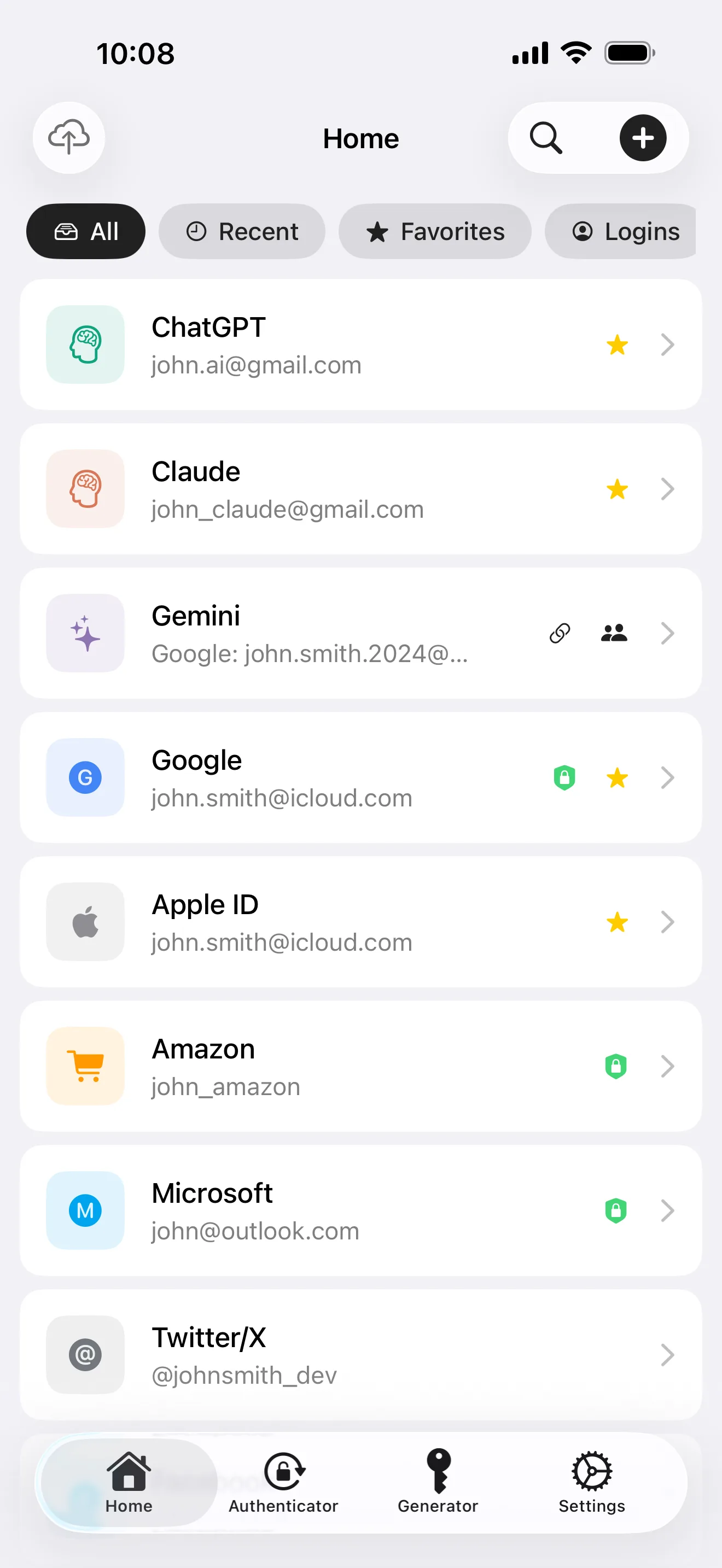
What a dedicated manager does that your browser doesn't
- 8 item types managed: passwords, cards, TOTP, passkeys, API keys, IDs, licenses, notes
- Active breach monitoring: HIBP-powered alerts when any of your saved passwords appear in known leaks
- End-to-end sync across Mac / iPad / iPhone — ciphertext only over iCloud
Don't let tonight be another "I'll get to it tomorrow." Spend 10 minutes installing a password manager and importing the reused ones from your browser — future-you will thank present-you at every login.
Free, no account required. Download ByteGuard on the App Store →