Satu lejar, lapan identiti
Setiap medan sensitif disulit dengan AES-256-GCM, dengan IV rawak tersendiri.
Lindungi kata laluan, kunci laluan, 2FA dan kad bank anda dengan penyulitan AES-256-GCM. Utamakan setempat, segerak iCloud pilihan.
Built on modern iOS primitives
Bukan "aplikasi kata laluan" — sebaliknya lejar tersulit yang menyatukan setiap identiti digital di satu tempat. Kelapan-lapan jenis item melalui saluran penyulitan peringkat medan yang sama.
Setiap medan sensitif disulit dengan AES-256-GCM, dengan IV rawak tersendiri.
Imbas untuk simpan. AutoFill mengisi kod 6 digit bersama kata laluan.
Rentetan rawak atau frasa EFF wordlist. Meter entropi langsung.
Dijana dan disimpan setempat. Kunci peribadi tidak pernah meninggalkan peranti dalam bentuk teks biasa.
Hanya 5 aksara pertama hash SHA-1 keluar dari peranti. Kata laluan anda tidak.
Sambungan AutoFill peringkat sistem. Face ID mengesahkan; kod turut diisi sekali.
Disalurkan melalui CloudKit peribadi Apple. Medan sensitif disulit pada peranti sebelum dimuat naik — hanya teks tersulit yang sampai ke pelayan. Matikan bila-bila masa untuk mod setempat sepenuhnya.
1Password · Bitwarden · LastPass · KeePass · Dashlane · Apple Keychain. Tiga format eksport: JSON / CSV (teks biasa) + .bytegx tersulit.
Setiap perubahan kata laluan menyimpan nilai sebelumnya — sehingga 5 versi sejarah, satu sentuhan untuk undur. Item dipadam masuk tong kitar semula dan dibersihkan selepas tempoh penyimpanan.
Pasteboard auto-clear melalui 5 pratetap (15-90s); auto-lock latar depan / latar belakang dikonfigurasi berasingan (sentiasa aktif, tidak boleh dilumpuhkan).
Dua widget: capaian peti pantas + penjana kata laluan segera.
TOTP terbina dalam, audit keselamatan pada peranti, dan Passkey — tiga bahagian di mana ByteGuard paling jelas mengatasi pengurus kata laluan biasa.
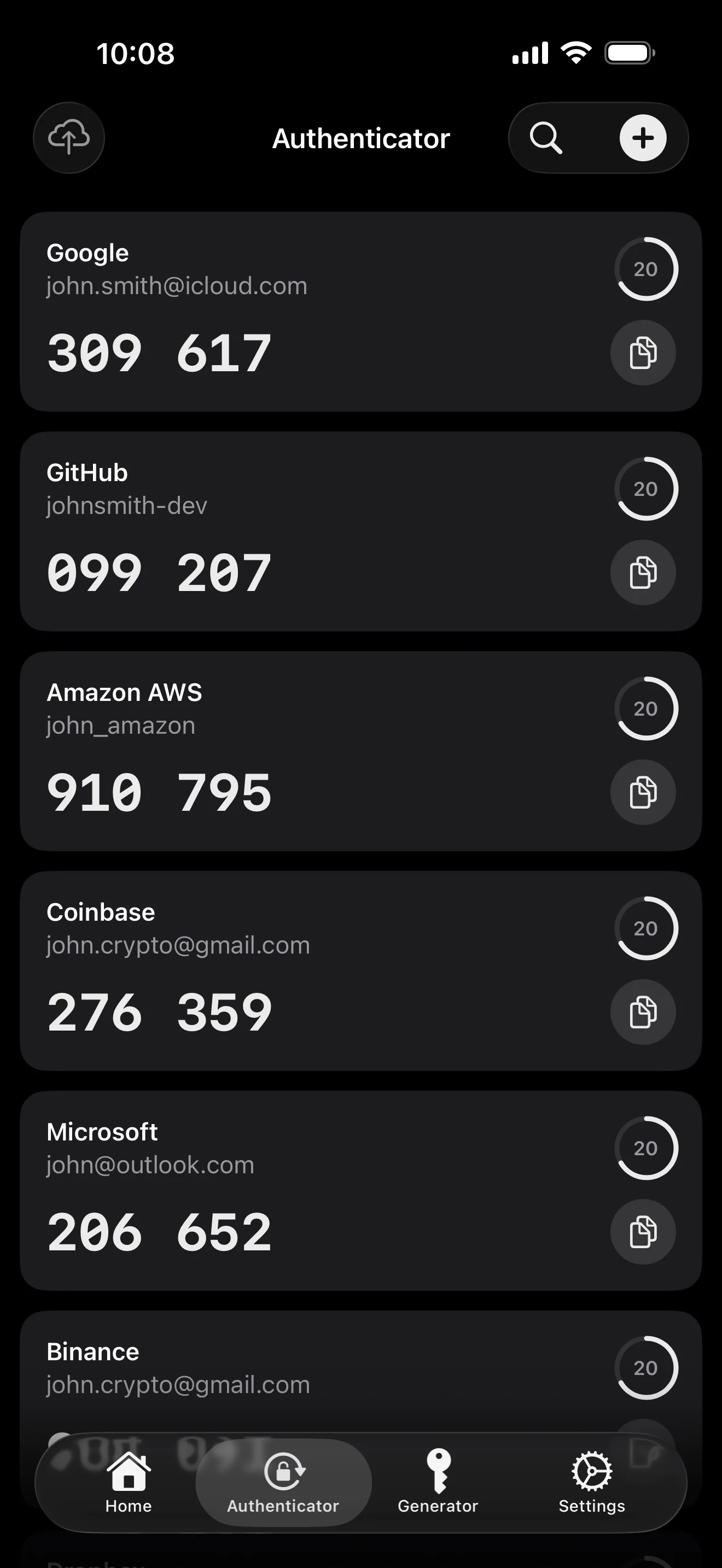
Scan to save — every 2FA in one place. The detail page shows the live code with a countdown ring; long-press to copy. With AutoFill, the code goes in along with username and password.
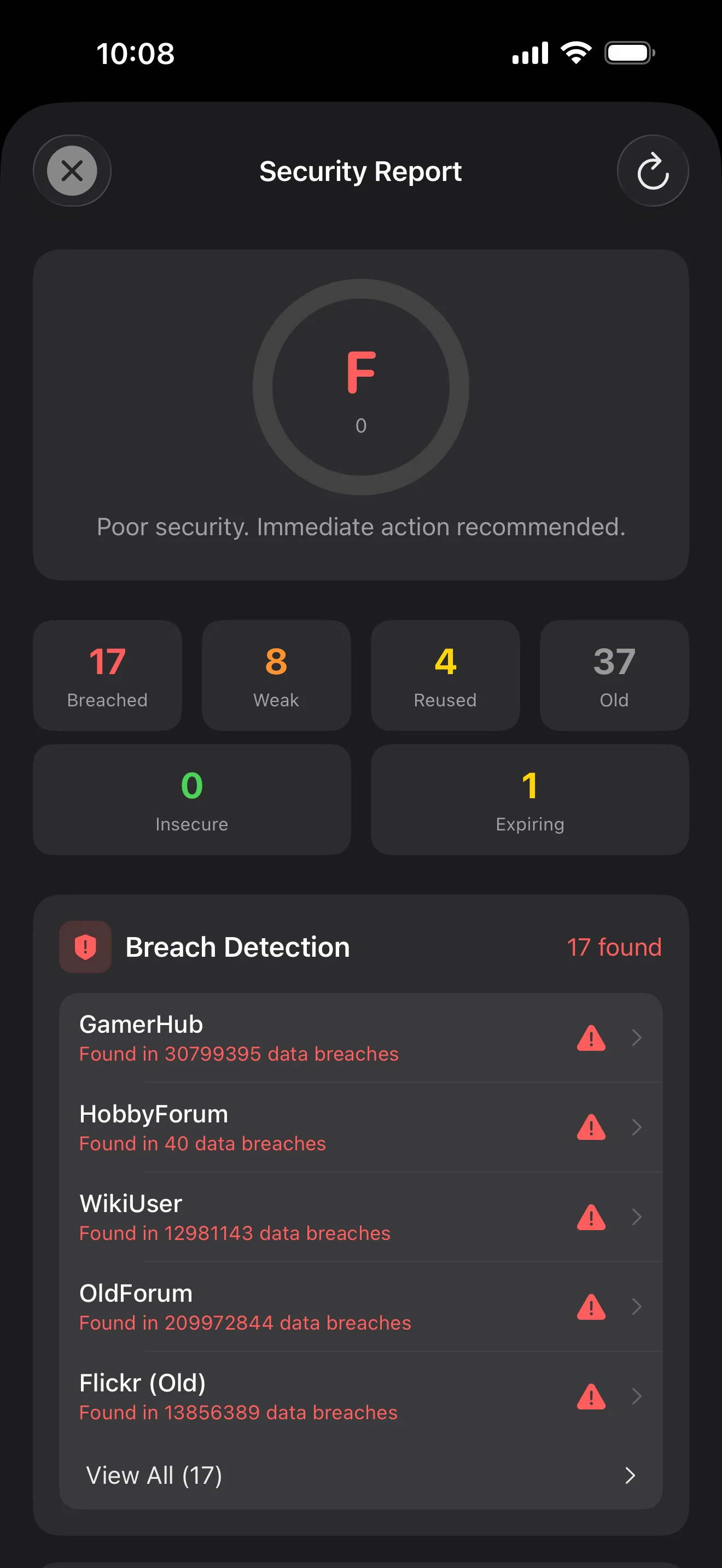
Backed by Have I Been Pwned with the k-anonymity protocol — only the first 5 chars of the SHA-1 hash ever leave the device. Every weakness comes with a concrete next step.
WebAuthn / FIDO2 standard. ES256 (ECDSA P-256, COSE alg -7). Private keys are AES-256-GCM encrypted with the Item Key — plaintext never written to disk. AutoFillExtension handles registration and assertion via the Apple system bridge.
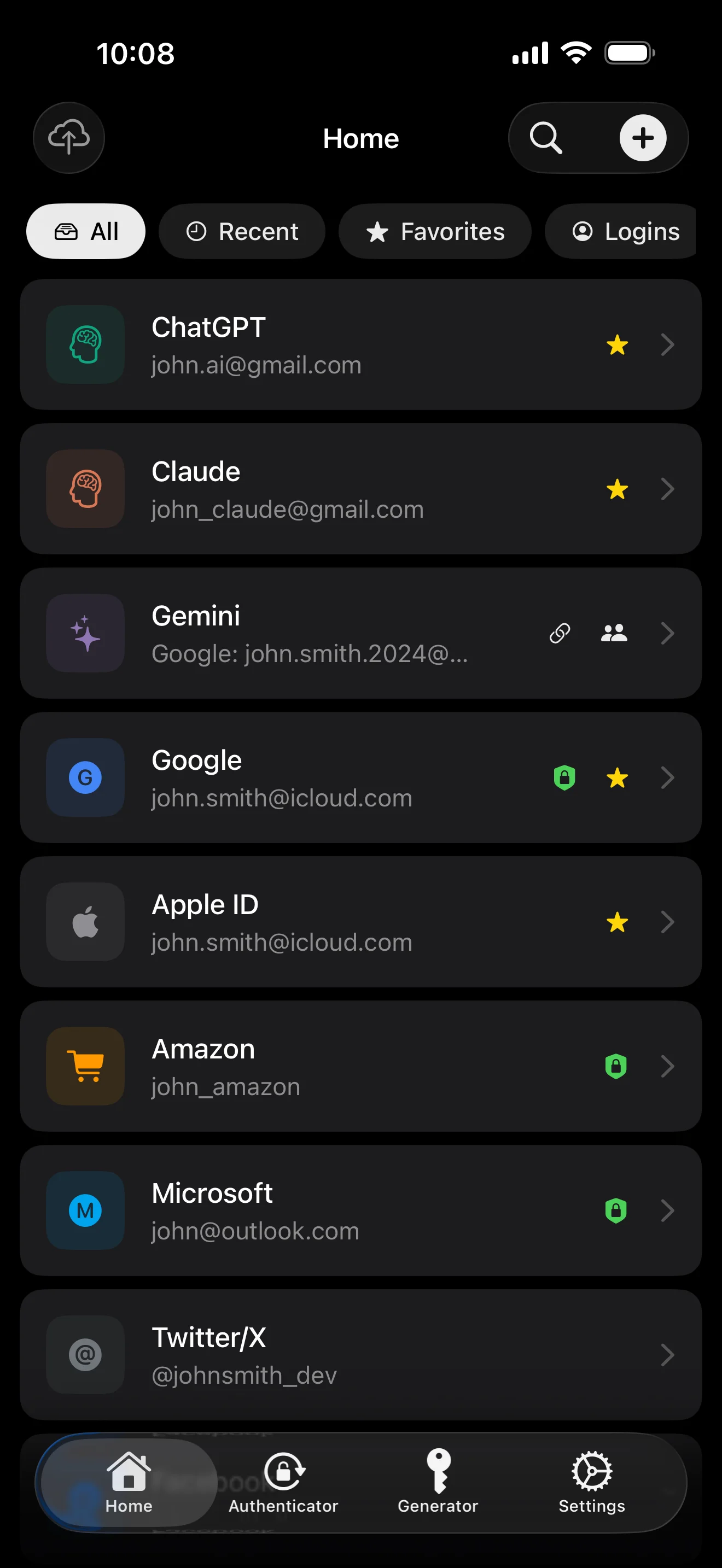
Sepuluh skrin, mengikut urutan senario — keseluruhan aplikasi diteliti. Tiada salinan pemasaran.
Top 10 / All / Favorites / Logins multi-view; live filtered search. All eight DataType cases run the full field-level encryption pipeline — not a 'password app', but a digital-identity ledger.
Scan to save — every 2FA in one place. The detail page shows the live code with a countdown ring; long-press to copy. With AutoFill, the code goes in along with username and password.
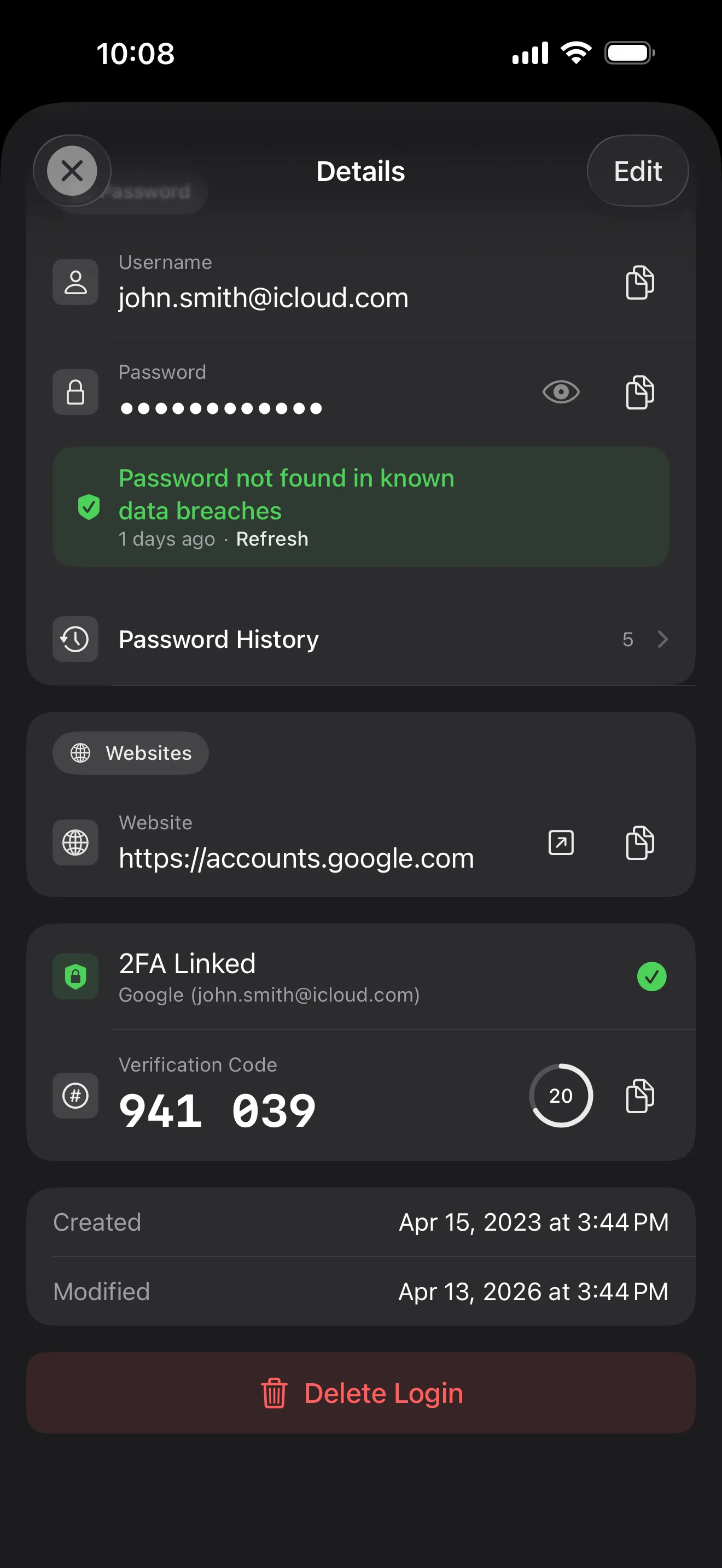
Login detail: username, password, history, linked TOTP, website, custom fields. Each sensitive field independently decrypted with its own IV, shown only on demand. Copy auto-clears the clipboard.
Every change saves the previous value (spec:R3 — up to 5 versions kept); tap the timeline to restore. Deleted items are retained for 90 days before permanent removal.
Backed by Have I Been Pwned with the k-anonymity protocol — only the first 5 chars of the SHA-1 hash ever leave the device. Every weakness comes with a concrete next step.
Random (4-64 chars / exclude look-alikes / digits-only for PIN) or EFF passphrase, with live entropy meter. Replaces the old value and records the change in history.
AutoFill Extension uses Apple's official ASCredentialProviderViewController; after Face ID / Touch ID, the username, password and TOTP all go in together. Info.plist also declares SupportsSavePasswordCredentials, so new passwords save back to ByteGuard from any flow.
WebAuthn / FIDO2 standard. ES256 (ECDSA P-256, COSE alg -7). Private keys are AES-256-GCM encrypted with the Item Key — plaintext never written to disk. AutoFillExtension handles registration and assertion via the Apple system bridge.
Card number (PAN) gets its own AES-256-GCM key with a unique IV. Cardholder name, expiry, brand (Visa / Mastercard / etc.) stay searchable as metadata. CVV/CVC are never persisted on this device.
AppearanceMode three modes: system / light / dark — switch any time, no restart. Premium tier unlocks multi-color themes; Home Screen widgets stay in sync.
Kata laluan utama anda tidak pernah meninggalkan peranti. Secret Key dijana setempat dan disimpan dalam Apple Keychain — disegerakkan antara peranti Apple anda melalui Keychain hujung-ke-hujung Apple (anda juga boleh menyimpannya pada satu peranti sahaja). Kedua-dua kunci diperlukan untuk menyahsulit data, dan baik saya mahupun Apple tidak boleh membaca mana-mana satunya. Ini bukan janji — inilah senibinanya.
kata laluan + Secret Key + 32B salt → Master Key. Parameter: memori 64 MB · 3 lelaran. Tahan brute force GPU/ASIC.
Master Key → KEK → DEK rawak. Setiap peti mempunyai DEK sendiri — tiada laluan nyahsulit melintang.
Setiap medan sensitif disulit secara berasingan · IV rawak baharu pada setiap penulisan. Teks biasa sama → teks tersulit berbeza · tag yang disahkan menghalang pencerobohan.
Kunci rawak (dalam bentuk mnemonik 12 perkataan BIP39), bebas daripada kata laluan utama. Walaupun kata laluan utama bocor, peti masih tidak boleh dibuka tanpanya.
No competitor table. No checkmarks. Just an indie developer listing — plainly — what I wrote, and what I deliberately didn't. Read it, then decide whether to trust me with your ledger.
Every sensitive field encrypted independently, with its own random IV.
64 MB memory × 3 iterations — resistant to GPU/ASIC brute force.
A random key independent of the master password — your second line of defense.
iCloud sync can be turned off in one tap; the app falls back to pure local storage.
Only the first 5 chars of the SHA-1 hash are sent — your password never leaves the device.
AutoFill, Passkey, and TOTP all use Apple's official APIs. No reinvented wheels.
No analytics. No tracking. No ads. No crash reporters.
XSS, extension supply-chain attacks, CDN takeovers — that surface is excluded by architecture, not policy.
Each platform means re-implementing the crypto primitives correctly. Get one line wrong and the whole chain breaks.
Sharing is trust delegation — I'm still working out how to do it right. Until I am, I won't ship it.
Under zero-knowledge, self-hosting just shifts the operational burden to you with no real security gain.
Honestly: I haven't paid for one yet. The /security page documents every crypto decision against the source so anyone can verify independently. Independent audit + open-sourcing the crypto core are both on the 2026 roadmap — follow the GitHub repo to be notified when they land.
If I could recover it, it wouldn't be zero-knowledge. The most reliable backup is still old-school: write your master password and Secret Key on paper and store them apart.
Crypto-related changes will move very conservatively. Stability over novelty.
Tiada bayaran tersembunyi. Langgan bulanan, tahunan, atau beli sekali untuk seumur hidup. Semua pengebilan dikendalikan oleh Apple.
Saya seorang developer indie. ByteGuard ditulis oleh saya seorang — tiada pasukan, tiada pendanaan, belum ada audit keselamatan pihak ketiga. (Saya senaraikan ini secara jujur di bahagian atas.) Yang saya boleh janjikan hanyalah senibinanya: kata laluan utama dan Secret Key anda tidak meninggalkan peranti, dan tiada apa di pelayan saya yang boleh menyahsulit data anda. Jika premis itu tidak mencukupi, aplikasi ini bukan untuk anda — dan itu tidak mengapa.
Saya tidak boleh memulihkannya. Itulah harga zero-knowledge: saya tidak boleh menetap semula apa yang saya tidak pernah tahu. Gunakan Face ID / Touch ID untuk membuka harian, dan tulis kata laluan utama serta Secret Key di atas kertas, simpan dalam peti besi atau peti deposit bank. Bunyinya seperti tahun 1990-an — tetapi ia masih sandaran paling boleh dipercayai.
Bergantung pada sama ada anda mengaktifkan penyegerakan iCloud Keychain untuk Secret Key. Jika iCloud Keychain diaktifkan (tetapan default disyorkan): Secret Key disulit hujung-ke-hujung oleh Apple dan disegerakkan pada semua peranti Apple anda. Pada peranti baharu, log masuk Apple ID dan Secret Key dipulihkan secara automatik — anda hanya perlu mengingat kata laluan utama. Jika iCloud Keychain dilumpuhkan (keselamatan maksimum, anda menyimpan kedua-dua kunci sendiri): Secret Key tidak pernah meninggalkan peranti tempatnya dijana. Sandaran tunggal anda ialah frasa pemulihan 12 perkataan (standard BIP39) yang dipaparkan ketika anda mula-mula mencipta peti. Tulis di kertas dan simpan berasingan daripada kata laluan utama. Tanpa sandaran kertas itu, Secret Key tidak boleh dipulihkan pada peranti baharu. Apa pun caranya: kata laluan utama tetap diperlukan untuk menyahsulit — Secret Key sahaja tidak mencukupi. Dan saya tidak pernah melihat satu bit pun daripada kedua-duanya: pelayan saya tidak menyimpan apa-apa yang boleh menyahsulit data anda, dan Apple juga tidak boleh membaca Secret Key (ia disulit E2E dalam lapisan Keychain mereka).
Semua medan sensitif disulit dengan AES-256-GCM sebelum keluar dari peranti. iCloud hanya menerima teks tersulit; saya pun tidak mempunyai kuncinya (kunci tidak pernah meninggalkan peranti anda). Jika anda lebih suka tidak menggunakan awan langsung, anda boleh mematikan penyegerakan dalam tetapan — aplikasi beralih ke mod setempat sepenuhnya, satu cara penggunaan yang sama-sama sah.
Dua sebab. Seorang sahaja boleh menyelenggara jumlah kod yang terhad, dan rentas-platform bermakna melaksanakan semula primitif kripto dengan betul pada setiap satu — silap satu baris, seluruh rantai patah. Yang lain: permukaan serangan aplikasi web (XSS, rantaian bekalan sambungan, pengambilalihan CDN) jauh lebih besar daripada aplikasi iOS asli. Saya lebih suka melakukan satu platform dengan baik daripada mengeluarkan sesuatu yang kelihatan menyeluruh tetapi keselamatannya tidak seimbang.
Import langsung daripada fail eksport 1Password / Bitwarden / LastPass / KeePass / Dashlane / Apple Keychain disokong. Keseluruhan import berjalan setempat — tiada apa dimuat naik. Jika format eksport pengurus lama anda menyukarkan, hantar e-mel kepada saya dan saya akan menambah sokongan.
Pakej seumur hidup $9.99 adalah kekal dan termasuk semua kemas kini akan datang. Jika tier "premium berlangganan" ditambah pada masa hadapan (contohnya analitik keselamatan lebih mendalam), ia hanya berasaskan langganan — ciri seumur hidup sedia ada tidak akan dipindahkan ke belakangnya. Itulah komitmen yang saya sanggup letakkan di halaman ini.