One ledger, eight identities
Every sensitive field encrypted with AES-256-GCM, with its own random IV.
Beveilig uw wachtwoorden, passkeys, 2FA en bankpassen met AES-256-GCM-encryptie. Lokaal eerst, optionele iCloud-synchronisatie.
Built on modern iOS primitives
Geen 'wachtwoord-app' — een versleuteld grootboek dat al je digitale identiteiten op één plek bundelt. Alle acht itemtypes gaan door dezelfde versleutelingspijplijn op veldniveau.
Every sensitive field encrypted with AES-256-GCM, with its own random IV.
Scan to save. AutoFill fills the 6-digit code along with the password.
Random string or EFF wordlist phrase. Live entropy meter.
Generated and stored locally. Private key never leaves the device in plaintext.
Only the first 5 chars of the SHA-1 hash leave the device. Your password never does.
System-level AutoFill extension. Face ID confirms; codes get filled in too.
Routed via Apple's private CloudKit. Sensitive fields are encrypted on-device before upload — only ciphertext reaches the server. Toggle off anytime to go fully local.
1Password · Bitwarden · LastPass · KeePass · Dashlane · Apple Keychain. Three export formats: JSON / CSV (plaintext) + encrypted .bytegx.
Every password change saves the previous value — up to 5 history versions kept, one-tap rollback. Deleted items go to a recycle bin and clear after the retention window.
Pasteboard auto-clears after a configurable delay; foreground / background auto-lock timers can be set separately.
Two widgets: quick vault access + on-the-fly password generator.
Ingebouwde TOTP, on-device beveiligingsaudit en Passkeys — de drie plekken waar ByteGuard duidelijk verder gaat dan een gemiddelde wachtwoordmanager.
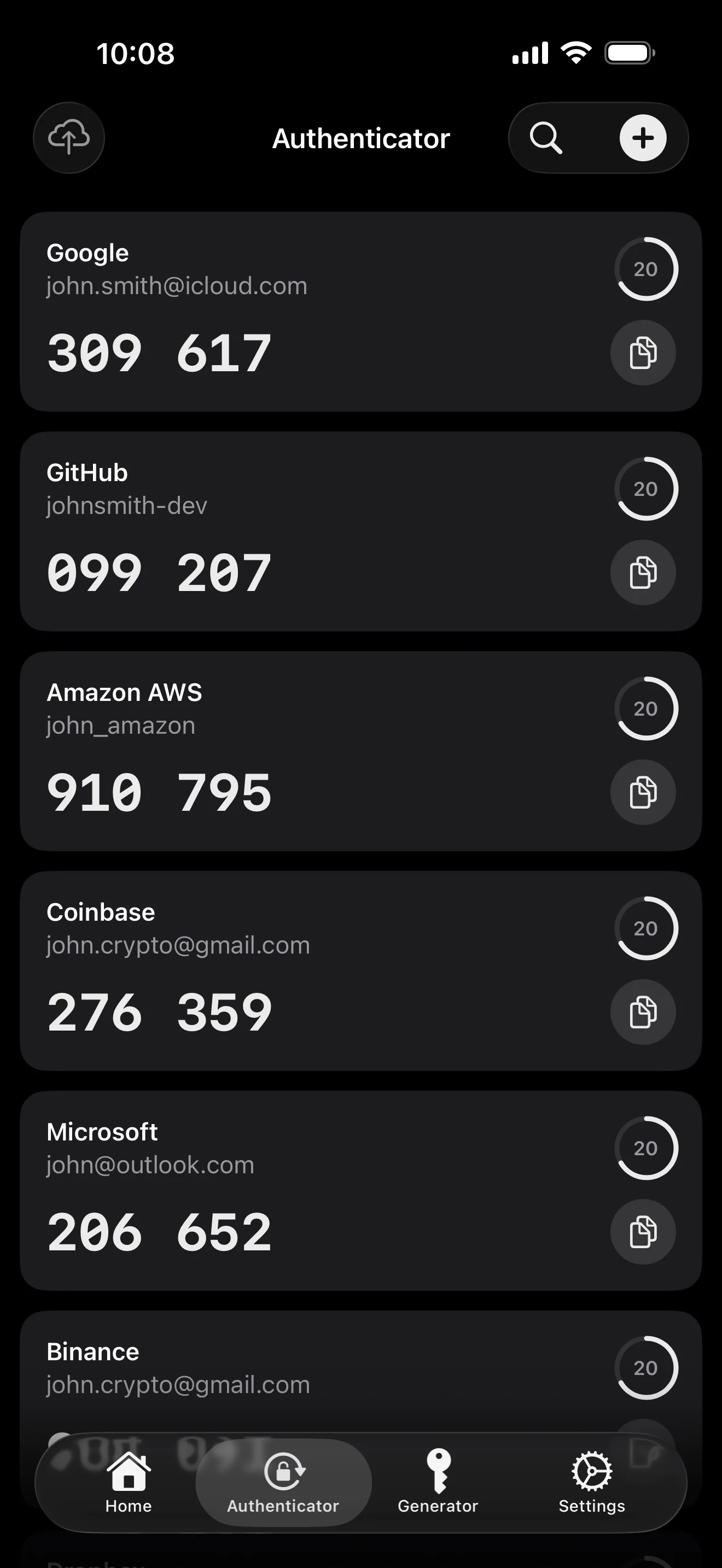
Scan to save — every 2FA in one place. The detail page shows the live code with a countdown ring; long-press to copy. With AutoFill, the code goes in along with username and password.
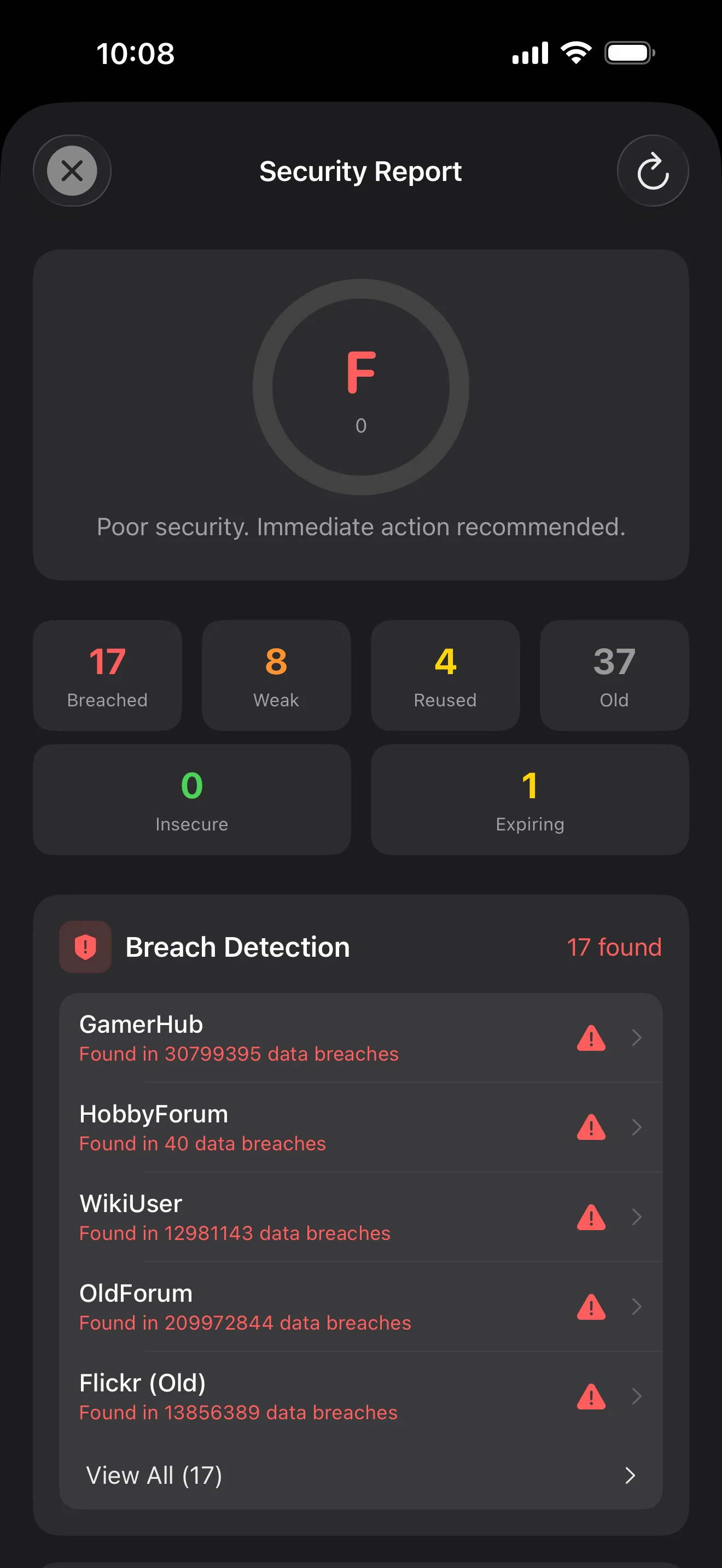
Backed by Have I Been Pwned with the k-anonymity protocol — only the first 5 chars of the SHA-1 hash ever leave the device. Every weakness comes with a concrete next step.
WebAuthn / FIDO2 standard. ES256 (ECDSA P-256, COSE alg -7). Private keys are AES-256-GCM encrypted with the Item Key — plaintext never written to disk. AutoFillExtension handles registration and assertion via the Apple system bridge.
Tien schermen, op scenario-volgorde — de hele app stap voor stap. Geen marketingtekst.
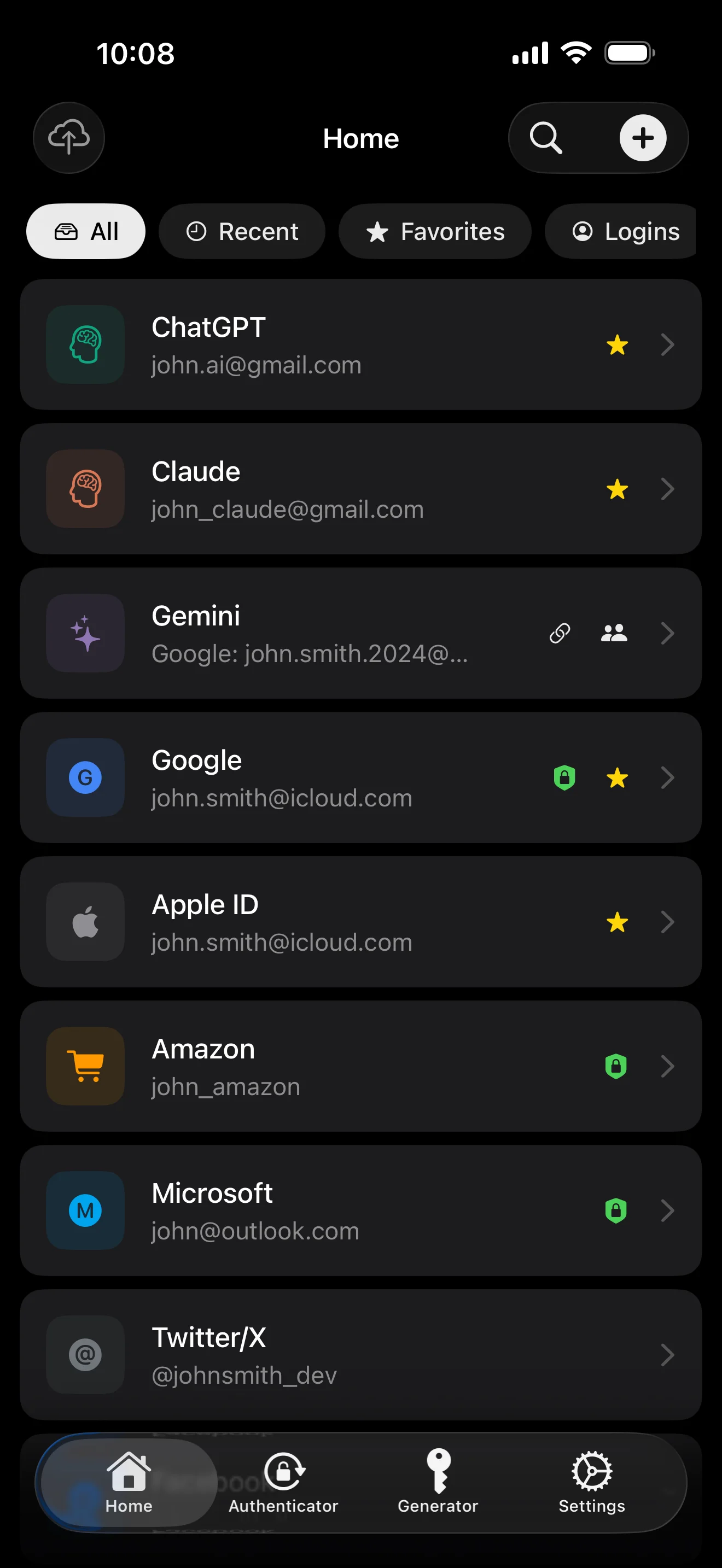
Top 10 / All / Favorites / Logins multi-view; live filtered search. All eight DataType cases run the full field-level encryption pipeline — not a 'password app', but a digital-identity ledger.
Scan to save — every 2FA in one place. The detail page shows the live code with a countdown ring; long-press to copy. With AutoFill, the code goes in along with username and password.
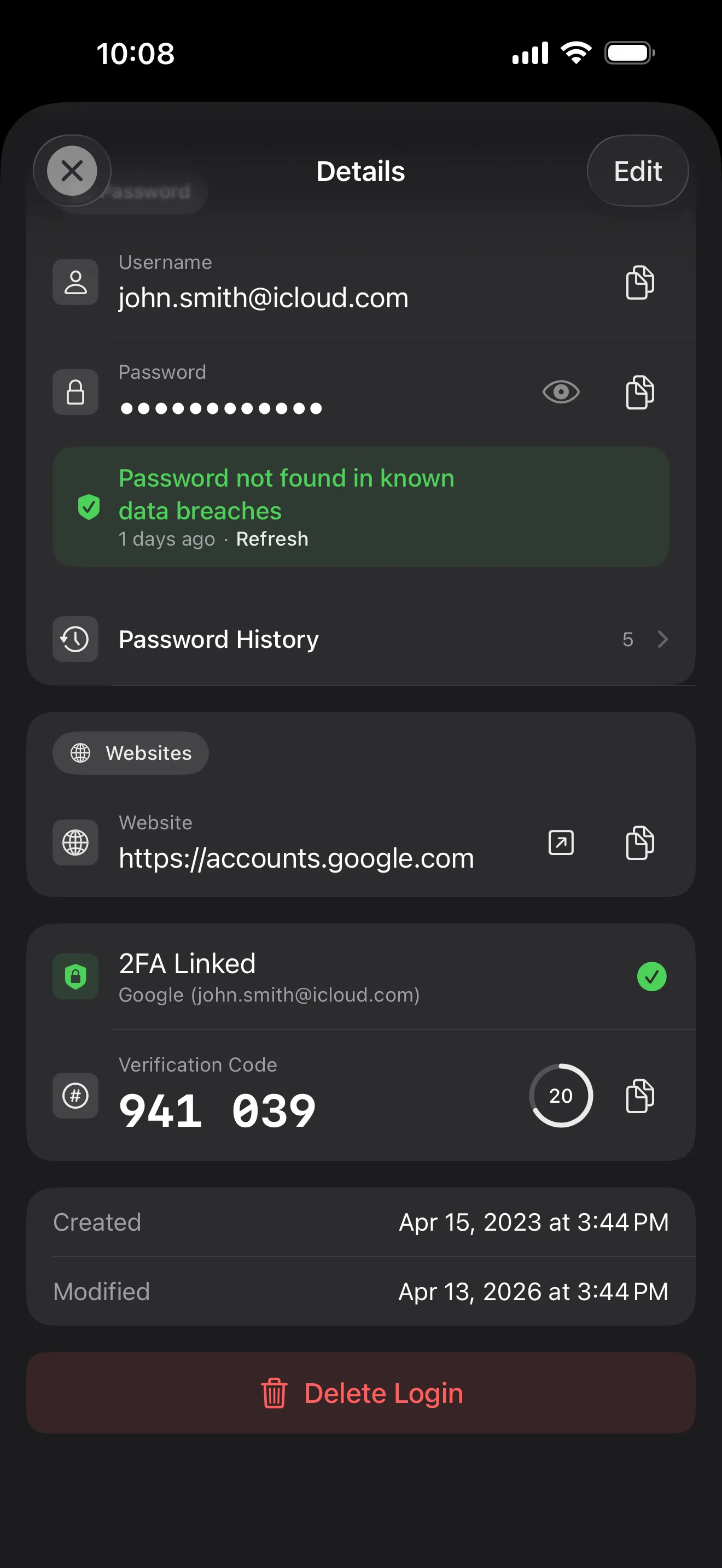
Login detail: username, password, history, linked TOTP, website, custom fields. Each sensitive field independently decrypted with its own IV, shown only on demand. Copy auto-clears the clipboard.
Every change saves the previous value (spec:R3 — up to 5 versions kept); tap the timeline to restore. Deleted items are retained for 90 days before permanent removal.
Backed by Have I Been Pwned with the k-anonymity protocol — only the first 5 chars of the SHA-1 hash ever leave the device. Every weakness comes with a concrete next step.
Random (4-64 chars / exclude look-alikes / digits-only for PIN) or EFF passphrase, with live entropy meter. Replaces the old value and records the change in history.
AutoFill Extension uses Apple's official ASCredentialProviderViewController; after Face ID / Touch ID, the username, password and TOTP all go in together. Info.plist also declares SupportsSavePasswordCredentials, so new passwords save back to ByteGuard from any flow.
WebAuthn / FIDO2 standard. ES256 (ECDSA P-256, COSE alg -7). Private keys are AES-256-GCM encrypted with the Item Key — plaintext never written to disk. AutoFillExtension handles registration and assertion via the Apple system bridge.
Card number (PAN) gets its own AES-256-GCM key with a unique IV. Cardholder name, expiry, brand (Visa / Mastercard / etc.) stay searchable as metadata. CVV/CVC are never persisted on this device.
AppearanceMode three modes: system / light / dark — switch any time, no restart. Premium tier unlocks multi-color themes; Home Screen widgets stay in sync.
Je hoofdwachtwoord verlaat nooit je apparaat. Je Secret Key wordt lokaal gegenereerd en opgeslagen in Apple Keychain — gesynchroniseerd over je Apple-apparaten via Apple's end-to-end versleutelde Keychain (je kunt hem ook op één apparaat houden). Beide sleutels zijn nodig om je gegevens te ontsleutelen, en noch ik noch Apple kan ze lezen. Dit is geen belofte — dit is de architectuur.
password + Secret Key + 32B salt → Master Key. Parameters: 64 MB memory · 3 iterations. Resistant to GPU/ASIC brute force.
Master Key → KEK → random DEK. Each vault gets its own DEK — no horizontal decryption path.
Every sensitive field encrypted independently · new random IV on every write. Same plaintext → different ciphertext · authenticated tag prevents tampering.
A random key (a 12-word BIP39 mnemonic in form), independent of the master password. Even if the master password leaks, your vault still cannot be opened without it.
No competitor table. No checkmarks. Just an indie developer listing — plainly — what I wrote, and what I deliberately didn't. Read it, then decide whether to trust me with your ledger.
Every sensitive field encrypted independently, with its own random IV.
64 MB memory × 3 iterations — resistant to GPU/ASIC brute force.
A random key independent of the master password — your second line of defense.
iCloud sync can be turned off in one tap; the app falls back to pure local storage.
Only the first 5 chars of the SHA-1 hash are sent — your password never leaves the device.
AutoFill, Passkey, and TOTP all use Apple's official APIs. No reinvented wheels.
No analytics. No tracking. No ads. No crash reporters.
XSS, extension supply-chain attacks, CDN takeovers — that surface is excluded by architecture, not policy.
Each platform means re-implementing the crypto primitives correctly. Get one line wrong and the whole chain breaks.
Sharing is trust delegation — I'm still working out how to do it right. Until I am, I won't ship it.
Under zero-knowledge, self-hosting just shifts the operational burden to you with no real security gain.
Honestly: I haven't paid for one yet. The /security page documents every crypto decision against the source so anyone can verify independently. Independent audit + open-sourcing the crypto core are both on the 2026 roadmap — follow the GitHub repo to be notified when they land.
If I could recover it, it wouldn't be zero-knowledge. The most reliable backup is still old-school: write your master password and Secret Key on paper and store them apart.
Crypto-related changes will move very conservatively. Stability over novelty.
Geen verborgen kosten. Maandelijks of jaarlijks abonneren, of eenmalig kopen voor het leven. Alle facturatie verloopt via Apple.
Ik ben een onafhankelijke ontwikkelaar. ByteGuard is door mij alleen geschreven — geen team, geen financiering, nog geen externe beveiligingsaudit. (Ik vermeld dit eerlijk in de sectie hierboven.) Het enige wat ik kan beloven, is de architectuur zelf: je hoofdwachtwoord en Secret Key verlaten nooit je apparaat, en er staat niets op mijn server dat je gegevens kan ontsleutelen. Als die premisse voor jou niet genoeg is, past deze app niet bij je — en dat is helemaal prima.
Ik kan het niet herstellen. Dat is de prijs van zero-knowledge: ik kan niet resetten wat ik nooit heb geweten. Gebruik Face ID / Touch ID voor dagelijks ontgrendelen, en schrijf je hoofdwachtwoord en Secret Key op een papier in een kluis of bankkluis. Het klinkt als de jaren 90 — en het blijft de meest betrouwbare back-up die we hebben.
Dat hangt ervan af of je iCloud Keychain-synchronisatie voor je Secret Key hebt ingeschakeld. Als iCloud Keychain-synchronisatie aan staat (de standaard aanbevolen instelling): je Secret Key is end-to-end versleuteld door Apple en gesynchroniseerd over al je Apple-apparaten. Op een nieuw apparaat hoef je alleen in te loggen met je Apple ID en je Secret Key wordt automatisch hersteld — je hoeft alleen je hoofdwachtwoord te onthouden. Als iCloud Keychain-synchronisatie uit staat (maximale beveiliging, je beheert beide sleutels zelf): de Secret Key verlaat nooit het apparaat waarop hij is gegenereerd. Je enige back-up is de 12-woordige herstelzin (BIP39-standaard) die werd getoond toen je de kluis aanmaakte. Schrijf hem op papier en bewaar hem gescheiden van je hoofdwachtwoord. Zonder die papieren back-up kan de Secret Key niet op een nieuw apparaat worden hersteld. Hoe dan ook: je hoofdwachtwoord blijft nodig om iets te ontsleutelen — alleen de Secret Key is niet genoeg. En ik heb nooit ook maar één bit van beide gezien: mijn server bevat niets dat je gegevens kan ontsleutelen, en Apple kan je Secret Key ook niet lezen (deze is E2E versleuteld in hun Keychain-laag).
Alle gevoelige velden worden met AES-256-GCM versleuteld voordat ze het apparaat verlaten. iCloud ontvangt alleen ciphertext; zelfs ik heb de sleutel niet (de sleutel verlaat nooit je apparaat). Wil je liever helemaal geen cloud, dan kun je synchronisatie uitschakelen in de instellingen — de app valt terug op een volledig lokale modus, een volkomen legitieme manier om hem te gebruiken.
Twee redenen. Eén persoon kan maar zoveel code onderhouden, en cross-platform betekent dat je crypto-primitieven op elk platform correct moet herimplementeren — één regel fout en de hele keten breekt. De andere reden: het aanvalsoppervlak van een web-app (XSS, supply-chain in extensies, CDN-overname) is veel groter dan dat van een native iOS-app. Ik doe liever één platform goed dan iets te leveren dat alomvattend lijkt maar ongelijk veilig is.
Directe import vanuit exportbestanden van 1Password / Bitwarden / LastPass / KeePass / Dashlane / Apple Keychain wordt ondersteund. De volledige import draait lokaal — er wordt niets geüpload. Als het exportformaat van je oude manager problemen geeft, mail me en ik voeg ondersteuning toe.
$9,99 levenslang is permanent en omvat alle toekomstige updates. Mocht er ooit een 'premium-abonnement' komen (bijv. diepere beveiligingsanalyses), dan is dat alleen op abonnementsbasis — bestaande levenslange functies worden er nooit achter geplaatst. Dat is een belofte die ik op deze pagina durf te zetten.