One ledger, eight identities
Every sensitive field encrypted with AES-256-GCM, with its own random IV.
Zabezpiecz hasła, klucze dostępu, 2FA i karty bankowe za pomocą szyfrowania AES-256-GCM. Najpierw lokalnie, opcjonalna synchronizacja iCloud.
Built on modern iOS primitives
To nie 'aplikacja do haseł' — to zaszyfrowana księga, która konsoliduje każdą cyfrową tożsamość w jednym miejscu. Wszystkie osiem typów elementów przechodzi przez ten sam potok szyfrowania na poziomie pól.
Every sensitive field encrypted with AES-256-GCM, with its own random IV.
Scan to save. AutoFill fills the 6-digit code along with the password.
Random string or EFF wordlist phrase. Live entropy meter.
Generated and stored locally. Private key never leaves the device in plaintext.
Only the first 5 chars of the SHA-1 hash leave the device. Your password never does.
System-level AutoFill extension. Face ID confirms; codes get filled in too.
Routed via Apple's private CloudKit. Sensitive fields are encrypted on-device before upload — only ciphertext reaches the server. Toggle off anytime to go fully local.
1Password · Bitwarden · LastPass · KeePass · Dashlane · Apple Keychain. Three export formats: JSON / CSV (plaintext) + encrypted .bytegx.
Every password change saves the previous value — up to 5 history versions kept, one-tap rollback. Deleted items go to a recycle bin and clear after the retention window.
Pasteboard auto-clears after a configurable delay; foreground / background auto-lock timers can be set separately.
Two widgets: quick vault access + on-the-fly password generator.
Wbudowany TOTP, audyt bezpieczeństwa na urządzeniu i klucze Passkey — trzy obszary, w których ByteGuard wyraźnie wyprzedza przeciętnego menedżera haseł.
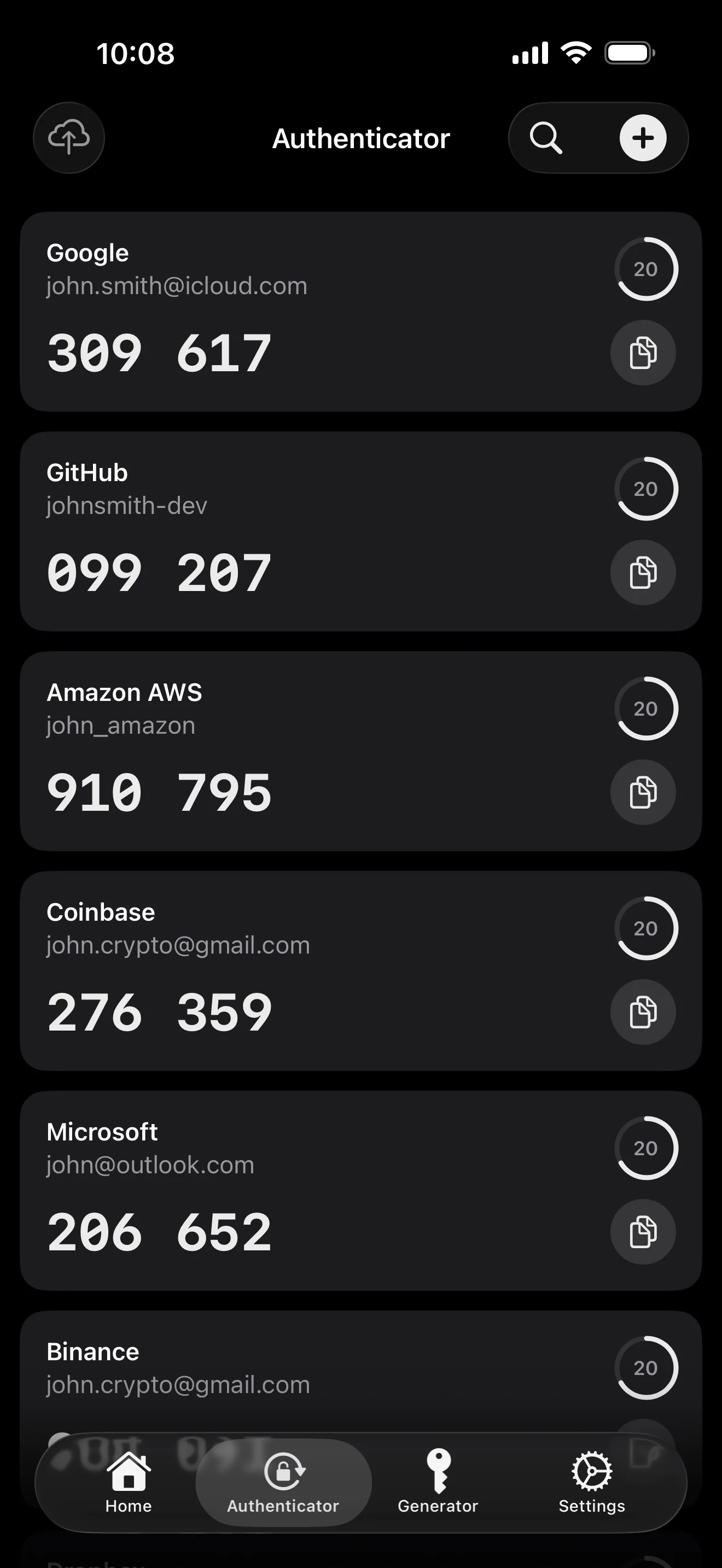
Scan to save — every 2FA in one place. The detail page shows the live code with a countdown ring; long-press to copy. With AutoFill, the code goes in along with username and password.
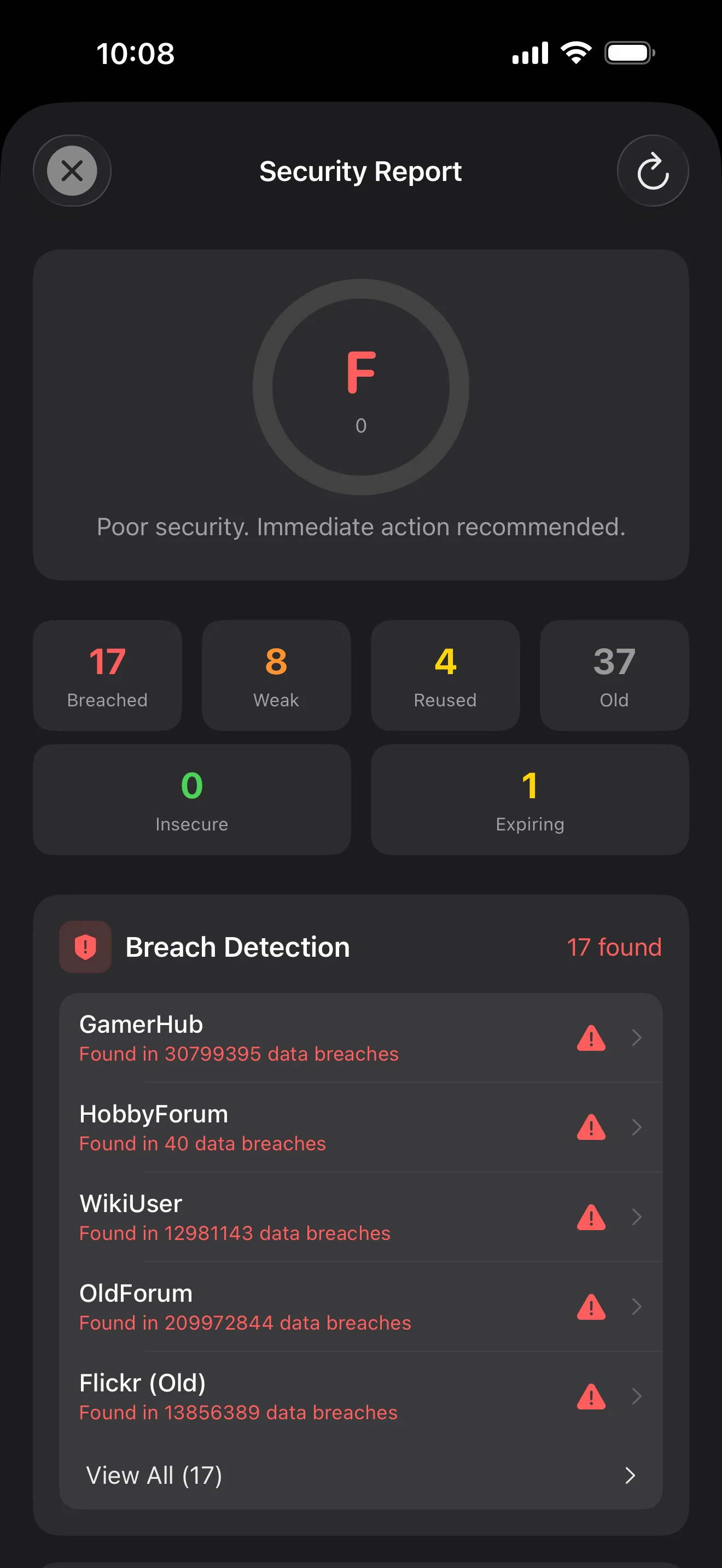
Backed by Have I Been Pwned with the k-anonymity protocol — only the first 5 chars of the SHA-1 hash ever leave the device. Every weakness comes with a concrete next step.
WebAuthn / FIDO2 standard. ES256 (ECDSA P-256, COSE alg -7). Private keys are AES-256-GCM encrypted with the Item Key — plaintext never written to disk. AutoFillExtension handles registration and assertion via the Apple system bridge.
Dziesięć ekranów w kolejności scenariuszy — cała aplikacja krok po kroku. Bez tekstów marketingowych.
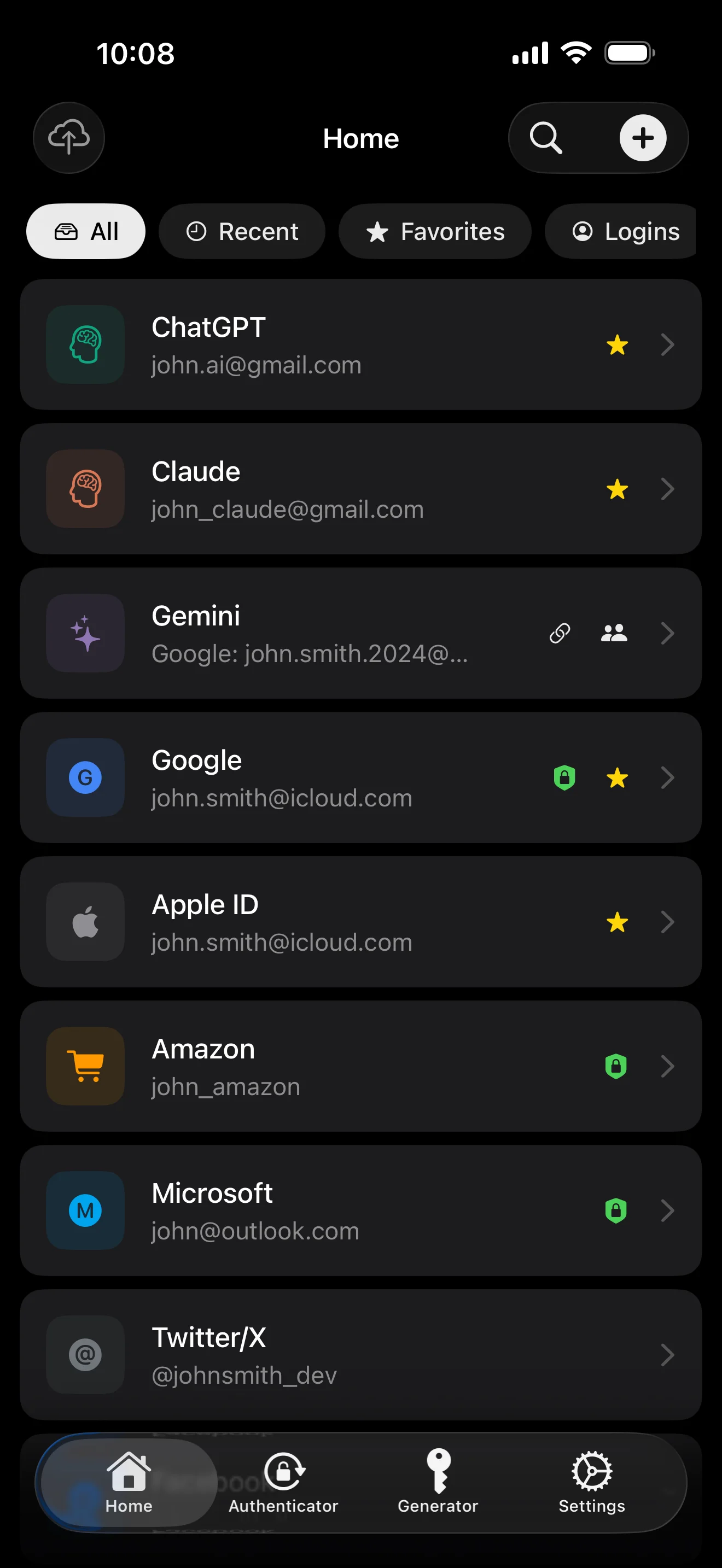
Top 10 / All / Favorites / Logins multi-view; live filtered search. All eight DataType cases run the full field-level encryption pipeline — not a 'password app', but a digital-identity ledger.
Scan to save — every 2FA in one place. The detail page shows the live code with a countdown ring; long-press to copy. With AutoFill, the code goes in along with username and password.
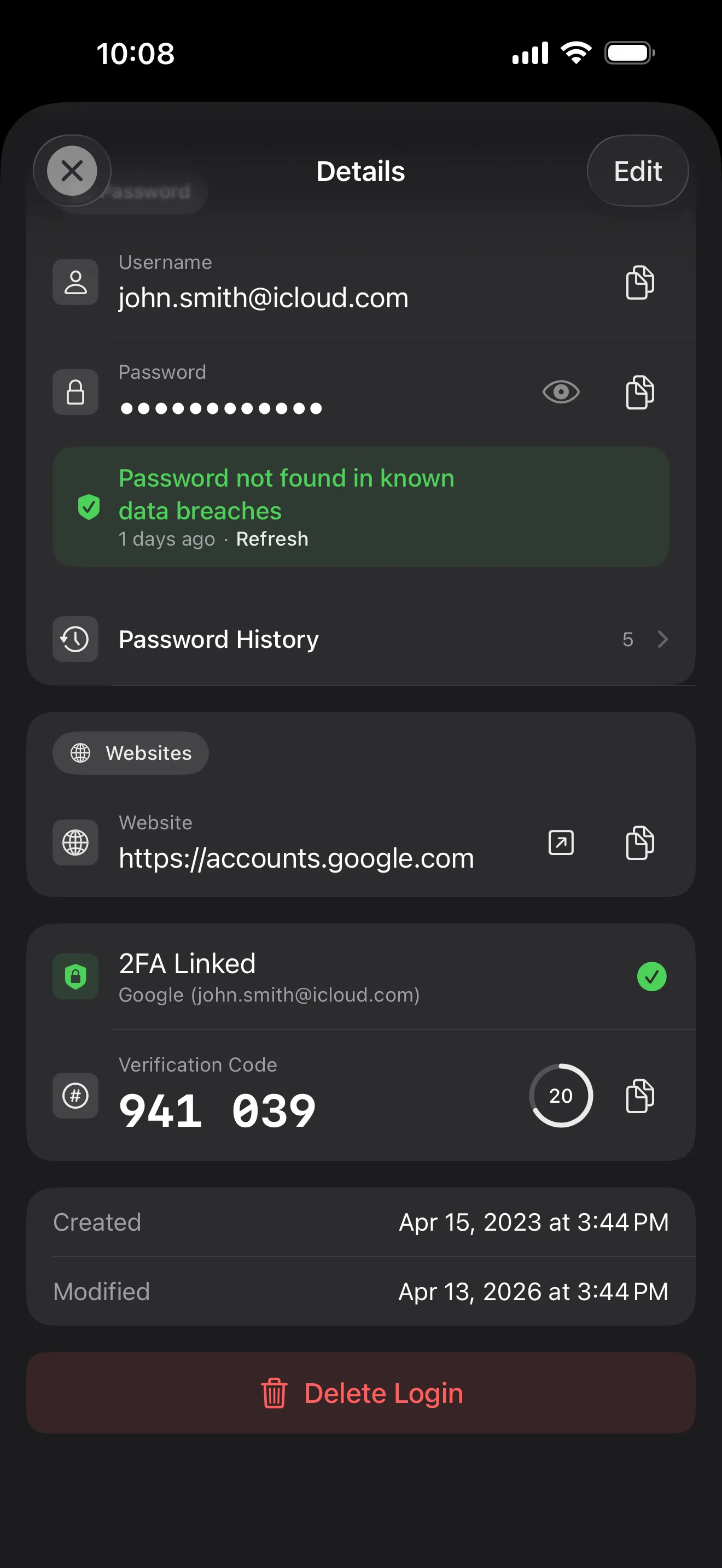
Login detail: username, password, history, linked TOTP, website, custom fields. Each sensitive field independently decrypted with its own IV, shown only on demand. Copy auto-clears the clipboard.
Every change saves the previous value (spec:R3 — up to 5 versions kept); tap the timeline to restore. Deleted items are retained for 90 days before permanent removal.
Backed by Have I Been Pwned with the k-anonymity protocol — only the first 5 chars of the SHA-1 hash ever leave the device. Every weakness comes with a concrete next step.
Random (4-64 chars / exclude look-alikes / digits-only for PIN) or EFF passphrase, with live entropy meter. Replaces the old value and records the change in history.
AutoFill Extension uses Apple's official ASCredentialProviderViewController; after Face ID / Touch ID, the username, password and TOTP all go in together. Info.plist also declares SupportsSavePasswordCredentials, so new passwords save back to ByteGuard from any flow.
WebAuthn / FIDO2 standard. ES256 (ECDSA P-256, COSE alg -7). Private keys are AES-256-GCM encrypted with the Item Key — plaintext never written to disk. AutoFillExtension handles registration and assertion via the Apple system bridge.
Card number (PAN) gets its own AES-256-GCM key with a unique IV. Cardholder name, expiry, brand (Visa / Mastercard / etc.) stay searchable as metadata. CVV/CVC are never persisted on this device.
AppearanceMode three modes: system / light / dark — switch any time, no restart. Premium tier unlocks multi-color themes; Home Screen widgets stay in sync.
Twoje hasło główne nigdy nie opuszcza twojego urządzenia. Twój Secret Key jest generowany lokalnie i przechowywany w Apple Keychain — synchronizowany między urządzeniami Apple poprzez ich Keychain z szyfrowaniem end-to-end (możesz też trzymać go tylko na jednym urządzeniu). Oba klucze są niezbędne do odszyfrowania danych, a żaden z nich nie jest dostępny dla mnie ani dla Apple. To nie obietnica — to architektura.
password + Secret Key + 32B salt → Master Key. Parameters: 64 MB memory · 3 iterations. Resistant to GPU/ASIC brute force.
Master Key → KEK → random DEK. Each vault gets its own DEK — no horizontal decryption path.
Every sensitive field encrypted independently · new random IV on every write. Same plaintext → different ciphertext · authenticated tag prevents tampering.
A random key (a 12-word BIP39 mnemonic in form), independent of the master password. Even if the master password leaks, your vault still cannot be opened without it.
No competitor table. No checkmarks. Just an indie developer listing — plainly — what I wrote, and what I deliberately didn't. Read it, then decide whether to trust me with your ledger.
Every sensitive field encrypted independently, with its own random IV.
64 MB memory × 3 iterations — resistant to GPU/ASIC brute force.
A random key independent of the master password — your second line of defense.
iCloud sync can be turned off in one tap; the app falls back to pure local storage.
Only the first 5 chars of the SHA-1 hash are sent — your password never leaves the device.
AutoFill, Passkey, and TOTP all use Apple's official APIs. No reinvented wheels.
No analytics. No tracking. No ads. No crash reporters.
XSS, extension supply-chain attacks, CDN takeovers — that surface is excluded by architecture, not policy.
Each platform means re-implementing the crypto primitives correctly. Get one line wrong and the whole chain breaks.
Sharing is trust delegation — I'm still working out how to do it right. Until I am, I won't ship it.
Under zero-knowledge, self-hosting just shifts the operational burden to you with no real security gain.
Honestly: I haven't paid for one yet. The /security page documents every crypto decision against the source so anyone can verify independently. Independent audit + open-sourcing the crypto core are both on the 2026 roadmap — follow the GitHub repo to be notified when they land.
If I could recover it, it wouldn't be zero-knowledge. The most reliable backup is still old-school: write your master password and Secret Key on paper and store them apart.
Crypto-related changes will move very conservatively. Stability over novelty.
Brak ukrytych opłat. Subskrybuj miesięcznie, rocznie albo zapłać raz na zawsze. Wszystkie rozliczenia obsługuje Apple.
Jestem niezależnym deweloperem. ByteGuard piszę sam — bez zespołu, bez finansowania, jeszcze bez zewnętrznego audytu bezpieczeństwa. (Mówię o tym uczciwie w sekcji powyżej.) Jedyne, co mogę obiecać, to sama architektura: twoje hasło główne i Secret Key nigdy nie opuszczają urządzenia, a na moim serwerze nie ma niczego, co mogłoby odszyfrować twoje dane. Jeśli to założenie ci nie wystarcza, ta aplikacja nie jest dla ciebie — i to zupełnie w porządku.
Nie mogę go odzyskać. To koszt zero-knowledge: nie mogę zresetować czegoś, czego nigdy nie znałem. Używaj Face ID / Touch ID do codziennego odblokowywania, a hasło główne i Secret Key zapisz na papierze w sejfie lub skrytce bankowej. Brzmi jak lata 90. — i pozostaje najbardziej niezawodną kopią zapasową, jaką mamy.
Zależy od tego, czy włączyłeś synchronizację iCloud Keychain dla swojego Secret Key. Jeśli synchronizacja iCloud Keychain jest włączona (domyślnie zalecane ustawienie): twój Secret Key jest szyfrowany end-to-end przez Apple i synchronizowany między wszystkimi urządzeniami Apple. Na nowym urządzeniu wystarczy zalogować się przez Apple ID, a Secret Key zostanie automatycznie przywrócony — wystarczy pamiętać hasło główne. Jeśli synchronizacja iCloud Keychain jest wyłączona (maksymalne bezpieczeństwo, oba klucze trzymasz sam): Secret Key nigdy nie opuszcza urządzenia, na którym został wygenerowany. Twoją jedyną kopią zapasową jest 12-wyrazowa fraza odzyskiwania (standard BIP39), pokazana przy tworzeniu skarbca. Zapisz ją na papierze i przechowuj oddzielnie od hasła głównego. Bez tej papierowej kopii Secret Key nie da się odtworzyć na nowym urządzeniu. Tak czy inaczej: hasło główne jest nadal niezbędne do odszyfrowania czegokolwiek — sam Secret Key nie wystarczy. A ja nigdy nie widziałem ani jednego bitu żadnego z nich: mój serwer nie zawiera niczego, co mogłoby odszyfrować twoje dane, a Apple również nie może odczytać twojego Secret Key (jest on E2E zaszyfrowany w warstwie Keychain).
Wszystkie wrażliwe pola są szyfrowane AES-256-GCM, zanim opuszczą urządzenie. iCloud otrzymuje wyłącznie szyfrogram; nawet ja nie mam klucza (klucz nigdy nie opuszcza twojego urządzenia). Jeśli wolisz w ogóle nie używać chmury, możesz wyłączyć synchronizację w ustawieniach — aplikacja przejdzie w tryb w pełni lokalny, co jest całkowicie uzasadnionym sposobem korzystania.
Dwa powody. Jedna osoba może utrzymać tylko określoną ilość kodu, a wieloplatformowość oznacza poprawne reimplementowanie prymitywów kryptograficznych na każdej z platform — jeden błędny wiersz i cały łańcuch się rozpada. Drugi powód: powierzchnia ataku aplikacji webowej (XSS, łańcuch dostaw rozszerzeń, przejęcie CDN) jest znacznie większa niż natywnej aplikacji iOS. Wolę dobrze zrobić jedną platformę niż dostarczyć coś, co wygląda kompleksowo, ale jest nierównomiernie bezpieczne.
Bezpośredni import z plików eksportu 1Password / Bitwarden / LastPass / KeePass / Dashlane / Apple Keychain jest obsługiwany. Cały import działa lokalnie — nic nie jest wysyłane do sieci. Jeśli format eksportu twojego starego menedżera sprawia kłopot, napisz do mnie, a dodam wsparcie.
$9.99 dożywotnio jest na stałe i obejmuje wszystkie przyszłe aktualizacje. Jeśli kiedyś pojawi się 'subskrypcja premium' (np. głębsze analizy bezpieczeństwa), będzie ona dostępna wyłącznie w subskrypcji — istniejące funkcje dożywotnie nigdy nie zostaną za nią schowane. To zobowiązanie, które jestem gotów podpisać na tej stronie.