One ledger, eight identities
Every sensitive field encrypted with AES-256-GCM, with its own random IV.
Proteja as suas palavras-passe, chaves de acesso, 2FA e cartões bancários com encriptação AES-256-GCM. Local primeiro, sincronização iCloud opcional.
Built on modern iOS primitives
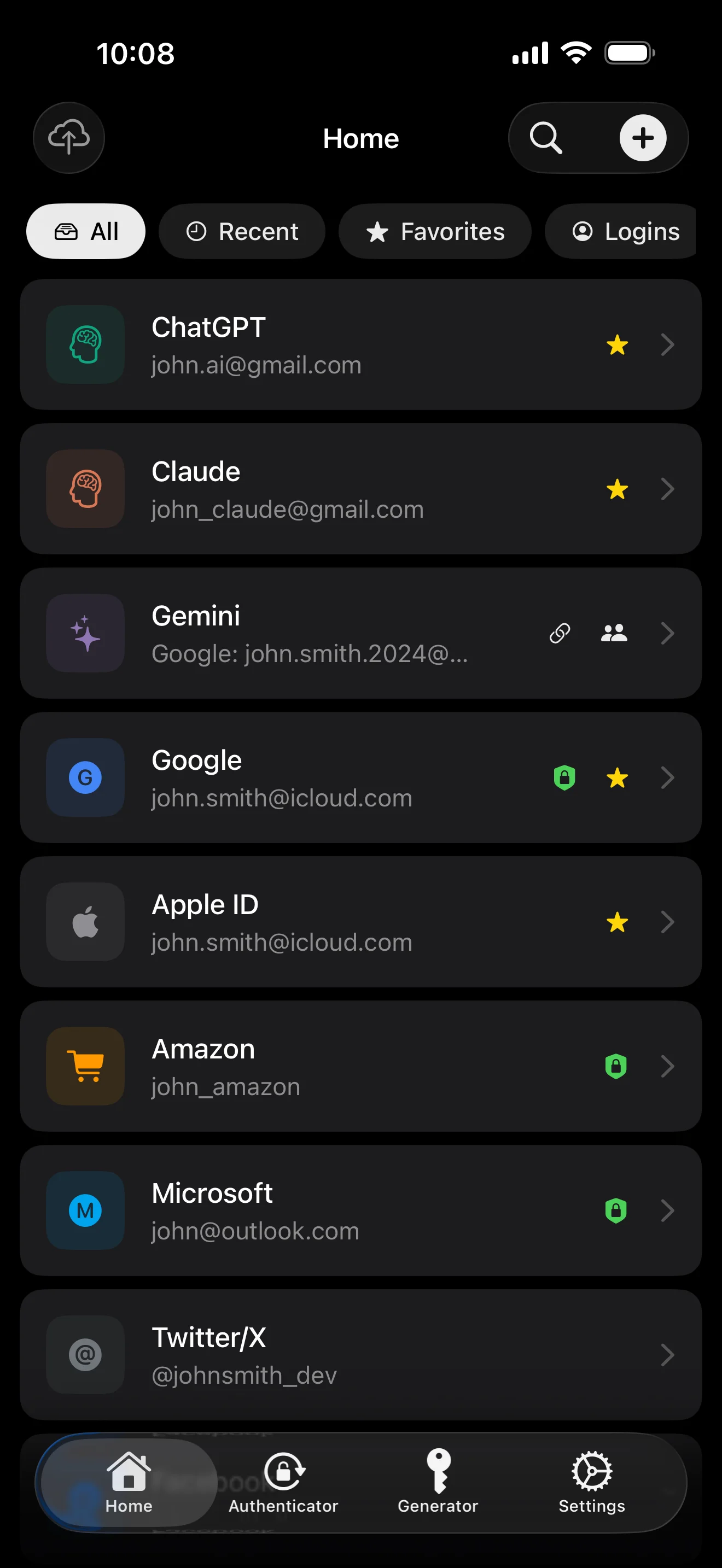
Não é uma 'app de palavras-passe' — é um livro-razão encriptado que reúne cada identidade digital num só lugar. Os oito tipos de itens passam pelo mesmo pipeline de encriptação ao nível dos campos.
Every sensitive field encrypted with AES-256-GCM, with its own random IV.
Scan to save. AutoFill fills the 6-digit code along with the password.
Random string or EFF wordlist phrase. Live entropy meter.
Generated and stored locally. Private key never leaves the device in plaintext.
Only the first 5 chars of the SHA-1 hash leave the device. Your password never does.
System-level AutoFill extension. Face ID confirms; codes get filled in too.
Routed via Apple's private CloudKit. Sensitive fields are encrypted on-device before upload — only ciphertext reaches the server. Toggle off anytime to go fully local.
1Password · Bitwarden · LastPass · KeePass · Dashlane · Apple Keychain. Three export formats: JSON / CSV (plaintext) + encrypted .bytegx.
Every password change saves the previous value — up to 5 history versions kept, one-tap rollback. Deleted items go to a recycle bin and clear after the retention window.
Pasteboard auto-clears after a configurable delay; foreground / background auto-lock timers can be set separately.
Two widgets: quick vault access + on-the-fly password generator.
TOTP integrado, auditoria de segurança no dispositivo e Passkeys — os três pontos onde o ByteGuard se distingue claramente do gestor de palavras-passe médio.
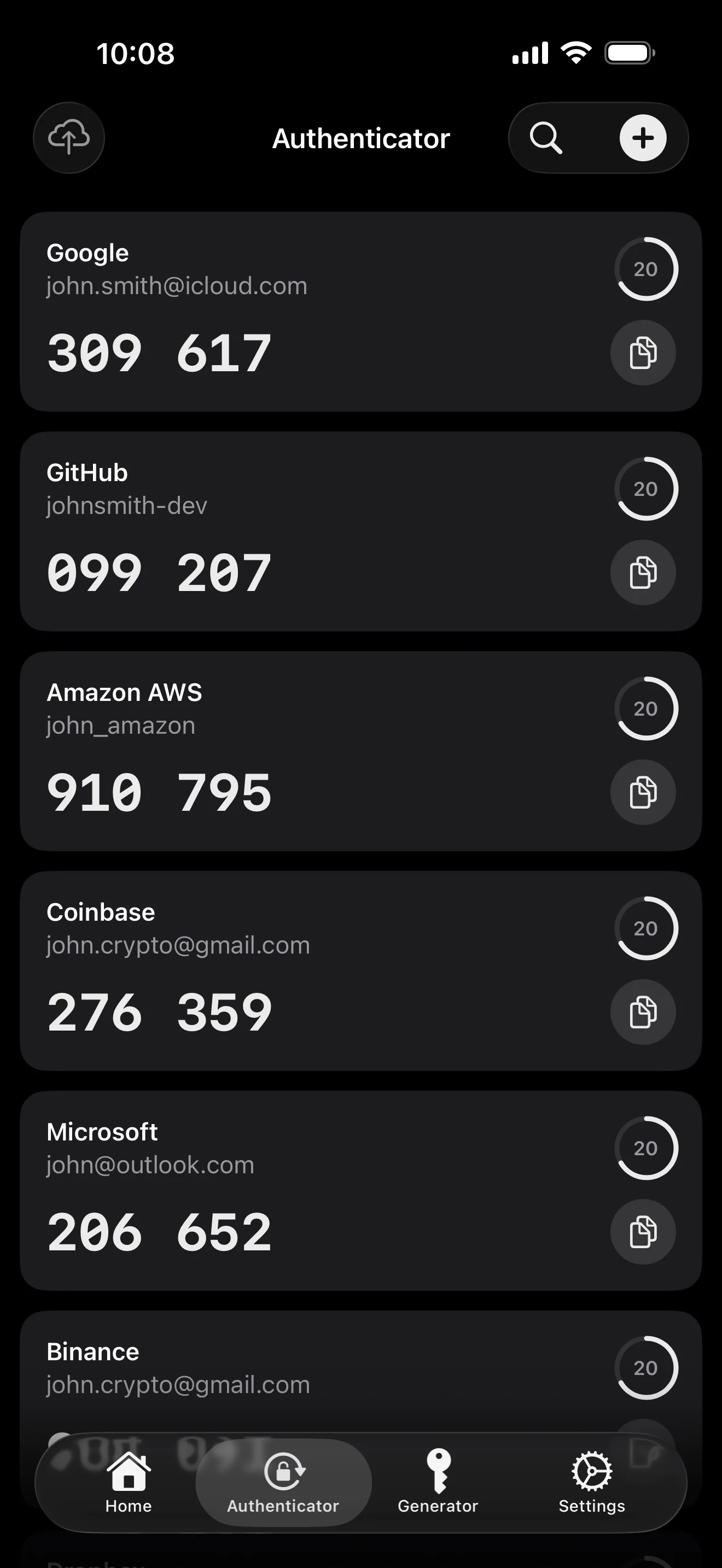
Scan to save — every 2FA in one place. The detail page shows the live code with a countdown ring; long-press to copy. With AutoFill, the code goes in along with username and password.
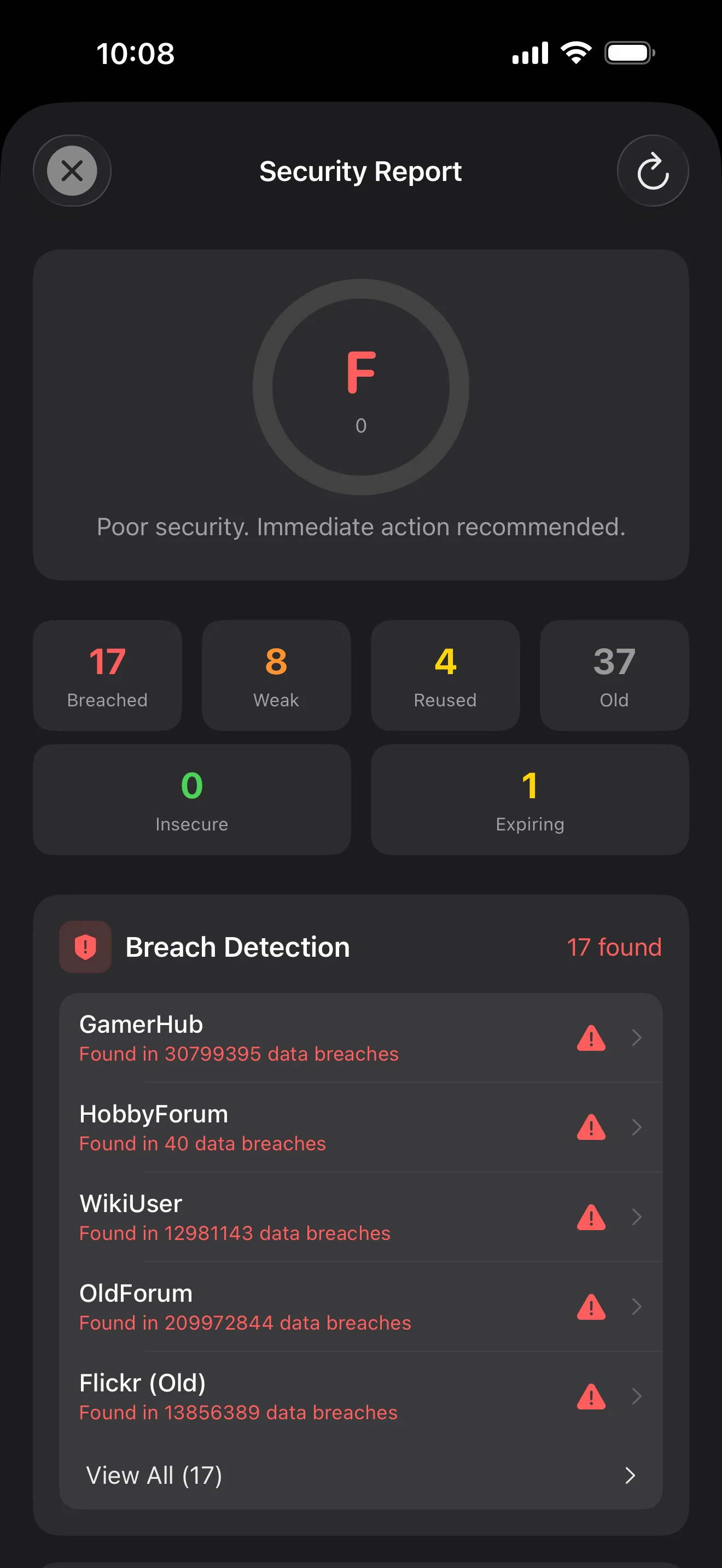
Backed by Have I Been Pwned with the k-anonymity protocol — only the first 5 chars of the SHA-1 hash ever leave the device. Every weakness comes with a concrete next step.
WebAuthn / FIDO2 standard. ES256 (ECDSA P-256, COSE alg -7). Private keys are AES-256-GCM encrypted with the Item Key — plaintext never written to disk. AutoFillExtension handles registration and assertion via the Apple system bridge.
Dez ecrãs, por ordem de cenário — toda a aplicação percorrida. Sem texto de marketing.
Top 10 / All / Favorites / Logins multi-view; live filtered search. All eight DataType cases run the full field-level encryption pipeline — not a 'password app', but a digital-identity ledger.
Scan to save — every 2FA in one place. The detail page shows the live code with a countdown ring; long-press to copy. With AutoFill, the code goes in along with username and password.
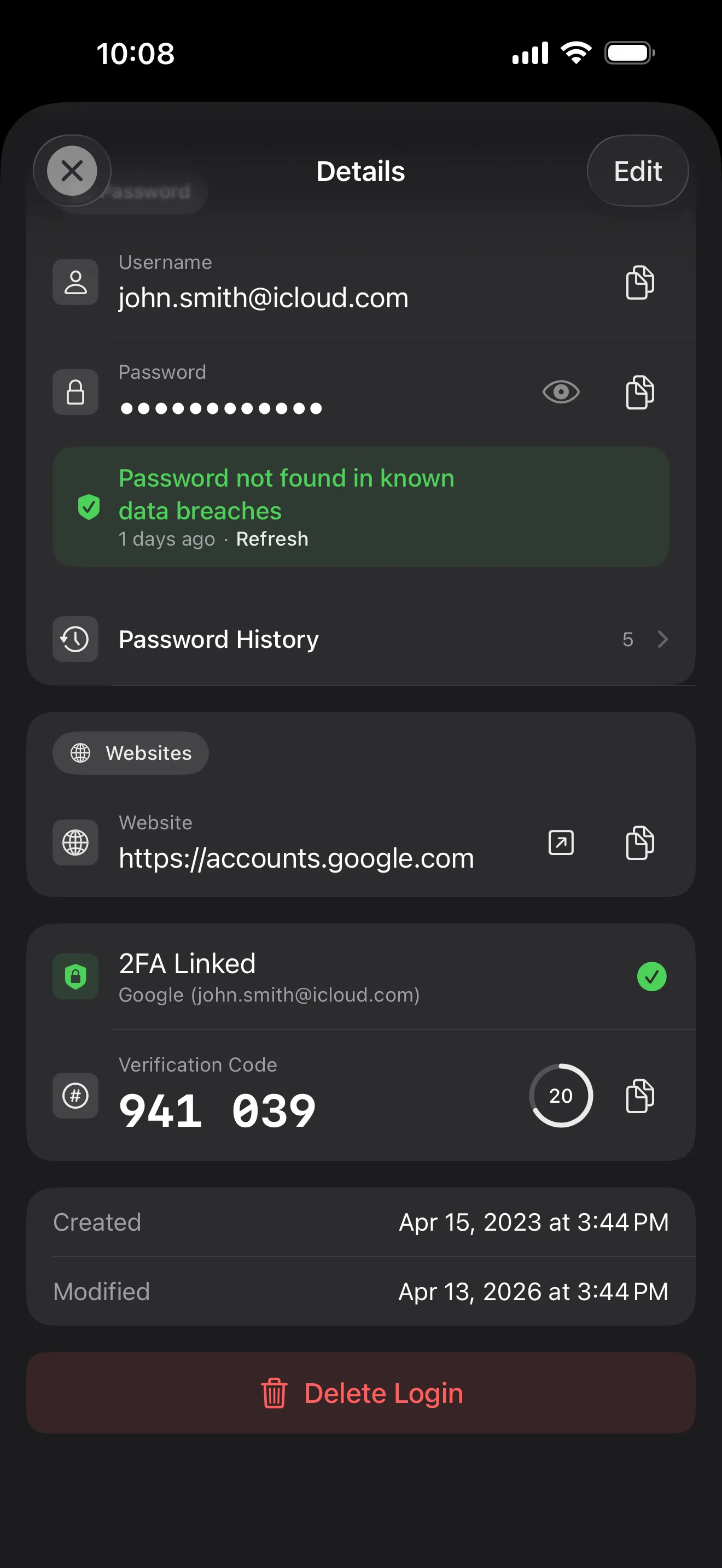
Login detail: username, password, history, linked TOTP, website, custom fields. Each sensitive field independently decrypted with its own IV, shown only on demand. Copy auto-clears the clipboard.
Every change saves the previous value (spec:R3 — up to 5 versions kept); tap the timeline to restore. Deleted items are retained for 90 days before permanent removal.
Backed by Have I Been Pwned with the k-anonymity protocol — only the first 5 chars of the SHA-1 hash ever leave the device. Every weakness comes with a concrete next step.
Random (4-64 chars / exclude look-alikes / digits-only for PIN) or EFF passphrase, with live entropy meter. Replaces the old value and records the change in history.
AutoFill Extension uses Apple's official ASCredentialProviderViewController; after Face ID / Touch ID, the username, password and TOTP all go in together. Info.plist also declares SupportsSavePasswordCredentials, so new passwords save back to ByteGuard from any flow.
WebAuthn / FIDO2 standard. ES256 (ECDSA P-256, COSE alg -7). Private keys are AES-256-GCM encrypted with the Item Key — plaintext never written to disk. AutoFillExtension handles registration and assertion via the Apple system bridge.
Card number (PAN) gets its own AES-256-GCM key with a unique IV. Cardholder name, expiry, brand (Visa / Mastercard / etc.) stay searchable as metadata. CVV/CVC are never persisted on this device.
AppearanceMode three modes: system / light / dark — switch any time, no restart. Premium tier unlocks multi-color themes; Home Screen widgets stay in sync.
A tua palavra-passe principal nunca sai do teu dispositivo. A tua Secret Key é gerada localmente e guardada na Apple Keychain — sincronizada entre os teus dispositivos Apple através do Keychain encriptado de ponta a ponta da Apple (também a podes manter num único dispositivo). Ambas as chaves são necessárias para desencriptar os teus dados, e nem eu nem a Apple consegue ler qualquer uma. Isto não é uma promessa — é a arquitetura.
password + Secret Key + 32B salt → Master Key. Parameters: 64 MB memory · 3 iterations. Resistant to GPU/ASIC brute force.
Master Key → KEK → random DEK. Each vault gets its own DEK — no horizontal decryption path.
Every sensitive field encrypted independently · new random IV on every write. Same plaintext → different ciphertext · authenticated tag prevents tampering.
A random key (a 12-word BIP39 mnemonic in form), independent of the master password. Even if the master password leaks, your vault still cannot be opened without it.
No competitor table. No checkmarks. Just an indie developer listing — plainly — what I wrote, and what I deliberately didn't. Read it, then decide whether to trust me with your ledger.
Every sensitive field encrypted independently, with its own random IV.
64 MB memory × 3 iterations — resistant to GPU/ASIC brute force.
A random key independent of the master password — your second line of defense.
iCloud sync can be turned off in one tap; the app falls back to pure local storage.
Only the first 5 chars of the SHA-1 hash are sent — your password never leaves the device.
AutoFill, Passkey, and TOTP all use Apple's official APIs. No reinvented wheels.
No analytics. No tracking. No ads. No crash reporters.
XSS, extension supply-chain attacks, CDN takeovers — that surface is excluded by architecture, not policy.
Each platform means re-implementing the crypto primitives correctly. Get one line wrong and the whole chain breaks.
Sharing is trust delegation — I'm still working out how to do it right. Until I am, I won't ship it.
Under zero-knowledge, self-hosting just shifts the operational burden to you with no real security gain.
Honestly: I haven't paid for one yet. The /security page documents every crypto decision against the source so anyone can verify independently. Independent audit + open-sourcing the crypto core are both on the 2026 roadmap — follow the GitHub repo to be notified when they land.
If I could recover it, it wouldn't be zero-knowledge. The most reliable backup is still old-school: write your master password and Secret Key on paper and store them apart.
Crypto-related changes will move very conservatively. Stability over novelty.
Sem taxas escondidas. Subscreve mensal ou anualmente, ou compra uma vez para sempre. Toda a faturação é tratada pela Apple.
Sou um programador independente. O ByteGuard é escrito apenas por mim — sem equipa, sem financiamento, ainda sem auditoria de segurança externa. (Indico-o de forma honesta na secção acima.) A única coisa que posso prometer é a própria arquitetura: a tua palavra-passe principal e a Secret Key nunca saem do teu dispositivo, e não há nada no meu servidor que consiga desencriptar os teus dados. Se essa premissa não te basta, esta aplicação não é a indicada — e isso é perfeitamente legítimo.
Não a consigo recuperar. É o preço do zero-knowledge: não posso repor o que nunca conheci. Usa o Face ID / Touch ID para o desbloqueio diário e escreve a palavra-passe principal e a Secret Key num papel guardado num cofre ou num cofre bancário. Soa aos anos 90 — e continua a ser a cópia de segurança mais fiável que temos.
Depende de teres ativado a sincronização do iCloud Keychain para a tua Secret Key. Se a sincronização do iCloud Keychain estiver ativa (configuração predefinida e recomendada): a tua Secret Key é encriptada de ponta a ponta pela Apple e sincronizada entre todos os teus dispositivos Apple. Num dispositivo novo, basta iniciar sessão com o teu Apple ID e a Secret Key é restaurada automaticamente — só precisas de te lembrar da palavra-passe principal. Se a sincronização do iCloud Keychain estiver desativada (segurança máxima, ficas com ambas as chaves): a Secret Key nunca sai do dispositivo onde foi gerada. A tua única cópia de segurança é a frase de recuperação de 12 palavras (norma BIP39), mostrada quando criaste o cofre pela primeira vez. Escreve-a num papel e guarda-a separada da palavra-passe principal. Sem essa cópia em papel, a Secret Key não pode ser restaurada num dispositivo novo. Em ambos os casos: a palavra-passe principal continua a ser necessária para desencriptar — só a Secret Key não chega. E nunca vi um único bit de qualquer uma delas: o meu servidor não tem nada que possa desencriptar os teus dados, e a Apple também não consegue ler a tua Secret Key (está encriptada E2E na camada do Keychain).
Todos os campos sensíveis são encriptados com AES-256-GCM antes de saírem do dispositivo. O iCloud recebe apenas texto cifrado; nem eu tenho a chave (a chave nunca sai do teu dispositivo). Se preferires não usar a nuvem de todo, podes desativar a sincronização nas definições — a aplicação passa a um modo totalmente local, uma forma perfeitamente legítima de a usar.
Duas razões. Uma só pessoa só consegue manter uma quantidade limitada de código, e suportar várias plataformas significa reimplementar primitivas criptográficas corretamente em cada uma — uma linha errada e toda a cadeia parte. A outra: a superfície de ataque de uma app web (XSS, cadeia de fornecimento de extensões, takeover de CDN) é muito maior do que a de uma app iOS nativa. Prefiro fazer bem uma plataforma do que entregar algo que parece abrangente mas é desigualmente seguro.
É suportada a importação direta a partir de ficheiros de exportação do 1Password / Bitwarden / LastPass / KeePass / Dashlane / Apple Keychain. Toda a importação corre localmente — nada é enviado. Se o formato de exportação do teu antigo gestor te causar problemas, envia-me um e-mail e adiciono suporte.
Os $9.99 vitalícios são permanentes e incluem todas as atualizações futuras. Se algum dia for adicionado um nível de 'subscrição premium' (por exemplo, análises de segurança mais profundas), será apenas por subscrição — as funcionalidades vitalícias existentes nunca serão movidas para lá. É um compromisso que assumo nesta página.