One ledger, eight identities
Every sensitive field encrypted with AES-256-GCM, with its own random IV.
Protejează-ți parolele, cheile de acces, 2FA și cardurile bancare cu criptare AES-256-GCM. Local întâi, sincronizare iCloud opțională.
Built on modern iOS primitives
Nu este o „aplicație de parole” — este un registru criptat care consolidează fiecare identitate digitală într-un singur loc. Toate cele opt tipuri de elemente trec prin același pipeline de criptare la nivel de câmp.
Every sensitive field encrypted with AES-256-GCM, with its own random IV.
Scan to save. AutoFill fills the 6-digit code along with the password.
Random string or EFF wordlist phrase. Live entropy meter.
Generated and stored locally. Private key never leaves the device in plaintext.
Only the first 5 chars of the SHA-1 hash leave the device. Your password never does.
System-level AutoFill extension. Face ID confirms; codes get filled in too.
Routed via Apple's private CloudKit. Sensitive fields are encrypted on-device before upload — only ciphertext reaches the server. Toggle off anytime to go fully local.
1Password · Bitwarden · LastPass · KeePass · Dashlane · Apple Keychain. Three export formats: JSON / CSV (plaintext) + encrypted .bytegx.
Every password change saves the previous value — up to 5 history versions kept, one-tap rollback. Deleted items go to a recycle bin and clear after the retention window.
Pasteboard auto-clears after a configurable delay; foreground / background auto-lock timers can be set separately.
Two widgets: quick vault access + on-the-fly password generator.
TOTP integrat, audit de securitate pe dispozitiv și Passkeys — cele trei zone unde ByteGuard depășește cel mai clar managerul mediu de parole.
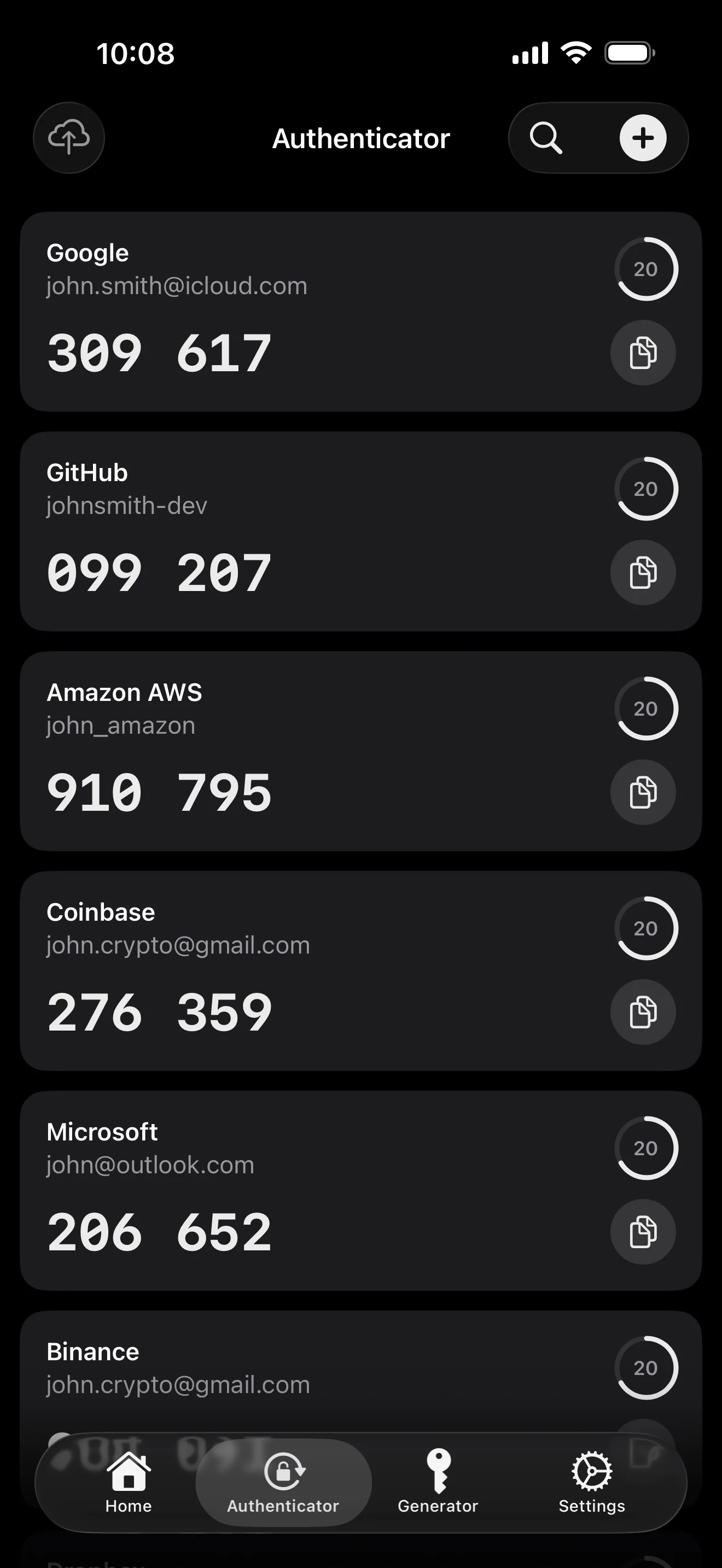
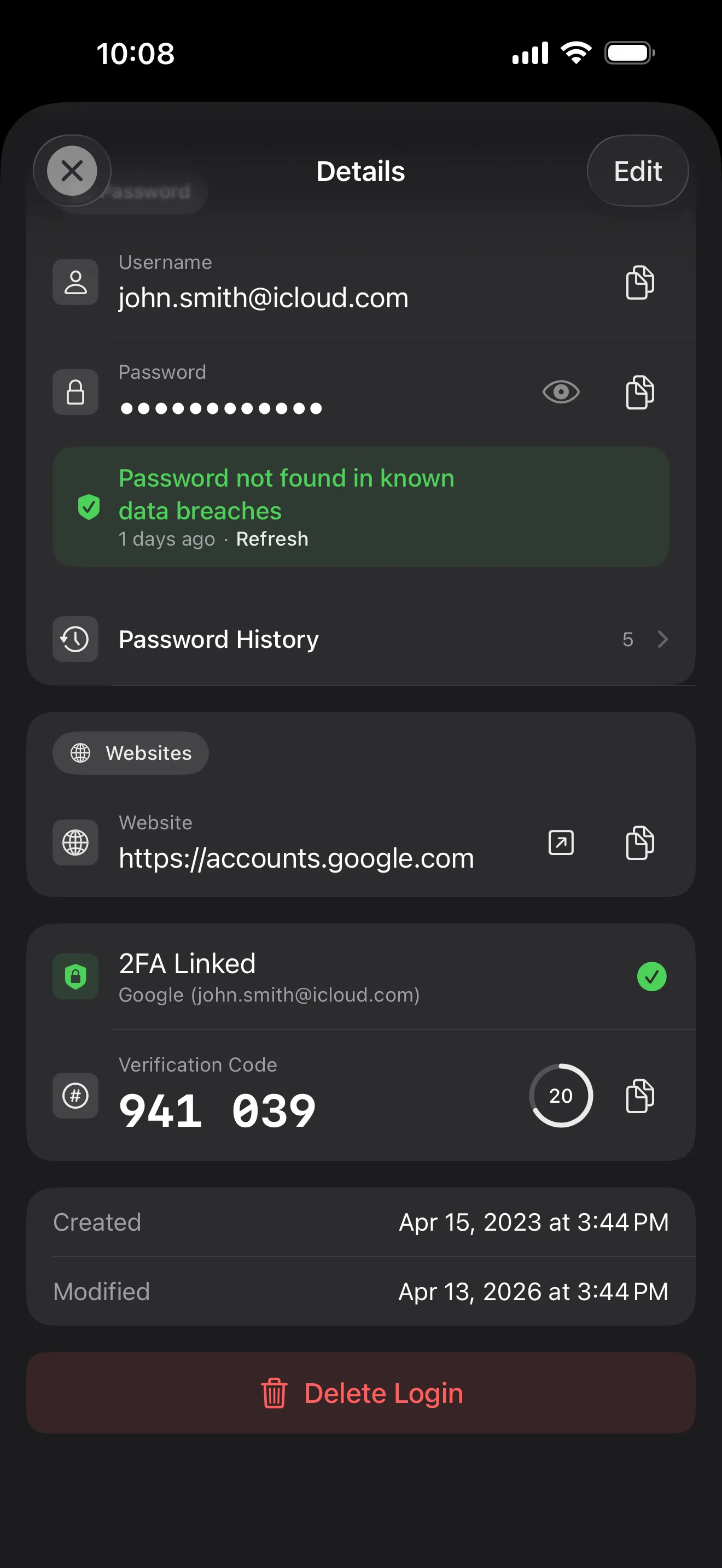
Scan to save — every 2FA in one place. The detail page shows the live code with a countdown ring; long-press to copy. With AutoFill, the code goes in along with username and password.
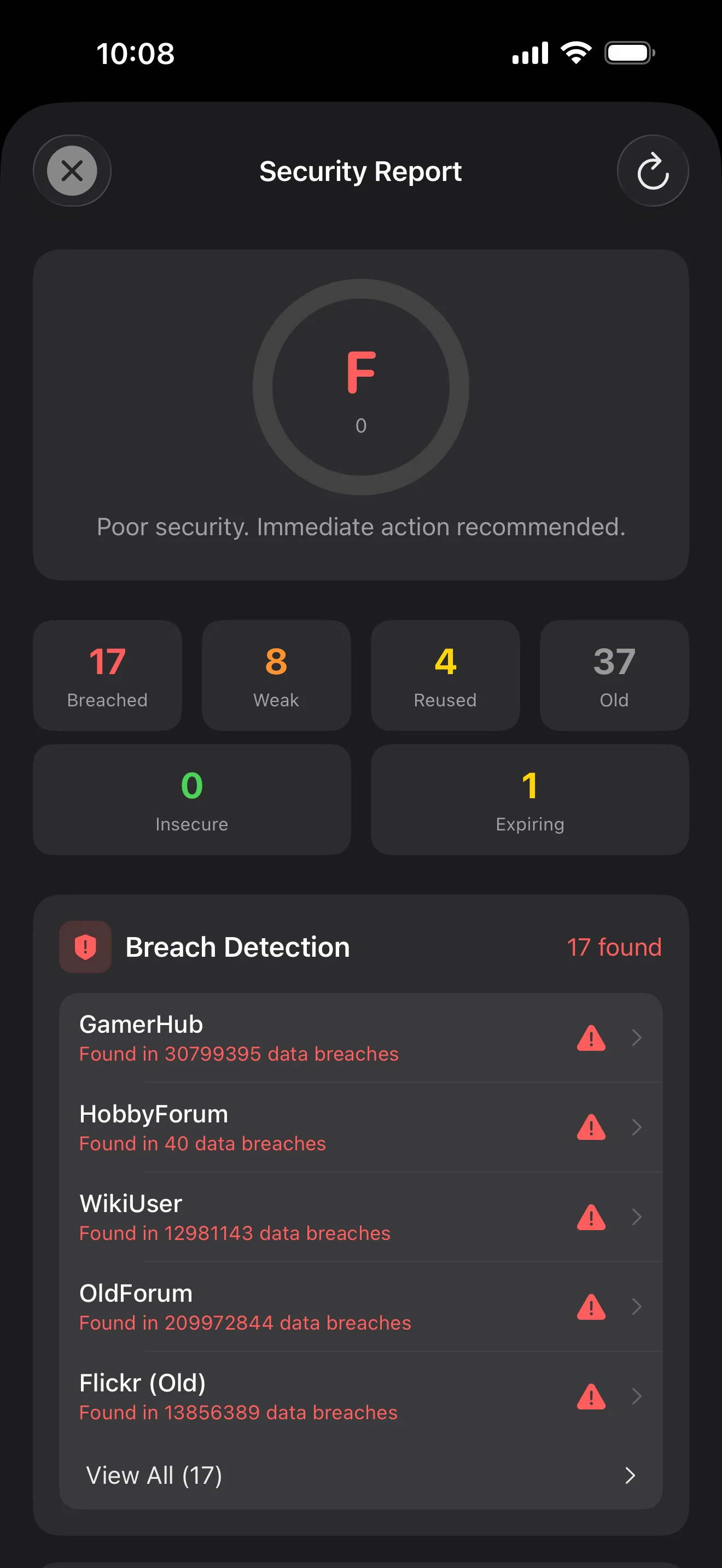
Backed by Have I Been Pwned with the k-anonymity protocol — only the first 5 chars of the SHA-1 hash ever leave the device. Every weakness comes with a concrete next step.
WebAuthn / FIDO2 standard. ES256 (ECDSA P-256, COSE alg -7). Private keys are AES-256-GCM encrypted with the Item Key — plaintext never written to disk. AutoFillExtension handles registration and assertion via the Apple system bridge.
Zece ecrane, în ordinea scenariilor — toată aplicația explicată pas cu pas. Fără texte de marketing.
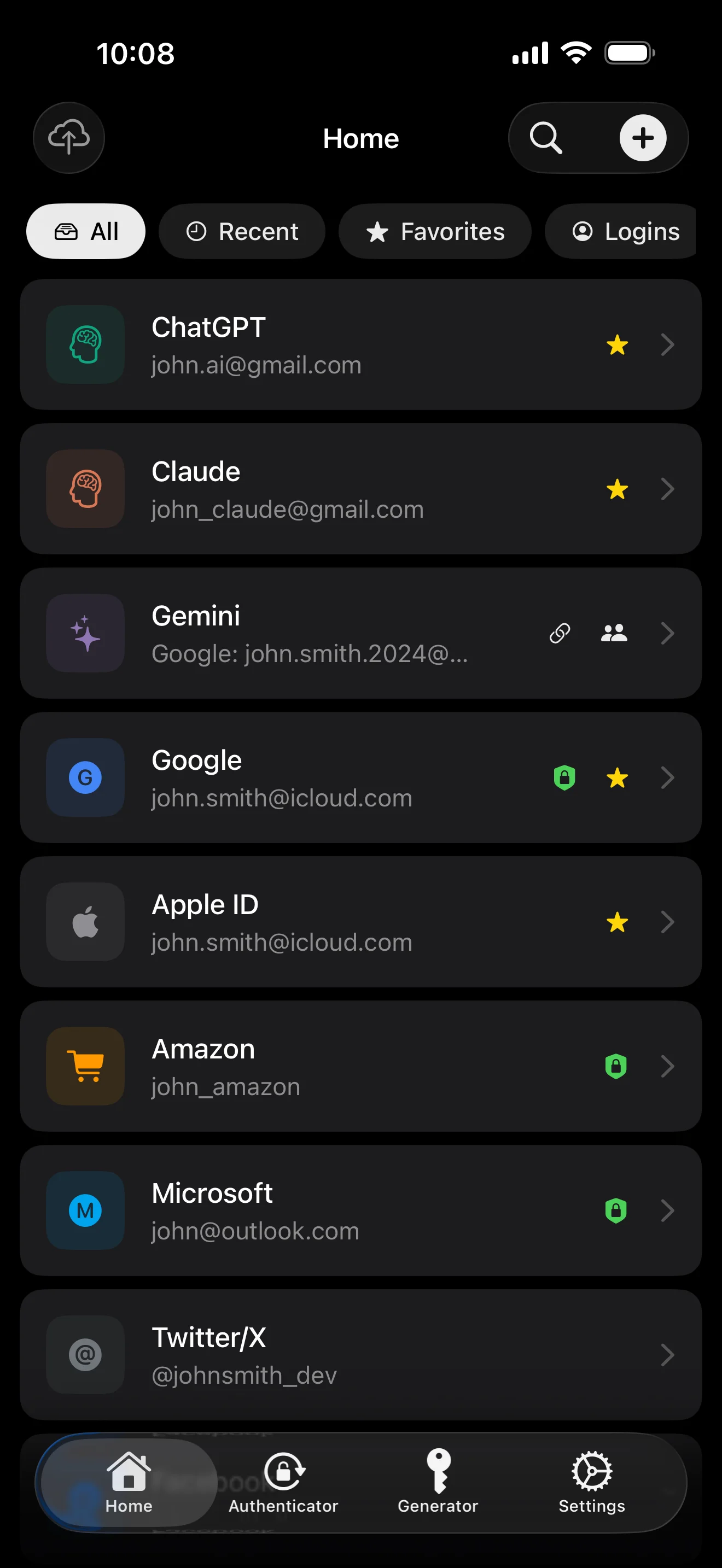
Top 10 / All / Favorites / Logins multi-view; live filtered search. All eight DataType cases run the full field-level encryption pipeline — not a 'password app', but a digital-identity ledger.
Scan to save — every 2FA in one place. The detail page shows the live code with a countdown ring; long-press to copy. With AutoFill, the code goes in along with username and password.
Login detail: username, password, history, linked TOTP, website, custom fields. Each sensitive field independently decrypted with its own IV, shown only on demand. Copy auto-clears the clipboard.
Every change saves the previous value (spec:R3 — up to 5 versions kept); tap the timeline to restore. Deleted items are retained for 90 days before permanent removal.
Backed by Have I Been Pwned with the k-anonymity protocol — only the first 5 chars of the SHA-1 hash ever leave the device. Every weakness comes with a concrete next step.
Random (4-64 chars / exclude look-alikes / digits-only for PIN) or EFF passphrase, with live entropy meter. Replaces the old value and records the change in history.
AutoFill Extension uses Apple's official ASCredentialProviderViewController; after Face ID / Touch ID, the username, password and TOTP all go in together. Info.plist also declares SupportsSavePasswordCredentials, so new passwords save back to ByteGuard from any flow.
WebAuthn / FIDO2 standard. ES256 (ECDSA P-256, COSE alg -7). Private keys are AES-256-GCM encrypted with the Item Key — plaintext never written to disk. AutoFillExtension handles registration and assertion via the Apple system bridge.
Card number (PAN) gets its own AES-256-GCM key with a unique IV. Cardholder name, expiry, brand (Visa / Mastercard / etc.) stay searchable as metadata. CVV/CVC are never persisted on this device.
AppearanceMode three modes: system / light / dark — switch any time, no restart. Premium tier unlocks multi-color themes; Home Screen widgets stay in sync.
Parola ta principală nu părăsește niciodată dispozitivul. Secret Key-ul tău este generat local și stocat în Apple Keychain — sincronizat între dispozitivele tale Apple prin Keychain-ul criptat end-to-end al Apple (îl poți păstra și pe un singur dispozitiv). Ambele chei sunt necesare pentru a-ți decripta datele, iar nici eu, nici Apple nu putem citi vreuna dintre ele. Nu este o promisiune — este arhitectura.
password + Secret Key + 32B salt → Master Key. Parameters: 64 MB memory · 3 iterations. Resistant to GPU/ASIC brute force.
Master Key → KEK → random DEK. Each vault gets its own DEK — no horizontal decryption path.
Every sensitive field encrypted independently · new random IV on every write. Same plaintext → different ciphertext · authenticated tag prevents tampering.
A random key (a 12-word BIP39 mnemonic in form), independent of the master password. Even if the master password leaks, your vault still cannot be opened without it.
No competitor table. No checkmarks. Just an indie developer listing — plainly — what I wrote, and what I deliberately didn't. Read it, then decide whether to trust me with your ledger.
Every sensitive field encrypted independently, with its own random IV.
64 MB memory × 3 iterations — resistant to GPU/ASIC brute force.
A random key independent of the master password — your second line of defense.
iCloud sync can be turned off in one tap; the app falls back to pure local storage.
Only the first 5 chars of the SHA-1 hash are sent — your password never leaves the device.
AutoFill, Passkey, and TOTP all use Apple's official APIs. No reinvented wheels.
No analytics. No tracking. No ads. No crash reporters.
XSS, extension supply-chain attacks, CDN takeovers — that surface is excluded by architecture, not policy.
Each platform means re-implementing the crypto primitives correctly. Get one line wrong and the whole chain breaks.
Sharing is trust delegation — I'm still working out how to do it right. Until I am, I won't ship it.
Under zero-knowledge, self-hosting just shifts the operational burden to you with no real security gain.
Honestly: I haven't paid for one yet. The /security page documents every crypto decision against the source so anyone can verify independently. Independent audit + open-sourcing the crypto core are both on the 2026 roadmap — follow the GitHub repo to be notified when they land.
If I could recover it, it wouldn't be zero-knowledge. The most reliable backup is still old-school: write your master password and Secret Key on paper and store them apart.
Crypto-related changes will move very conservatively. Stability over novelty.
Fără taxe ascunse. Abonează-te lunar, anual sau plătește o singură dată pe viață. Toată facturarea este gestionată de Apple.
Sunt un dezvoltator independent. ByteGuard este scris doar de mine — fără echipă, fără finanțare, fără audit de securitate independent încă. (Mai sus o spun sincer.) Singurul lucru pe care îl pot promite este arhitectura în sine: parola ta principală și Secret Key nu părăsesc niciodată dispozitivul, iar pe serverul meu nu există nimic care să-ți poată decripta datele. Dacă această premisă nu îți este suficientă, această aplicație nu ți se potrivește — și e perfect în regulă.
Nu o pot recupera. Acesta este costul zero-knowledge: nu pot reseta ceea ce nu am știut niciodată. Folosește Face ID / Touch ID pentru deblocare zilnică și scrie parola principală și Secret Key pe o foaie de hârtie ținută într-un seif sau o casetă de valori la bancă. Sună ca anii '90 — și rămâne cea mai sigură copie de rezervă pe care o avem.
Depinde dacă ai activat sincronizarea iCloud Keychain pentru Secret Key. Dacă sincronizarea iCloud Keychain este activată (configurația implicită recomandată): Secret Key-ul tău este criptat end-to-end de Apple și sincronizat pe toate dispozitivele tale Apple. Pe un dispozitiv nou, doar te conectezi cu Apple ID și Secret Key se restaurează automat — trebuie doar să-ți amintești parola principală. Dacă sincronizarea iCloud Keychain este dezactivată (securitate maximă, ții ambele chei chiar tu): Secret Key nu părăsește niciodată dispozitivul pe care a fost generat. Singura ta copie de rezervă este fraza de recuperare de 12 cuvinte (standard BIP39) afișată la prima creare a seifului. Scrie-o pe hârtie și păstreaz-o separat de parola principală. Fără acea copie pe hârtie, Secret Key nu poate fi restaurat pe un dispozitiv nou. În oricare caz: parola principală este în continuare necesară pentru a decripta orice — Secret Key singur nu este suficient. Și eu nu am văzut niciodată un singur bit din nicio cheie: serverul meu nu conține nimic care să-ți poată decripta datele, iar nici Apple nu poate citi Secret Key-ul tău (este criptat E2E în stratul lor Keychain).
Toate câmpurile sensibile sunt criptate cu AES-256-GCM înainte de a părăsi vreodată dispozitivul. iCloud primește doar ciphertext; nici eu nu am cheia (cheia nu părăsește niciodată dispozitivul tău). Dacă preferi să nu folosești cloudul deloc, poți dezactiva sincronizarea în setări — aplicația revine la un mod complet local, ceea ce este o modalitate perfect legitimă de utilizare.
Două motive. O singură persoană poate întreține doar atâta cod, iar multiplatformul înseamnă reimplementarea corectă a primitivelor criptografice pe fiecare platformă — o singură linie greșită și tot lanțul cedează. Al doilea: suprafața de atac a unei aplicații web (XSS, lanț de aprovizionare al extensiilor, preluarea CDN) este mult mai mare decât a unei aplicații native iOS. Prefer să fac o platformă bine decât să livrez ceva care pare complet, dar este inegal de sigur.
Importul direct din fișierele exportate de 1Password / Bitwarden / LastPass / KeePass / Dashlane / Apple Keychain este suportat. Tot importul rulează local — nu se încarcă nimic. Dacă formatul de export al managerului tău vechi îți dă probleme, scrie-mi un email și voi adăuga suport.
9,99 $ pe viață este permanent și include toate actualizările viitoare. Dacă vreodată va fi adăugat un tarif „abonament premium” (de ex. analize de securitate mai aprofundate), va fi doar pe bază de abonament — funcțiile existente pe viață nu vor fi mutate niciodată în spatele lui. Acesta este un angajament pe care sunt dispus să-l pun pe această pagină.