บัญชีเดียว แปดตัวตน
ทุกฟิลด์สำคัญเข้ารหัสด้วย AES-256-GCM พร้อม IV สุ่มเฉพาะตัว
ปกป้องรหัสผ่าน พาสคีย์ 2FA และบัตรธนาคารด้วยการเข้ารหัส AES-256-GCM จัดเก็บในเครื่องเป็นหลัก เลือกซิงค์ผ่าน iCloud ได้
Built on modern iOS primitives
ไม่ใช่แค่ 'แอปรหัสผ่าน' — แต่เป็นบัญชีเข้ารหัสที่รวมทุกตัวตนดิจิทัลของคุณไว้ที่เดียว ข้อมูลสำคัญทั้งหมดเข้ารหัสด้วย AES-256-GCM บนเครื่องของคุณ
ทุกฟิลด์สำคัญเข้ารหัสด้วย AES-256-GCM พร้อม IV สุ่มเฉพาะตัว
สแกนเพื่อบันทึก AutoFill กรอกรหัส 6 หลักพร้อมรหัสผ่าน
สตริงสุ่มหรือวลีจาก EFF wordlist พร้อมมิเตอร์ entropy แบบเรียลไทม์
สร้างและเก็บบนเครื่อง คีย์ส่วนตัวไม่เคยออกจากเครื่องในรูปแบบ plaintext
เพียง 5 ตัวอักษรแรกของ SHA-1 hash เท่านั้นที่ออกจากเครื่อง รหัสผ่านของคุณไม่เคยออก
ส่วนขยาย AutoFill ระดับระบบ Face ID ยืนยัน รหัสก็กรอกให้ด้วย
ส่งผ่าน CloudKit ส่วนตัวของ Apple ฟิลด์สำคัญเข้ารหัสบนเครื่องก่อนอัปโหลด — Apple เห็นเพียง ciphertext
1Password · Bitwarden · LastPass · KeePass · Dashlane · Apple Keychain สามรูปแบบส่งออก: JSON / CSV / .bytegx
ทุกการเปลี่ยนรหัสผ่านบันทึกค่าก่อนหน้า — เก็บไว้สูงสุด 5 เวอร์ชัน ย้อนกลับด้วยแตะเดียว รายการที่ลบจะอยู่ในถังขยะ
เพสต์บอร์ดล้างอัตโนมัติ 5 ค่าตั้ง (15-90 วินาที) ล็อกอัตโนมัติ foreground / background ตั้งค่าแยกกัน
สองวิดเจ็ต: เข้าถึงห้องนิรภัยรวดเร็ว + ตัวสร้างรหัสผ่านทันใจ
TOTP ในตัว, ตรวจสอบความปลอดภัยบนเครื่อง และ Passkeys — สามจุดที่ ByteGuard เด่นชัดที่สุด
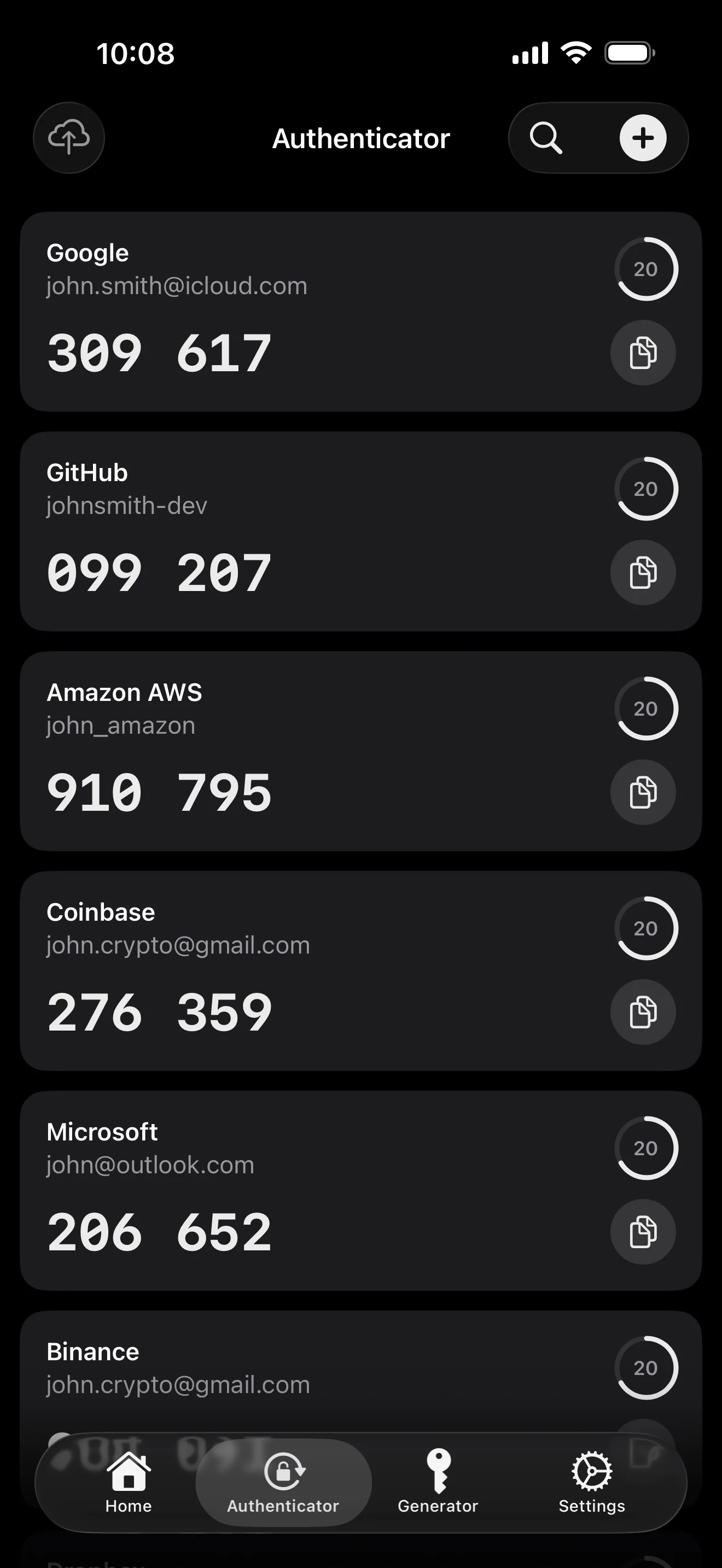
Scan to save — every 2FA in one place. The detail page shows the live code with a countdown ring; long-press to copy. With AutoFill, the code goes in along with username and password.
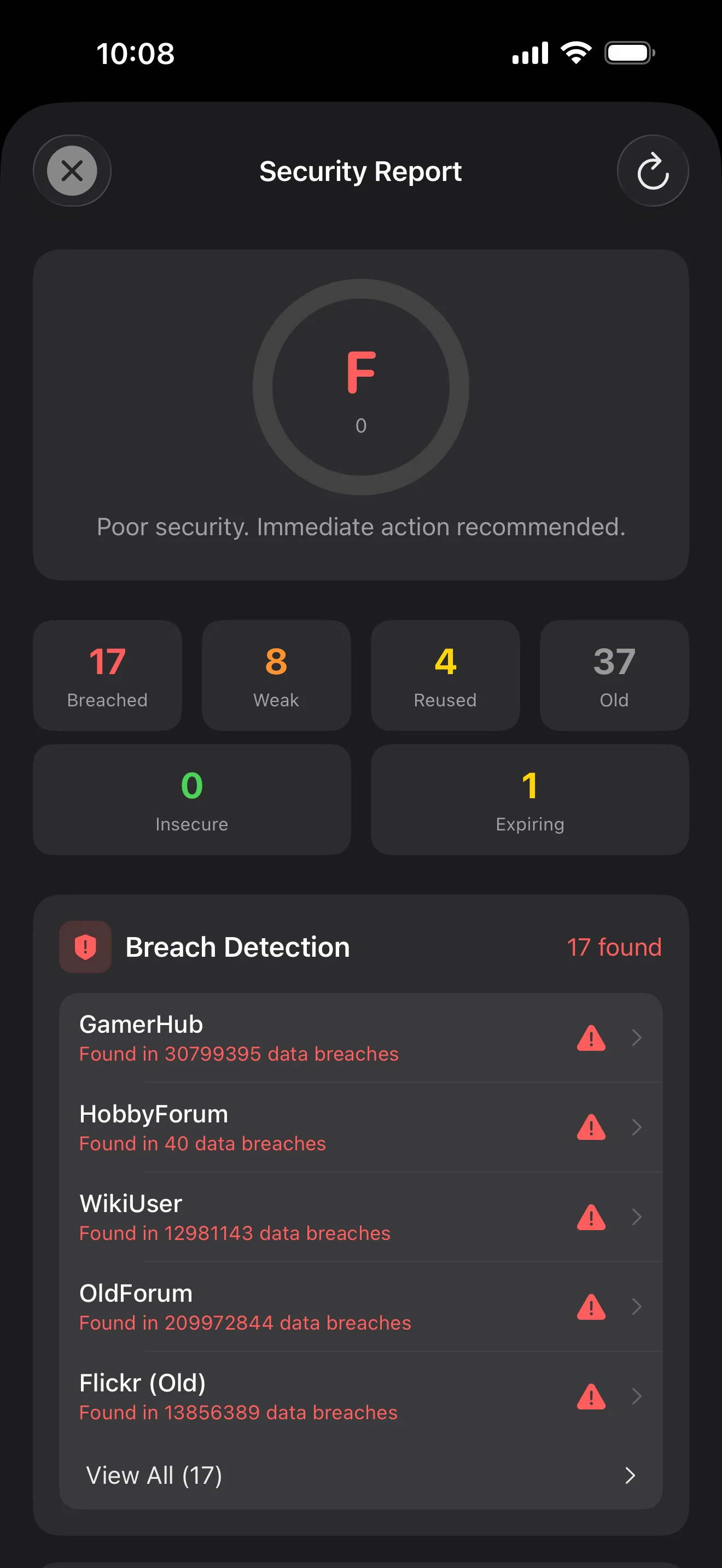
Backed by Have I Been Pwned with the k-anonymity protocol — only the first 5 chars of the SHA-1 hash ever leave the device. Every weakness comes with a concrete next step.
WebAuthn / FIDO2 standard. ES256 (ECDSA P-256, COSE alg -7). Private keys are AES-256-GCM encrypted with the Item Key — plaintext never written to disk. AutoFillExtension handles registration and assertion via the Apple system bridge.
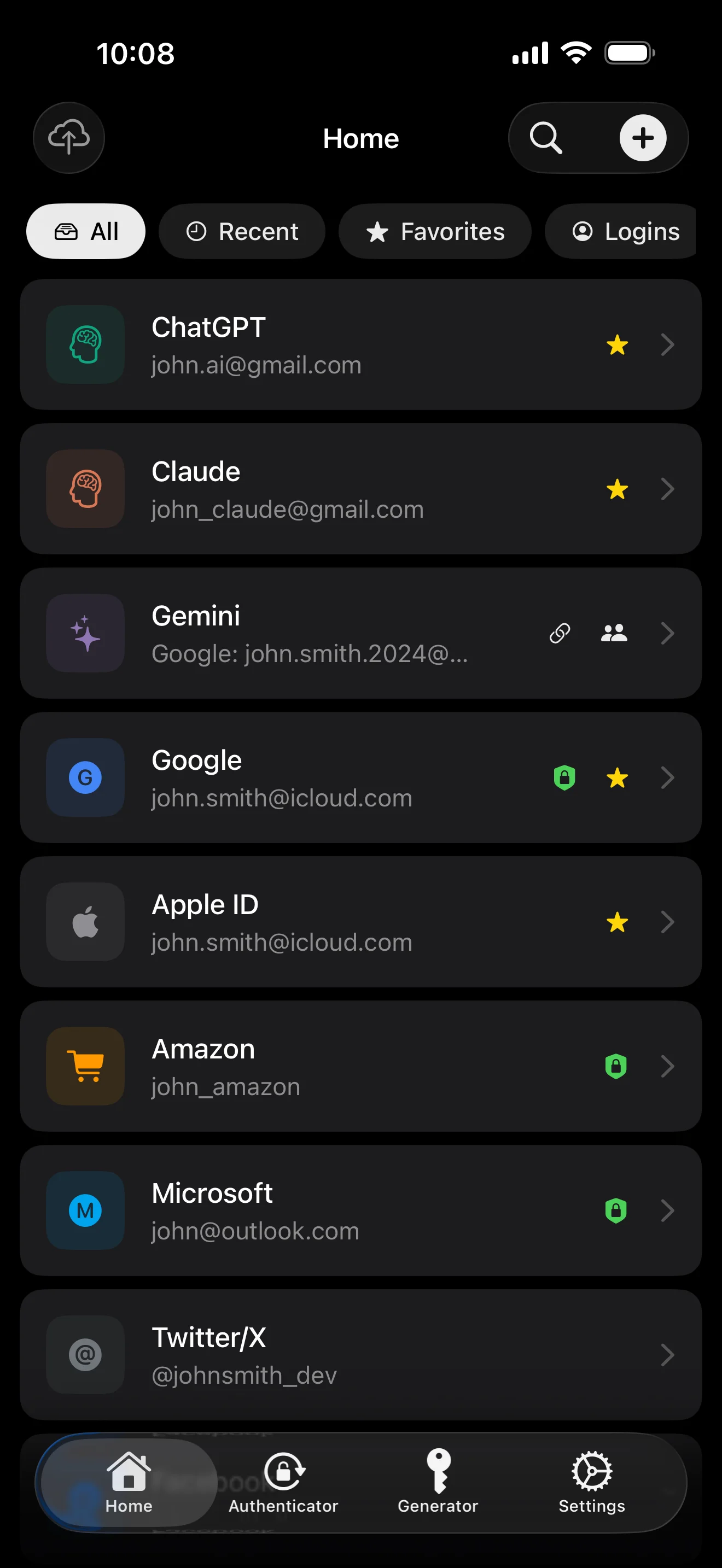
สิบหน้าจอตามลำดับสถานการณ์ — แอปทั้งหมด ไม่มีคำโฆษณา
Top 10 / All / Favorites / Logins multi-view; live filtered search. All eight DataType cases run the full field-level encryption pipeline — not a 'password app', but a digital-identity ledger.
Scan to save — every 2FA in one place. The detail page shows the live code with a countdown ring; long-press to copy. With AutoFill, the code goes in along with username and password.
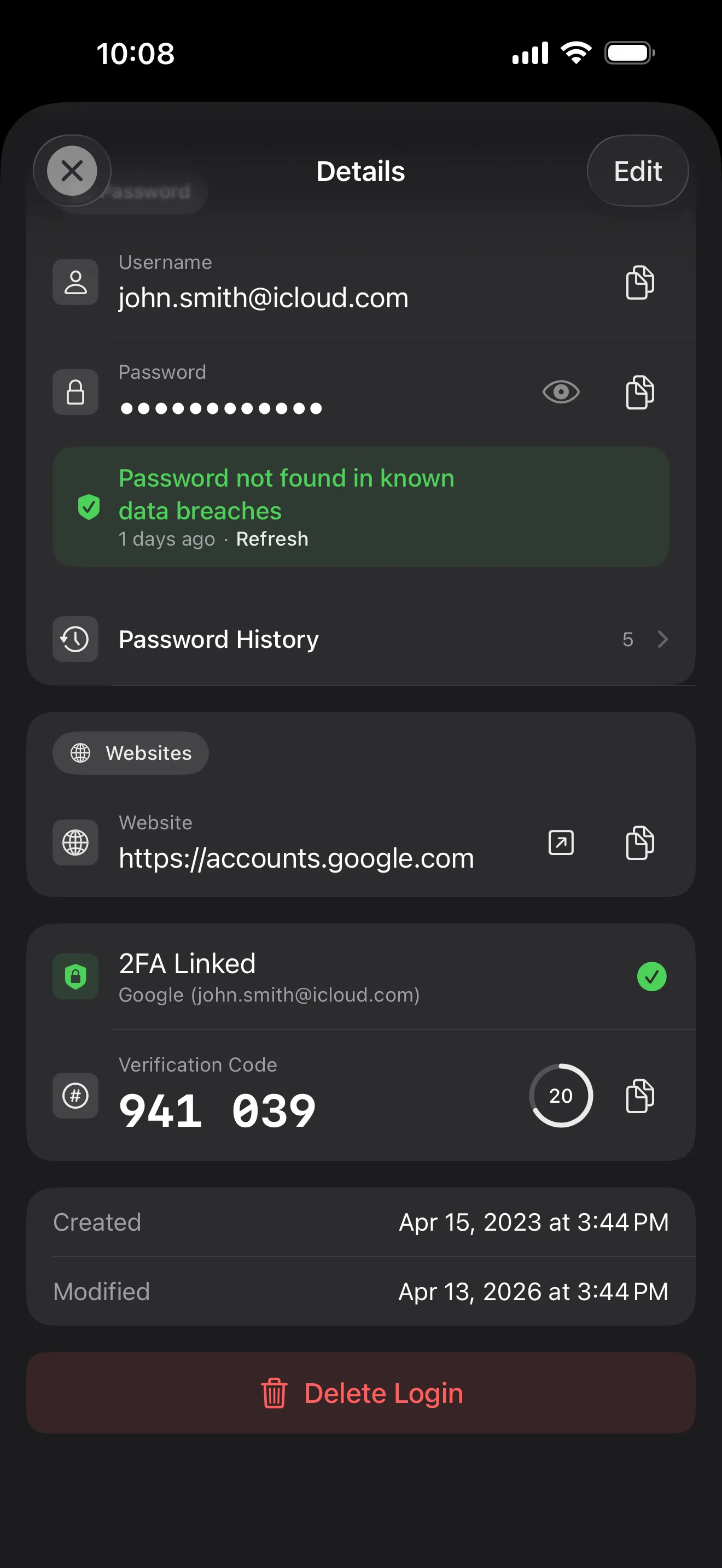
Login detail: username, password, history, linked TOTP, website, custom fields. Each sensitive field independently decrypted with its own IV, shown only on demand. Copy auto-clears the clipboard.
Every change saves the previous value (spec:R3 — up to 5 versions kept); tap the timeline to restore. Deleted items are retained for 90 days before permanent removal.
Backed by Have I Been Pwned with the k-anonymity protocol — only the first 5 chars of the SHA-1 hash ever leave the device. Every weakness comes with a concrete next step.
Random (4-64 chars / exclude look-alikes / digits-only for PIN) or EFF passphrase, with live entropy meter. Replaces the old value and records the change in history.
AutoFill Extension uses Apple's official ASCredentialProviderViewController; after Face ID / Touch ID, the username, password and TOTP all go in together. Info.plist also declares SupportsSavePasswordCredentials, so new passwords save back to ByteGuard from any flow.
WebAuthn / FIDO2 standard. ES256 (ECDSA P-256, COSE alg -7). Private keys are AES-256-GCM encrypted with the Item Key — plaintext never written to disk. AutoFillExtension handles registration and assertion via the Apple system bridge.
Card number (PAN) gets its own AES-256-GCM key with a unique IV. Cardholder name, expiry, brand (Visa / Mastercard / etc.) stay searchable as metadata. CVV/CVC are never persisted on this device.
AppearanceMode three modes: system / light / dark — switch any time, no restart. Premium tier unlocks multi-color themes; Home Screen widgets stay in sync.
รหัสผ่านหลักของคุณไม่เคยออกจากเครื่อง Secret Key สร้างบนเครื่องและเก็บใน Keychain ของ Apple ไม่มีบุคคลที่สามใดมีคีย์ถอดรหัสข้อมูลของคุณ
รหัสผ่าน + Secret Key + salt 32B → Master Key พารามิเตอร์: หน่วยความจำ 64 MB · 3 รอบ ทนทานต่อการโจมตีด้วย GPU/ASIC
Master Key → KEK → DEK สุ่ม แต่ละ vault มี DEK ของตัวเอง — ไม่มีเส้นทางถอดรหัสแนวนอน
ฟิลด์สำคัญแต่ละฟิลด์เข้ารหัสอิสระ · IV สุ่มใหม่ทุกการเขียน plaintext เดียวกัน → ciphertext ต่างกัน
คีย์สุ่ม (อยู่ในรูป BIP39 mnemonic 12 คำ) อิสระจากรหัสผ่านหลัก แม้รหัสผ่านหลักรั่ว ก็ถอดรหัสข้อมูลไม่ได้หากไม่มีคีย์นี้
No competitor table. No checkmarks. Just an indie developer listing — plainly — what I wrote, and what I deliberately didn't. Read it, then decide whether to trust me with your ledger.
Every sensitive field encrypted independently, with its own random IV.
64 MB memory × 3 iterations — resistant to GPU/ASIC brute force.
A random key independent of the master password — your second line of defense.
iCloud sync can be turned off in one tap; the app falls back to pure local storage.
Only the first 5 chars of the SHA-1 hash are sent — your password never leaves the device.
AutoFill, Passkey, and TOTP all use Apple's official APIs. No reinvented wheels.
No analytics. No tracking. No ads. No crash reporters.
XSS, extension supply-chain attacks, CDN takeovers — that surface is excluded by architecture, not policy.
Each platform means re-implementing the crypto primitives correctly. Get one line wrong and the whole chain breaks.
Sharing is trust delegation — I'm still working out how to do it right. Until I am, I won't ship it.
Under zero-knowledge, self-hosting just shifts the operational burden to you with no real security gain.
Honestly: I haven't paid for one yet. The /security page documents every crypto decision against the source so anyone can verify independently. Independent audit + open-sourcing the crypto core are both on the 2026 roadmap — follow the GitHub repo to be notified when they land.
If I could recover it, it wouldn't be zero-knowledge. The most reliable backup is still old-school: write your master password and Secret Key on paper and store them apart.
Crypto-related changes will move very conservatively. Stability over novelty.
ไม่มีค่าธรรมเนียมแอบแฝง สมัครรายเดือน รายปี หรือซื้อครั้งเดียวตลอดชีพ การชำระเงินจัดการโดย Apple
ผมเป็นนักพัฒนาอิสระ ByteGuard เขียนโดยผมคนเดียว — ไม่มีทีม ไม่มีการระดมทุน ไม่มี security audit ภายนอกจนถึงตอนนี้ ความไว้วางใจไม่ได้มาจากผม แต่มาจากสถาปัตยกรรม: ผมไม่สามารถเห็นข้อมูลคุณได้ในทางเทคนิค โค้ดจะเปิดในปี 2026 พร้อม audit คริปโตอิสระ
ผมกู้คืนไม่ได้ นั่นคือต้นทุนของ zero-knowledge: ผมรีเซ็ตสิ่งที่ผมไม่เคยรู้ไม่ได้ ใช้ Face ID / Touch ID สำหรับการเข้าถึงประจำวัน และเขียนรหัสผ่านหลักไว้บนกระดาษเก็บในที่ปลอดภัย
ขึ้นอยู่กับว่าคุณเปิดใช้ iCloud Keychain sync สำหรับ Secret Key ไหม ถ้าเปิดไว้ คีย์จะซิงก์ระหว่างเครื่อง ถ้าไม่ได้เปิด การเสีย Secret Key หมายถึงเสียข้อมูล เขียน mnemonic 12 คำเก็บในที่ปลอดภัย
ฟิลด์สำคัญทั้งหมดเข้ารหัสด้วย AES-256-GCM ก่อนออกจากเครื่อง iCloud รับเพียง ciphertext — Apple มองไม่เห็นรหัสผ่านของคุณ แม้ Apple ถูกร้องขอให้ส่งมอบข้อมูล ข้อมูลก็เข้ารหัสด้วยคีย์ของคุณ
สองเหตุผล คนเดียวดูแลโค้ดได้จำกัด และข้ามแพลตฟอร์มหมายถึงเขียนคริปโตใหม่ ผมโฟกัสที่ Apple เพราะรู้แพลตฟอร์ม Apple ลึก และต้องการมอบประสบการณ์ที่ยอดเยี่ยมแทนที่จะธรรมดาทุกที่
นำเข้าโดยตรงจากไฟล์ส่งออกของ 1Password / Bitwarden / LastPass / KeePass / Dashlane / Apple Keychain ส่งออก CSV / JSON จากแอปปัจจุบัน นำเข้าใน ByteGuard เสร็จ
$9.99 ตลอดชีพถาวร รวมอัปเดตในอนาคตทั้งหมด หากมีระดับ 'premium subscription' ในอนาคต จะเป็นทางเลือก — ผู้ซื้อตลอดชีพจะไม่เสียฟีเจอร์ที่ซื้อไป